Use Hostinger Agent skills to get structured, guided results without needing to write a complex prompt yourself.
What are Hostinger Agent skills?
Skills are structured, guided tasks built into each Hostinger Agent. They are the most efficient way to get a specific result without having to determine the correct prompt yourself. When you select a skill, the agent takes the lead by breaking the task into steps and asking you the necessary questions in a logical order.
For example, selecting Keyword Research with SEO Consultant will prompt you for details about your business, your target audience, and the topics you care about, then deliver a prioritized keyword list. You do not need to know SEO methodology to get a useful output.
Using skills
You can initiate skills in two ways. Directly in the chat, by clicking on the bolt icon:
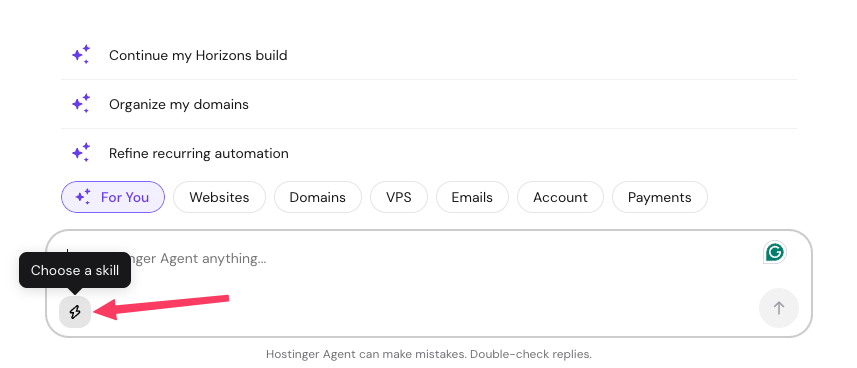
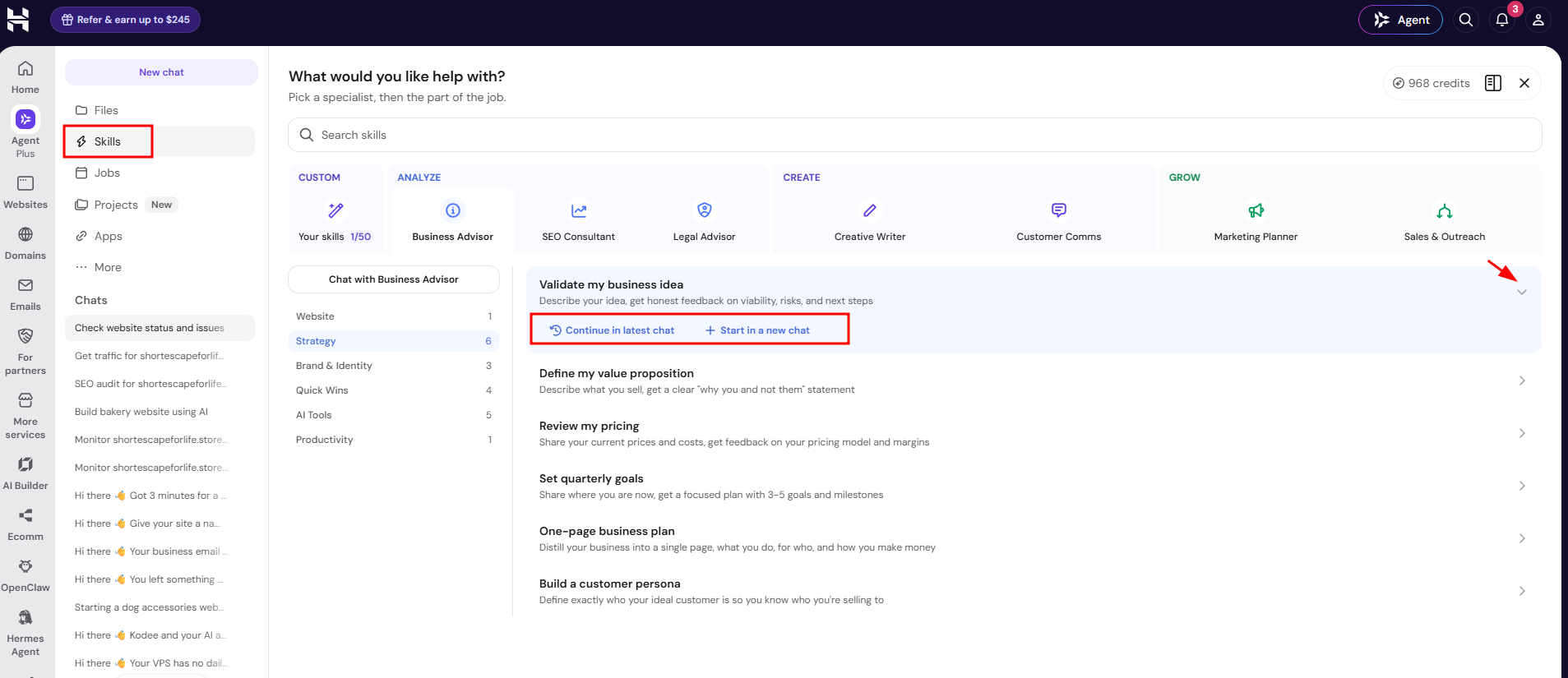
Or open the Skills tab in the chat widget and selecting the one you want. Click the arrow (❯) next to a skill to reveal Continue in latest chat and Start in a new chat, then choose whether to use it in your latest chat or a new one.
Support requests vs. skills
Hostinger Agent handles two kinds of requests differently, as explained in Hostinger Agent pricing and how conversations with Hostinger Agent work. Support requests, such as troubleshooting, account management, and service setup, are free and do not require selecting a skill. For example, asking Hostinger Agent to create a new website is a support request and stays free. Business requests, such as strategy, outreach, or brand and identity work, use Agent credits according to their complexity, and this is where skills apply.
How the Skills tab is organized
Open the Skills tab to see every skill organized by specialist. Each specialist groups its skills into sub-categories.
- Your skills — custom skills you save yourself (up to 50). See “Create your own skill” below.
- Based on AI Memory — personalized skill suggestions based on your account, will no longer be visible once you turn on AI memory.
- Business Advisor — Website, Strategy, Brand & Identity, Quick Wins, AI Tools, Productivity. Includes Get your first 100 customers and how to ask Hostinger Agent to check something at regular intervals-style automation skills under Productivity.
- SEO Consultant — Research, Local, Content for SEO, Strategy, Technical, Optimization. Includes SEO audit.
- Legal Advisor — Policies, Starting Up, E-Commerce, Compliance.
- Creative Writer — Blog & Articles, E-Commerce, Social, Website, Lead Generation, Creative.
- Customer Comms — External (for example, drafting professional emails).
- Marketing Planner — Strategy, Social Media, Advertising, Content, Growth.
- Sales & Outreach — Outreach, Strategy.
Hostinger Agent regularly adds, renames, and retires skills, so the Skills tab is always the current source for what is available. Each skill’s description there explains exactly what it does and what information it needs from you before you select it.
Create your own skill
Select Create skill in the Your skills tab to save instructions you use often, so you can reuse them in any conversation without retyping them.
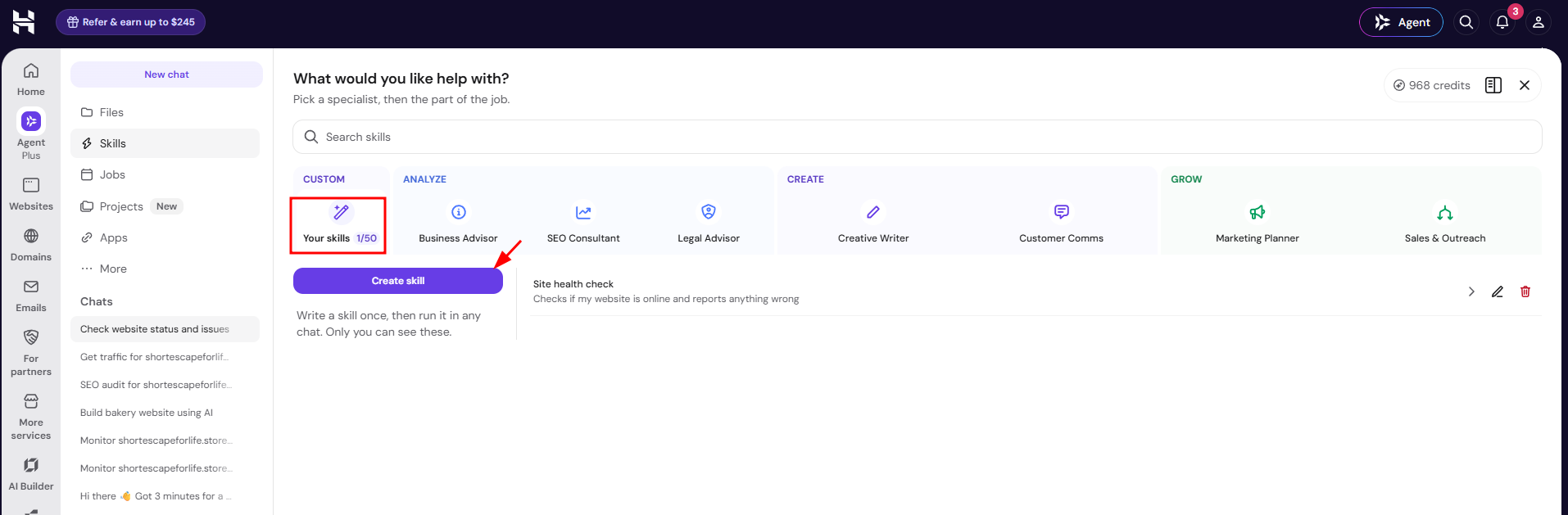
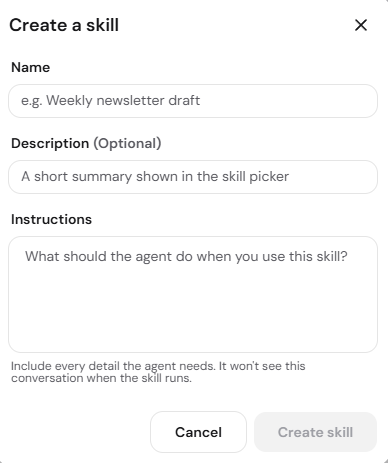
Give it a name, an optional short description, and the instructions for what Agent should do. You can save up to 50 custom skills, and each appears under Your skills.
Tips for better skill results
- Provide specific answers when prompted by a skill. For example, if a skill asks about your target audience, and your answer is “everyone,” the output will be generic.
- Review the skills menu descriptions to determine which tool best fits your current project.
- If you want to refine the idea before selecting a skill, you can start chatting and later switch to a skill once you have a specific task in mind.
You can now efficiently automate your tasks using Hostinger Agent skills to save time and improve the quality of your content.