Hostinger Agent marketing skills create ready-to-use social media posts, content calendars, growth and traffic plans, product launch plans, post images, blog posts, how-to guides, ad copy, Google Ads plans, social media audits, and TikTok strategies for your business. To use them, describe your business, audience, and goal in the chat, and Hostinger Agent applies the matching skill and delivers the result in the chat or as a downloadable file. You can copy the content into your own channels, or connect Instagram and Facebook to publish posts from the chat.
Marketing skills in Hostinger Agent
Hostinger Agent has 11 marketing skills that turn a short brief into a plan or ready-to-post content. Hostinger Agent picks the right skill based on your request, and the skill name appears in the chat as Skill used. See how to use Hostinger Agent skills to learn how to select a skill yourself.
|
Skill |
What Hostinger Agent creates |
|
Social media content |
A week of social media posts, with the platform, post format, visual direction, caption, call to action, and hashtags for each post. |
|
Content calendar |
A multi-week posting calendar with posting days and times per platform, content types, topics, and an estimate of how long each post takes to make. |
|
Instagram strategy |
An Instagram growth strategy with a 2-week test plan, profile changes, measurement steps, and success criteria. |
|
Brand awareness plan |
A 30-day traffic plan that ranks your marketing channels and lists weekly actions and metrics to track. |
|
Product launch plan |
A launch plan with positioning, priority channels, a week-by-week task list, budget allocation, and KPIs. |
|
Write social captions |
Ready-to-use captions for social media posts. |
|
Write a blog post |
A topic and outline for your approval, then a full blog post that Hostinger Agent can add to your website. |
|
Write a how-to guide |
A step-by-step guide for your readers, with what they need, tips, and common mistakes to avoid. |
|
Write ad copy |
Ad copy for Google Search and Facebook in three message variants, within each platform’s character limits. |
|
Social media audit |
An audit of your social media account with a prioritized improvement plan and success criteria. |
|
TikTok strategy |
A TikTok content strategy with content series, a 30-day test plan, and a business bio. |
Write a week of social media posts with Hostinger Agent
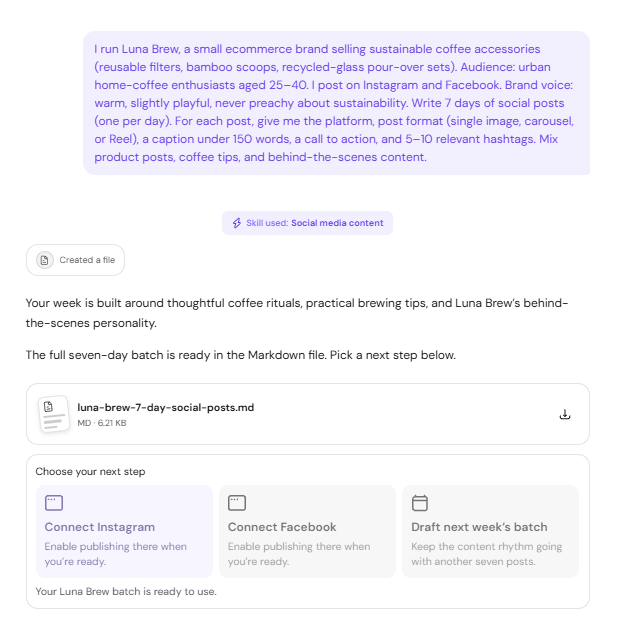
Describe your business, platforms, and brand voice, and Hostinger Agent writes a full week of posts with the Social media content skill.
- Open Hostinger Agent and start a new chat.
- Describe your business and what you need. For example: I run a small online store selling sustainable coffee accessories. I post on Instagram and Facebook. Brand voice: warm and slightly playful. Write 7 days of social posts, one per day, with the platform, format, caption, call to action, and 5–10 hashtags for each post.
- Answer any questions Hostinger Agent asks about your business or audience.
- Open the posts file from the chat to review each post, then download it.
Select Draft next week’s batch under the result to get another week of posts, or Connect Instagram or Connect Facebook to publish the posts from the chat.
Create a content calendar with Hostinger Agent
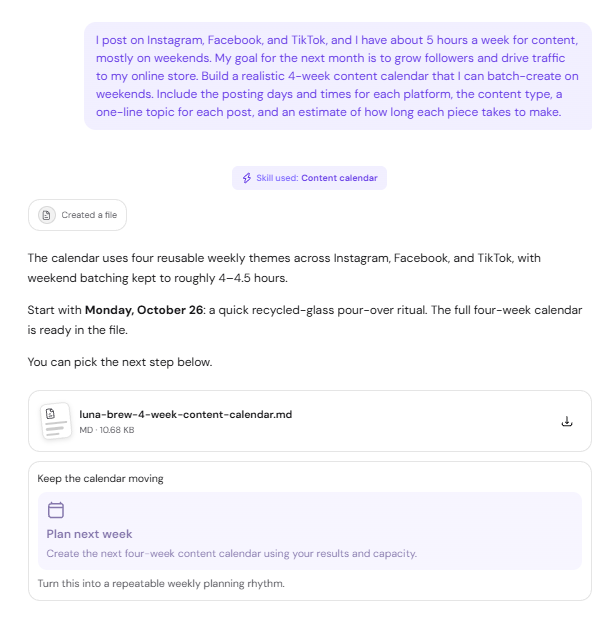
Share your platforms, goal, and how much time you have each week, and Hostinger Agent builds a realistic posting calendar with the Content calendar skill. For example: I post on Instagram, Facebook, and TikTok, and I have about 5 hours a week for content, mostly on weekends. Build a 4-week content calendar I can batch-create, with posting days and times, content type, a one-line topic, and an estimate of how long each post takes to make.
The calendar file includes a recommended posting cadence for each platform, a weekend batching workflow, week-by-week posts, and a measurement checkpoint. Select Plan next week under the result to continue the calendar.
Get an Instagram growth plan from Hostinger Agent
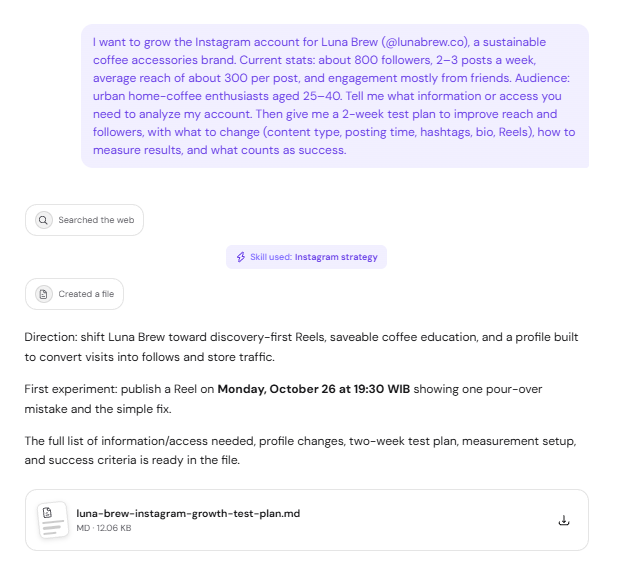
Share your Instagram handle, current results, and goal, and Hostinger Agent creates a growth strategy and a 2-week test plan with the Instagram strategy skill. For example: I want to grow my Instagram account. I have about 800 followers, post 2–3 times a week, and get about 300 reach per post. Tell me what information you need to analyze my account, then give me a 2-week test plan.
The plan file includes:
- The information Hostinger Agent needs for a full account analysis, such as screenshots of your Instagram Insights.
- Content pillars and the role of each post format, such as Reels, carousels, and Stories.
- Profile changes to make before the test, such as your bio, link, and pinned posts.
- A 2-week posting plan with topics, hooks, and calls to action.
- How to measure results and what counts as success.
NOTE
- Never share your Instagram password or two-factor authentication code in the chat. Screenshots or an export of your Instagram Insights are enough for the analysis.
Audit your social media account with Hostinger Agent
The Social media audit skill in Hostinger Agent reviews one of your social media accounts and creates a prioritized improvement plan. For example: Audit my Instagram account for my bakery.
Hostinger Agent asks three questions before it starts:
- The handle or public profile link of the account.
- How often you post and what content you usually share.
- What engagement you see, such as likes, comments, saves, shares, profile visits, or inquiries.
The audit file lists what is working, what may be limiting growth, a prioritized improvement plan, a suggested weekly schedule, and success criteria for the next four weeks. Hostinger Agent may not be able to view your public profile, so share figures from your account insights for a more accurate audit.
Create a TikTok strategy and bio with Hostinger Agent
The TikTok strategy skill in Hostinger Agent creates a TikTok content plan and a business bio for your account. For example: Write a TikTok strategy and a bio for my business.
Hostinger Agent asks three questions before it starts:
- What TikTok should drive, such as online purchases, local visits, or both.
- How much video experience you have.
- Which production style and posting frequency you can keep up. You can select more than one answer.
The strategy file includes content series, a repeatable video structure, a 30-day test plan, the metrics to track for each video, and a recommended bio with a shorter alternative.
Create a website traffic plan with Hostinger Agent
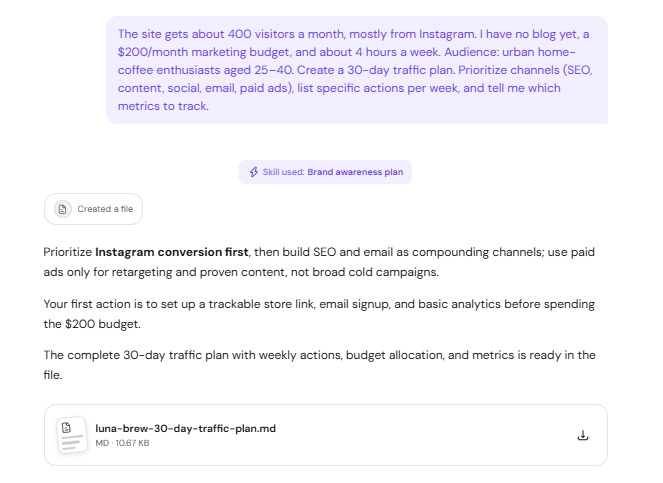
Share your current traffic, budget, and weekly time, and Hostinger Agent creates a 30-day traffic plan with the Brand awareness plan skill. For example: My site gets about 400 visitors a month, mostly from Instagram. I have no blog yet and about 4 hours a week. Create a 30-day traffic plan that prioritizes channels, lists specific actions per week, and tells me which metrics to track.
The plan file ranks channels such as social media, SEO, email, paid ads, and partnerships, then lists weekly actions, metrics to track, and success criteria for the month.
Plan a product launch with Hostinger Agent
Share your launch date, budget, and team, and Hostinger Agent creates a launch plan with the Product launch plan skill. For example: Act as an e-commerce consultant. Create a launch plan for my product, launching in 6 weeks, covering pre-launch, launch week, and the first month after launch.
Hostinger Agent may ask which of your websites or stores the launch is for. The plan includes positioning, priority channels, budget allocation, a week-by-week task list, and KPIs to track. Cards under the plan, such as Build launch website, Create interest signup, and Prepare launch content, start the next step. If you don’t have a website yet, see how to use Hostinger Agent to create a website.
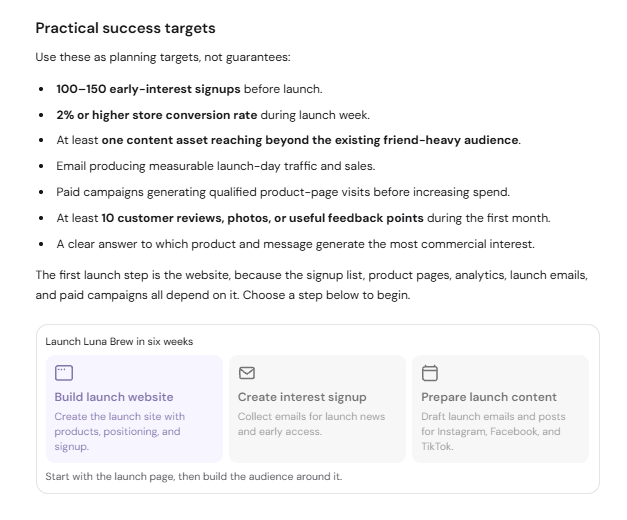
See how Hostinger Agent creates a marketing campaign strategy, budget allocation, and channel-specific ad copy from a product launch prompt:
Write blog posts with Hostinger Agent
The Write a blog post skill in Hostinger Agent suggests a topic and outline for your approval, then writes the full post and adds it to your website. Hostinger Agent asks three questions first:
- Your site’s topic or niche, and which website the post is for.
- Who you want to reach.
- Which tone the post should use, such as casual and friendly, professional and authoritative, inspirational and personal, or practical and straightforward.
Follow these steps to write and add a blog post:
- Ask Hostinger Agent for a blog post. For example: Write a blog post for my site about a topic my customers care about.
- Answer the three questions.
- Review the proposed topic and outline, then ask Hostinger Agent to use it. For example: Yes, use this outline for the blog post on domain.tld.
How Hostinger Agent adds the post depends on your website platform:
- Hostinger AI Builder agentic mode – Hostinger Agent adds the post as an unpublished draft that search engines don’t index. Save any open AI Builder edits first, because creating the post may discard unsaved changes. To make the post public, select Publish in AI Builder and ask Hostinger Agent to publish the post.
- WordPress – Hostinger Agent publishes the post directly and checks that it is publicly available.
For topic ideas, ask Hostinger Agent for suggestions. For example: Suggest 10 blog post topics my potential customers are searching for. Hostinger Agent lists each topic with the searches it targets.
Under Quick actions, Hostinger Agent can also write and publish a new post every week. See how to ask Hostinger Agent to check something at regular intervals to learn how recurring tasks work.
Write a how-to guide with Hostinger Agent
The Write a how-to guide skill in Hostinger Agent writes a step-by-step guide for your readers. For example: Write a how-to guide on keeping sourdough fresh at home.
Hostinger Agent asks two questions: who the guide is for and which experience level it should target. The guide includes what readers need, numbered steps with tips and examples, common mistakes to avoid, and a quick summary.
Write ad copy and a Google Ads plan with Hostinger Agent
The Write ad copy skill in Hostinger Agent writes ads for Google Search and Facebook in three message variants, each within the platform’s character limits. For example: Write Google and Facebook ad copy for my online store.
The ad copy file includes the Facebook primary text, headline, description, and call to action, plus Google Search headlines and descriptions for each variant. To run the ads, select Connect on the Google Ads card and authorize your Google Ads account. Facebook Ads can’t be connected to Hostinger Agent yet.
For a full campaign plan, ask Hostinger Agent for a Google Ads plan. For example: Create a Google Ads plan for my website. Hostinger Agent asks four questions:
- Where you want to serve customers.
- Which products the ads should promote first.
- Your monthly Google Ads budget.
- What counts as the main conversion, such as online purchases, order inquiries, phone calls, or store visits.
The plan file covers the campaign structure, keyword and negative keyword themes, landing page requirements, conversion tracking, and a 30-day testing plan.
Create social media post images with Hostinger Agent
Describe the images you need, and Hostinger Agent generates them in the chat. Include the style, colors, size, and exactly what each image shows. For example: Create 3 Facebook and Instagram post images for my recycled-glass pour-over set. Style: minimal, warm natural lighting, earthy tones. Size: 1080×1080. Image 1: product hero shot on a wooden kitchen counter. Don’t add extra logos or text beyond what I specified.
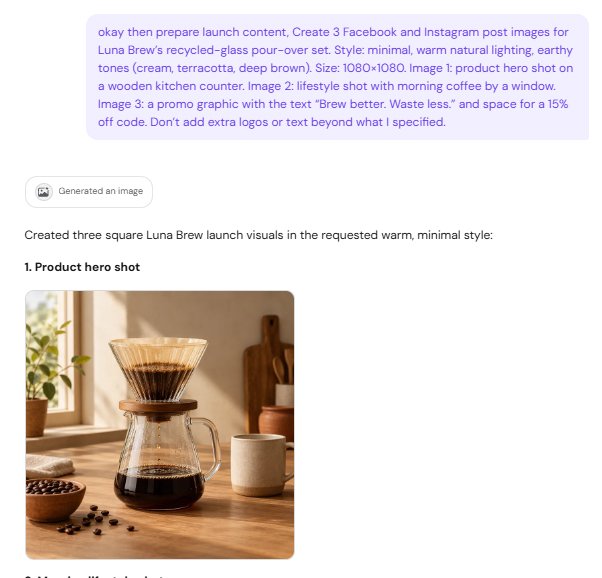
NOTE
- Hostinger Agent creates a new image for each request. If you upload a photo of your real product, check that the generated image still shows the product correctly before you post it.
Publish posts to Instagram and Facebook with Hostinger Agent
Connect your Instagram and Facebook accounts, and Hostinger Agent can publish your posts after you approve them.
Before you start
- Connecting apps is included in the Agent Plus subscription.
- Instagram must be a Business or Creator account. Personal Instagram accounts can’t be connected for publishing.
- Facebook posts are published to a Facebook Page that you are an admin of, not to a personal profile.
Follow these steps to connect your accounts and publish a post from the Hostinger Agent chat:
- Ask Hostinger Agent to connect your accounts, or select Connect Instagram or Connect Facebook under your posts.
- Click Connect on the Instagram or Facebook card and authorize access to your account.
- Ask Hostinger Agent to publish a post. For example: Publish the Day 1 post to Instagram.
- Review the confirmation card, then confirm to publish the post.
Hostinger Agent shows a confirmation card before it publishes anything, so no post goes live without your approval. Every Instagram post needs an image or a video. See connect apps and custom MCP servers to Hostinger Agent for more about app connections.
Find your Hostinger Agent marketing files
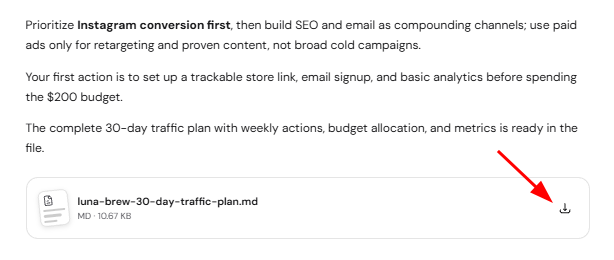
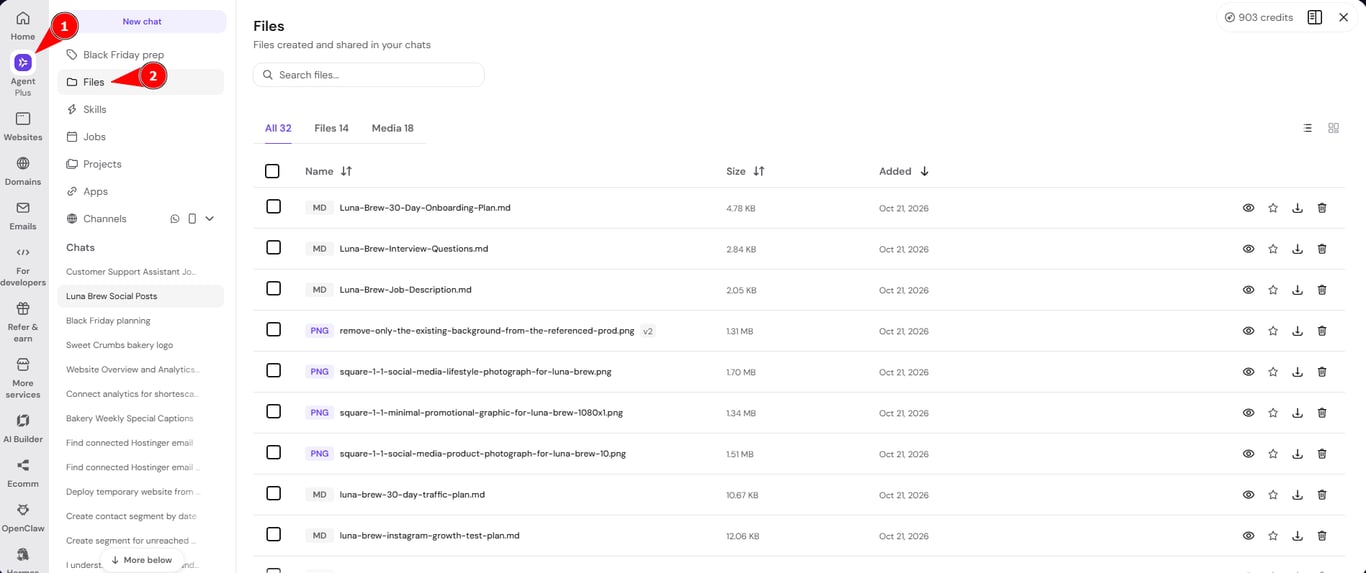
Hostinger Agent saves each plan, calendar, and post batch as a file you can open again later.
- In the chat: click a file to preview it, or click the download icon to save it.

- On the Files page: select Files in the Hostinger Agent sidebar to view, star, download, or delete any file created in your chats.

Tips for better Hostinger Agent marketing results
Hostinger Agent writes more useful marketing content when your request includes these five details:
- What your business sells.
- Who your audience is.
- Which platforms you use.
- Your brand voice.
- How much time or budget you have each week.
See Hostinger Agent: tips for getting better results for more prompting advice.
Your marketing plans and posts are ready to review and publish, either from the chat or on your own channels.