Hostinger Agent automations start with a plan: the Automate the boring stuff skill reviews the tasks you repeat and ranks what to automate, turn into a template, or stop doing. The plan names a tool and a first setup for each task, such as a spreadsheet workflow or a product template. Hostinger Agent then schedules the tasks it can run itself, such as checks and reports, with the Create a recurring job skill.
Plan an automation with the Automate the boring stuff skill
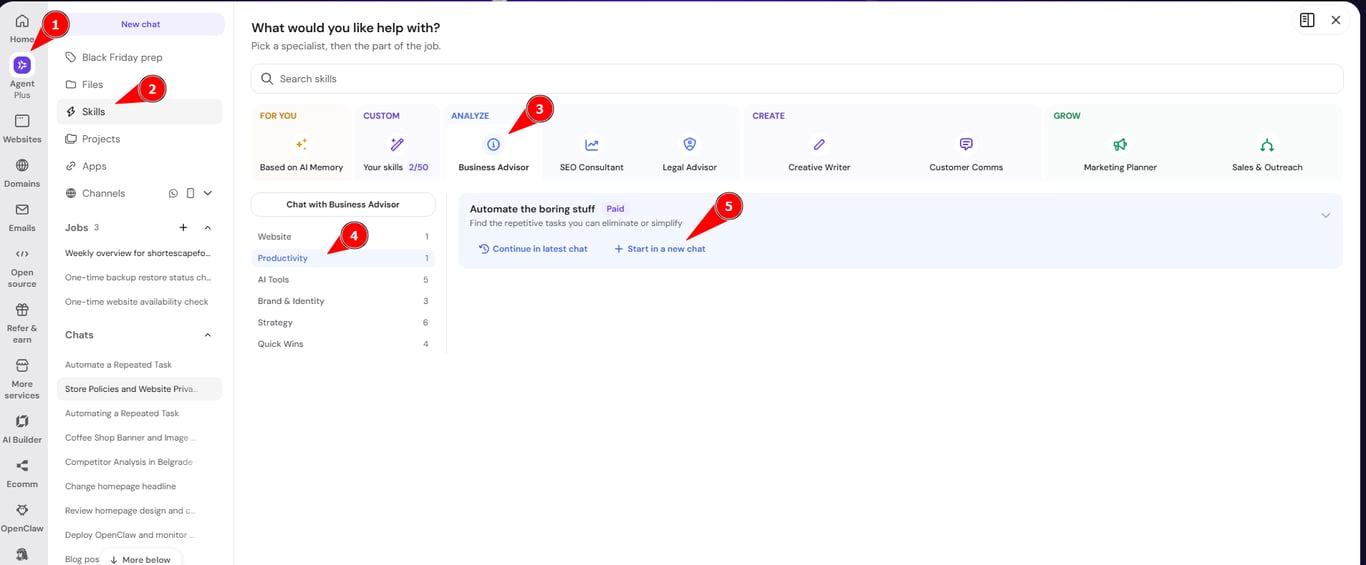
The Automate the boring stuff skill creates a prioritized automation plan based on your business and the tasks you repeat daily, weekly, or monthly. To plan an automation:
- Select Automate the boring stuff from the Skills tab or with the bolt icon in the Hostinger Agent chat. See how to use Hostinger Agent skills for both options.

- Answer the questions in the form: what your business does and who you serve, and which tasks you repeat. Name the exact task and the tools involved, for example: I copy product URLs into WooCommerce every day.
- Review the plan in the chat.
Each item in the plan has a classification, a suggested tool, and the steps to set it up. There are three classifications:
- Automate: a task a tool can do for you, such as importing products from a spreadsheet.
- Template: a reusable format, such as a product description template.
- Eliminate: a task to stop or batch, such as adding products once a week instead of every day.
The plan ends with a Recommended first setup that targets the task you named. Some suggested tools, such as Make or Zapier, are outside Hostinger, so set them up in those tools.
NOTES
- A general request such as Automate a task I repeat often can start the Create a recurring job skill instead. Select Automate the boring stuff directly to get a plan.
Schedule a recurring task with Hostinger Agent
Hostinger Agent runs a task on a schedule with the Create a recurring job skill, for example a weekly email or a monthly report. Ask for the task and the schedule in the chat, such as Send me an email every week, then answer the questions about the content, day, and time.
Hostinger Agent asks a follow-up question when the schedule is unclear, for example a weekly email with a daily time. See how to ask Hostinger Agent to check something at regular intervals for the full scheduling steps. For a complete example that sends sales follow-up emails every weekday, see how to send automatic sales follow-up emails with Hostinger Agent.
Limits when Hostinger Agent sets up an automation
Hostinger Agent sets up an automation only with the tools it has and the apps you connect. A connected app works only for the actions its connection provides. For example, the LinkedIn connection supports profile and posting actions, not job searches or job applications. Hostinger Agent tells you when an action is not available and suggests another approach. See connect apps and custom MCP servers to Hostinger Agent for how app connections work.
Hostinger Agent asks you to confirm each change to your website or hosting before it applies it, such as installing a plugin or adding an online store.
Your automation plan shows which repetitive tasks to automate first, and Hostinger Agent can schedule the checks and reports it runs itself.