Hostinger Reach integrations connect your website, online store, AI assistant, or own systems to Reach, so you manage contacts without adding them by hand. Hostinger Reach offers several integrations on the Integrations page: Hostinger AI Builder, WordPress, Hostinger Ecommerce, Hostinger Connector, and the Reach public API. The Integrations page also lists Zapier templates that sync contacts from Facebook Lead Ads, Shopify, and HubSpot.
Open the Hostinger Reach Integrations page
- Open the Reach dashboard.
- Click Integrations under Manage in the left sidebar.
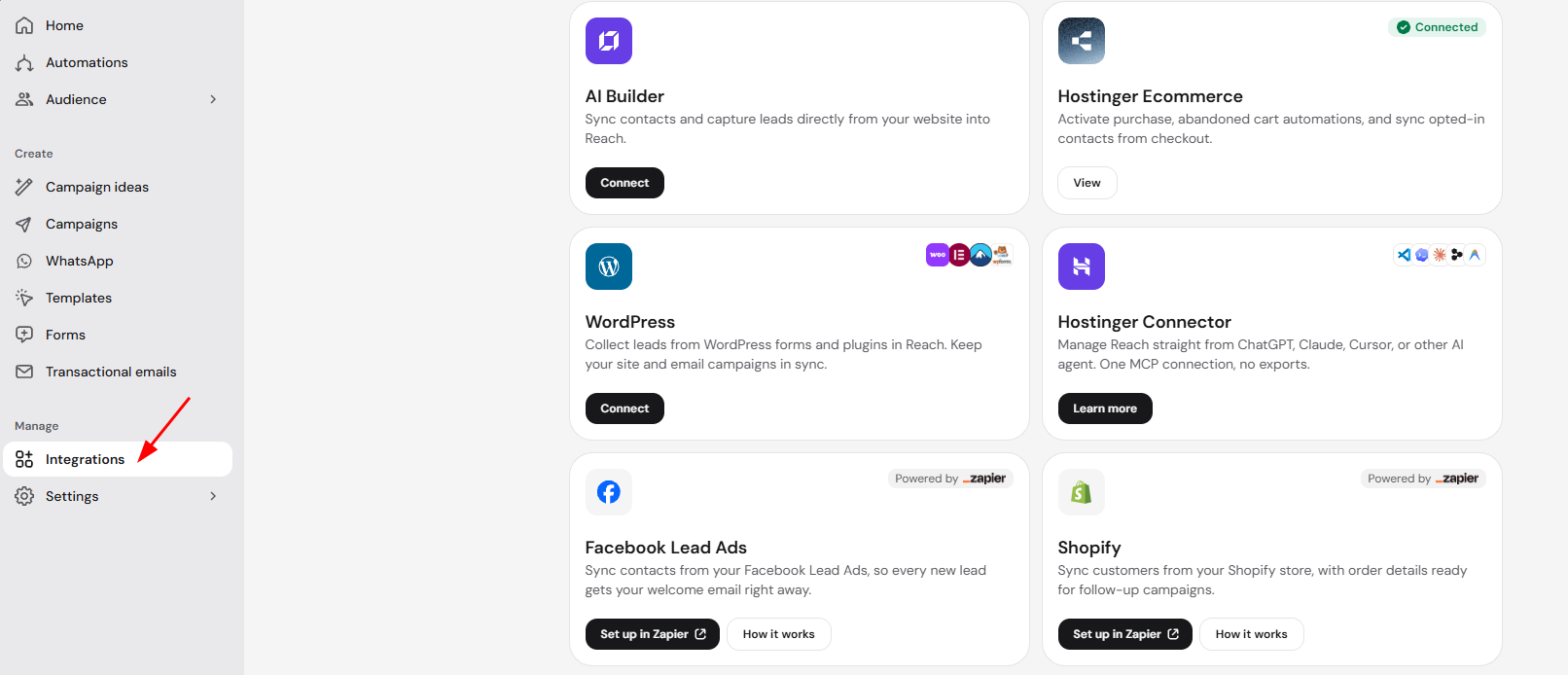
The Integrations page lists each integration as a card with a short description and a Connect, View, or Learn more button. Zapier template cards are marked Powered by Zapier and have Set up in Zapier and How it works buttons. A Connected label appears on integrations already linked to your Reach plan.
Choose a Hostinger Reach integration
Hostinger AI Builder integration
The Hostinger AI Builder integration syncs contacts and captures leads from your Hostinger AI Builder website into Reach. Setup depends on how your site was built:
- Agentic mode – see How to connect and use the Hostinger AI Builder agentic mode integration.
- Manual mode – see How to integrate with Hostinger AI Builder manual mode contact forms.
WordPress integration
The WordPress integration collects leads from WordPress forms and plugins and keeps your WordPress site and Reach email campaigns in sync. See How to integrate WordPress with Hostinger Reach for setup steps.
Hostinger Ecommerce integration
The Hostinger Ecommerce integration activates purchase and abandoned cart automations and syncs contacts who opt in at checkout. See How to connect and use the Hostinger eCommerce integration for setup steps.
Hostinger Connector integration
Hostinger Connector lets you manage Reach contacts, tags, and segments from ChatGPT, Claude, Cursor, or another AI agent through one Model Context Protocol (MCP) connection. See Hostinger Reach: How to manage Reach with Hostinger Connector for setup steps.
Zapier templates
Zapier templates sync contacts from Facebook Lead Ads, Shopify, and HubSpot into Reach through Zapier. See Hostinger Reach: How to sync contacts with Zapier templates for setup steps.
Reach public API integration
The Reach public API connects Reach with your own systems for custom and advanced setups, such as creating and organizing contacts and segments programmatically. See Hostinger Reach: How to use the Reach public API for setup steps.
Connect the Hostinger Reach integration that matches where your contacts come from, and your audience stays up to date without manual imports. For the full Reach setup, see Hostinger Reach: Getting started with your AI email marketing assistant.