The Hostinger AI Builder agentic mode integration with Hostinger Reach syncs contacts collected through your website to your Reach audience automatically. Set up and manage the integration by asking the AI in the Hostinger AI Builder agentic mode chat, and check the connection status in Reach. Disconnect the integration from either the chat or Reach to free your Reach plan for another website.
What the Hostinger AI Builder agentic mode integration can do
The AI (in Hostinger AI Builder agentic mode) can recognize in your chat when you want to:
- Collect contacts through your website
- Build an email marketing audience
- Add a signup or contact form.
- Send marketing emails to your contacts
When this happens, the AI can:
- Check whether you have an active Reach plan
- Show the available Reach plans that can be connected
- Offer a direct link to get a Reach plan if you do not have one
- Connect your website to Reach
- Automatically sync new form submissions to Reach either form created by Hostinger AI Builder agentic mode, or built with Reach
Connect your Hostinger AI Builder agentic mode website to Reach
To connect your website:
- Open the website you are building in Hostinger AI Builder agentic mode.
- In the chat, explain that you want to collect contacts or use email marketing.
For example, you can ask:
- “Add a signup form so I can collect email subscribers.”
- “Connect this website to Hostinger Reach.”
- “I want to collect contacts and send them marketing emails.”
Follow the instructions provided in the chat to complete the connection. If you do not have an active Reach plan, it will provide a link where you can get one.
Once the connection is completed, new contacts collected through your Hostinger AI Builder agentic mode website can be synced automatically to Reach.
Create signup forms with Hostinger AI Builder agentic mode
You can ask AI to create a signup/contact form directly on your website.
Describe what information you want to collect, such as:
- Email address
- First name
- Last name
- Phone number
- A note
The AI will generate a form that matches your website’s design and connect it to Reach. Every new submission will then be added to your Reach contacts automatically.
For example, you can ask:
Create a newsletter signup form with email and first name fields, and send all submissions to Hostinger Reach.
You can continue using the chat to change the form’s content, fields, placement, or design.
Import existing contacts from Hostinger AI Builder agentic mode
If your website already contains previously collected contacts, you can ask the AI to import them into Reach.
Open the chat and ask it to import the contacts currently stored on your website. It will guide you through the available steps.
This is separate from the automatic synchronization of new submissions. New contacts are synced after the integration is connected, while existing contacts must be imported separately.
Manage the connection through Hostinger AI Builder agentic mode
You can also use the chat to:
- Check whether your website is connected to Reach
- Disconnect the current website
- Connect another Hostinger AI Builder agentic mode website
- Update forms that send submissions to Reach
- Ask what Reach integration features are available
It will guide you through the required steps based on the action you request.
Check the connection in Reach
Although the connection is managed through Hostinger AI Builder agentic mode, you can review its status in Reach.
In Reach, open the AI Builder integration page to:
- See whether a website is connected
- Review which website is connected
- Check which features the integration supports
- Find guidance for using Reach with Hostinger AI Builder agentic mode
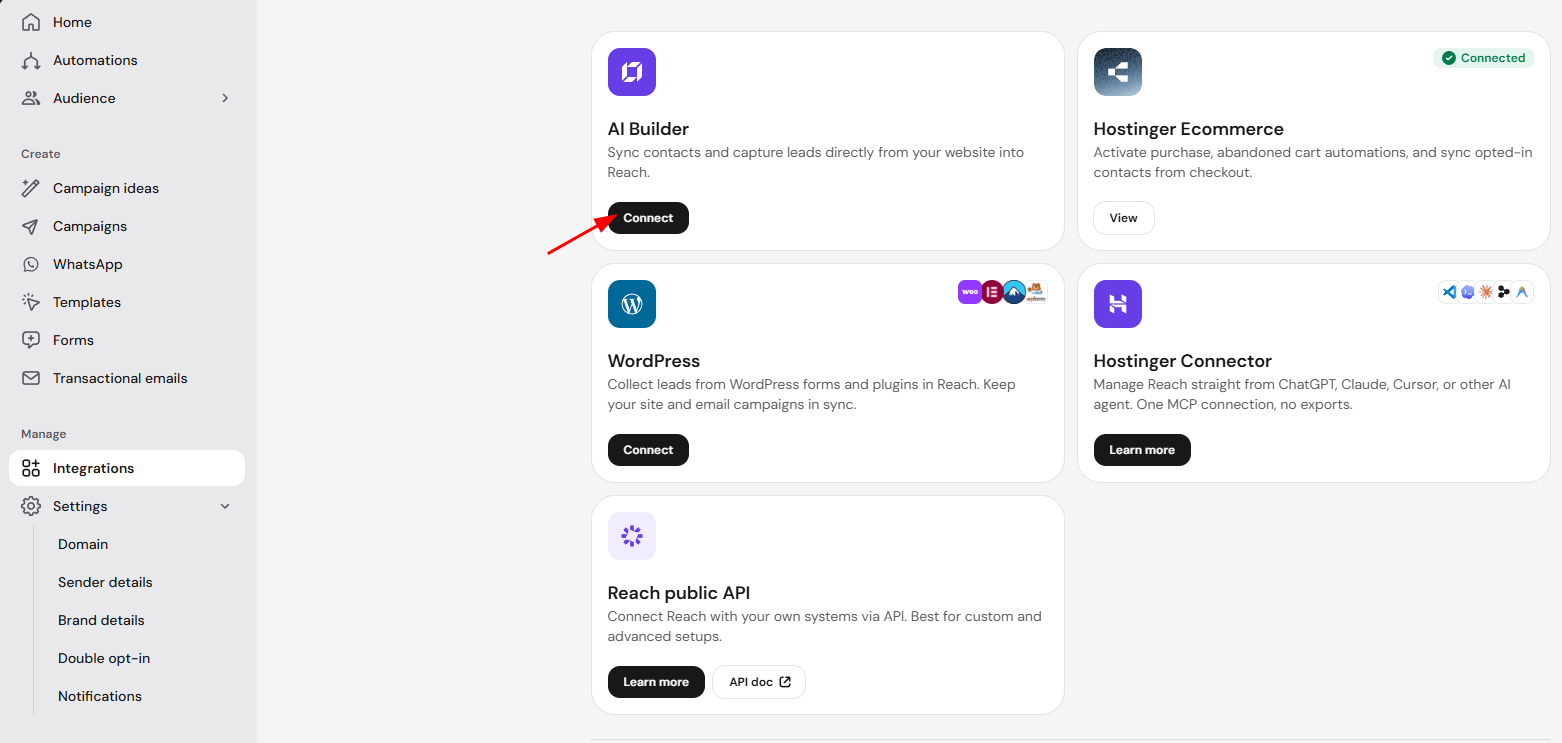
Currently, one Reach plan can be connected to one website at a time. To connect a different website, first disconnect the current website from Reach.
Disconnect your Hostinger AI Builder agentic mode website from Hostinger Reach
There are two ways to disconnect a Hostinger AI Builder agentic mode website from Hostinger Reach: in the Hostinger AI Builder agentic mode chat, or with the Disconnect button in Reach. Disconnecting frees your Reach plan so you can connect it to another website.
Option 1 – Disconnect Reach in the Hostinger AI Builder agentic mode chat
- Open the website in Hostinger AI Builder agentic mode.
- Ask the AI to disconnect Reach. For example: “Disconnect Reach from my website.”

- Confirm the disconnection when the chat asks.
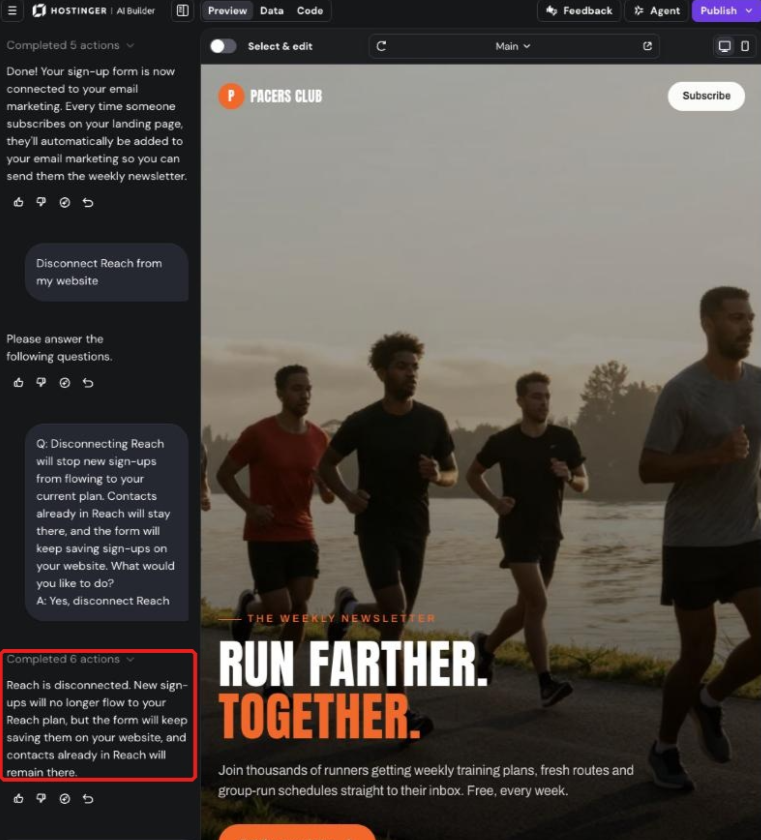
The chat confirms when Reach is disconnected.
Option 2 – Disconnect the website in Hostinger Reach
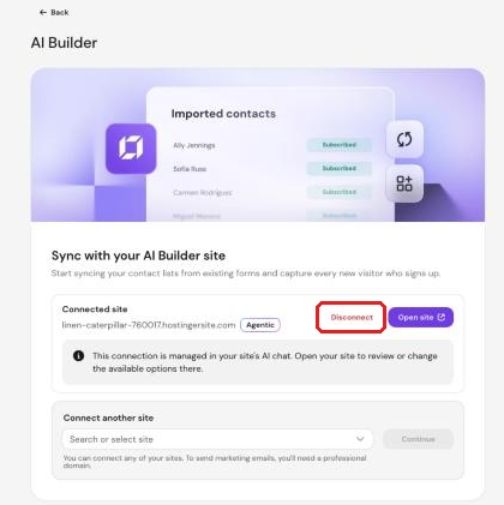
- In Reach, go to Settings → AI Builder.
- Click Disconnect next to the connected site.

- Send the pre-filled disconnect request in the Hostinger AI Builder agentic mode chat that opens, then confirm it.
What happens after you disconnect Hostinger Reach
Disconnecting Hostinger Reach from your Hostinger AI Builder agentic mode website has four effects:
- New sign-ups from the website no longer sync to Hostinger Reach.
- Forms on the website keep saving new sign-ups on the website.
- Contacts already in Hostinger Reach stay in Reach.
- Your Reach plan becomes free to connect to another website.
Deleting a Hostinger AI Builder agentic mode website frees its Reach plan automatically, so you don’t need to disconnect it first.
Switch your website to another Reach plan
Ask the AI in the Hostinger AI Builder agentic mode chat to switch your website to another Reach plan you own, for example: “Switch to my other Reach plan.” Confirm the request once to complete the switch.
Add a Reach Form to Hostinger AI Builder agentic mode
You can also share an active form created in Reach with your website.
To find this option:
- In Reach, go to Forms.
- Open an active form.
- Select Sharing options.

- Choose Add to AI Builder.

- Follow the provided instructions to continue in Hostinger AI Builder.
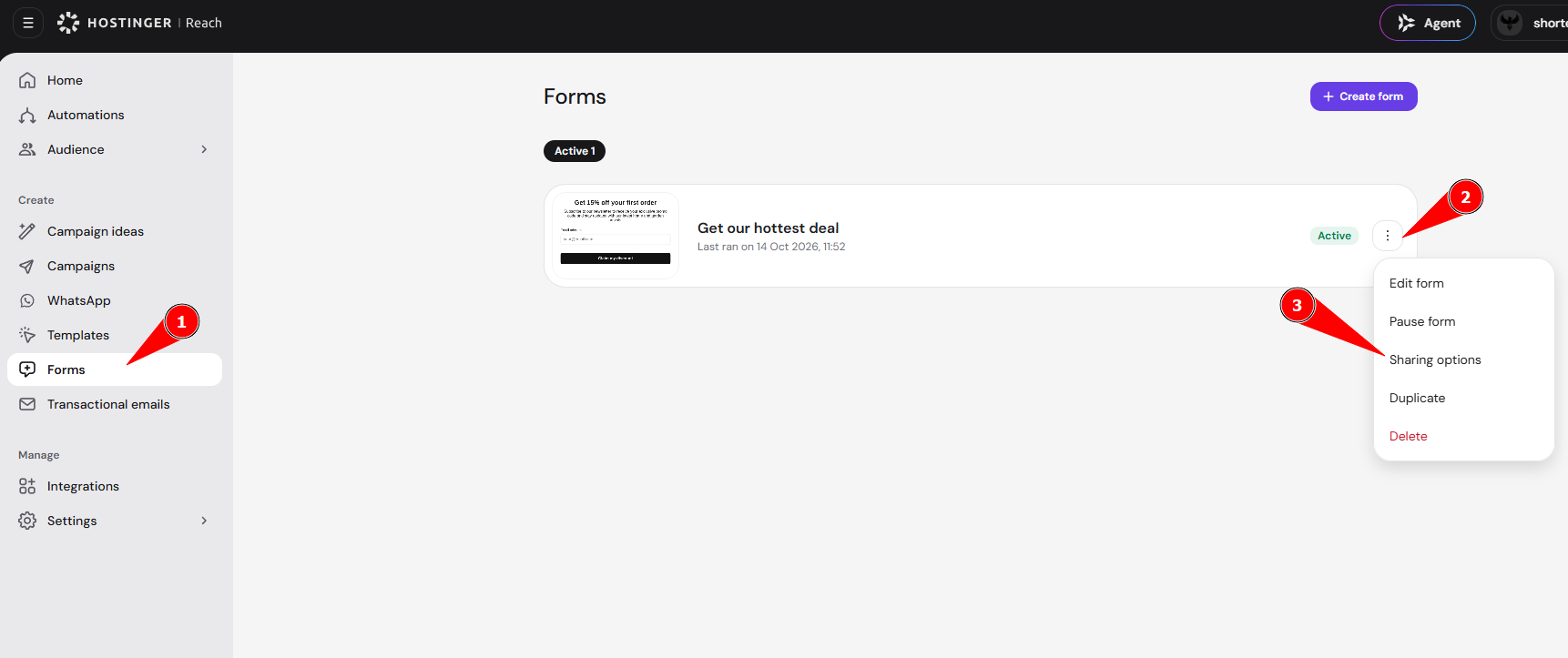
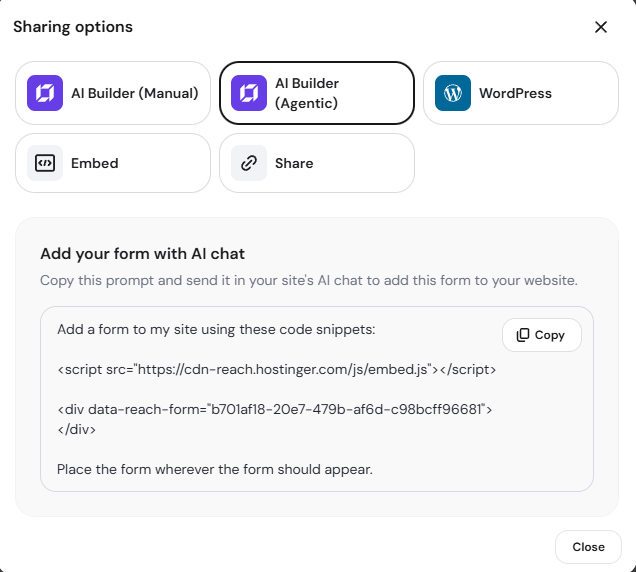
This lets you use a form created in Reach as part of your website and collect contacts for your Reach audience.
With the integration connected, new contacts from your Hostinger AI Builder agentic mode website flow into Hostinger Reach automatically, ready for your next email campaign.
Frequently asked questions
Do I need a Reach plan?
Yes. An active Reach plan is required to connect your website and sync contacts. If you do not have one, it can provide a direct link to get a plan. Every user is eligible to claim the Reach free trial as well to test out the integration.
Where do I manage the integration?
The connection and website changes are primarily managed through the Hostinger AI Builder agentic mode chat. Reach lets you review the connection status and the functionality covered by the integration.
Are new contacts synced automatically?
Yes. Once your website and form are connected, new submissions are automatically synced to Reach.
Are previously collected contacts imported automatically?
No. To import contacts that were collected before the integration was connected, ask AI to import your existing website contacts.
Can I connect multiple Hostinger AI Builder agentic mode websites to one Reach plan?
Currently, one Reach plan supports one connected Hostinger AI Builder agentic mode website at a time.