Hostinger Agency Hosting plans give web professionals the tools to manage multiple client websites securely, including full site isolation, priority support, access sharing, and a referral program. This guide covers choosing the right plan, migrating existing client sites, setting up your hosting, sharing access with clients and team members, and getting support and referral earnings.
Why choose an Agency Hosting plan?
The Agency Hosting Plan is tailored for web professionals managing multiple clients, offering unique benefits:
- Client and team collaboration – Access sharing per site for secure client management.
- Full website isolation – Prevents security risks from spreading between sites.
- Optimized for agencies – Handles up to 300 websites with superior performance.
- Priority 24/7 Support – Faster response times and multilingual WordPress experts.
- Exclusive Referral Program – Earn commissions and give clients a 20% discount.
Agency Hosting provides next-level security, efficiency, and earning potential for agencies managing multiple clients. Agency plans may not have some features included in standard web hosting plans. See Comparison with Cloud Hosting for a detailed comparison.
If you’re new to Hostinger, see how to get started with Hostinger’s services first.
Choosing the right Agency Hosting plan
Selecting the best Agency Hosting plan depends on your workload and client needs. Here’s a quick breakdown:
- Agency Startup – Ideal for freelancers and small agencies managing business or eCommerce sites. Comes with 6 CPU cores, 12 GB RAM, and 4,800 PHP workers (for 100 websites) for solid performance.
- Agency Professional – Best for growing agencies handling high-traffic websites. Offers more power, storage, and resources to keep multiple client sites running smoothly. It comes with 8 CPU cores, 20 GB RAM, and 9,600 PHP workers (for 200 websites) for solid performance.
- Agency Growth – The best option for large agencies, allowing up to 300 websites with 10 CPU cores, 30 GB RAM, 700 GB, and 14,400 PHP workers (for 300 websites) for solid performance.
All plans include full site isolation, access sharing, priority 24/7 support, and a referral program—ensuring a secure, scalable, and profitable hosting experience. Choose based on your client volume and performance needs.
Migrating an existing website to an Agency Hosting plan
After purchasing your plan, you can start setting up your hosting plan from Hostinger dashboard. During the onboarding process, you can select the migration option based on your needs:
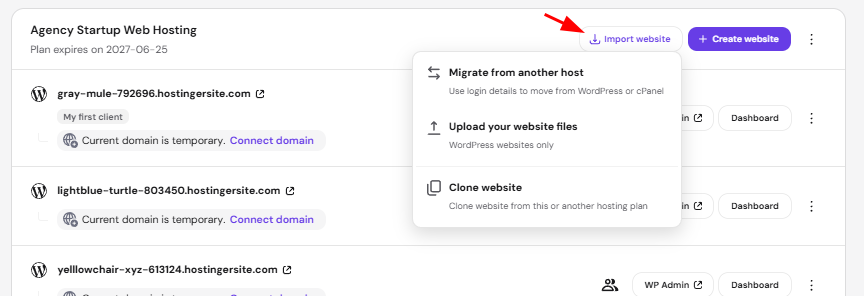
A few important things to note:
-
Please make sure that your websites do not point to Hostinger DNS; point your domain only after the migration is completed.
-
You will need to manually migrate your email service. For instructions, refer to this tutorial: How to migrate email services to Hostinger Email.
-
The migration process includes website files and databases. It does not include cron jobs, DNS records, custom SSL configuration, and FTP accounts.
Setting up your website
-
After purchasing your plan, you will be redirected to the Hostinger dashboard.
-
Set up your secure WordPress credentials.
-
Connect a domain (you will receive one for free if you select a plan of 12 months or more!)
-
SSL certificate will be installed automatically.
-
Build your website!
Sharing website access with clients and team members
Whether you want to add a Collaborator to help you build a website or share access to specific websites with your Client, you can do so with our Access Manager tool.
Getting support when you need it
Hostinger provides priority 24/7 support to Agency Hosting users. Here’s how you can get assistance:
-
Live Chat – Get help from WordPress experts within minutes.
-
Help Center – Browse articles and guides for troubleshooting.
Response Time: Typically under 2 minutes for Agency Hosting customers.
How to get started with referrals
Hostinger’s referral program allows you to earn up to $200 per referral while giving your clients a 20% discount on their first hosting purchase.
-
Log in to your Hostinger account.
-
Go to the Referral Program section.
-
Copy your unique referral link and share it with clients.
-
Earn commissions every time a client signs up using your link.
Manage your Agency Hosting plan
Once your plan is active, use these resources to monitor usage, secure your sites, and handle day-to-day maintenance.
- How to check resource usage in Agency plan
- How to download backup files on Hostinger Agency Hosting plans
- How to install a custom SSL on Agency plans
- Restricting IP addresses on Agency Hosting
- Maintenance mode on Agency Hosting
- PHP logs on Agency Hosting
- .htaccess files in Agency Hosting
Website development and technical setup on Agency Hosting
Use these guides to set up and customize the technical environment for websites hosted on your Agency plan.
- How to update the WordPress version on Agency Hosting plans
- How to convert a custom PHP website to WordPress on Agency plan
- How to create a WordPress staging environment on Agency plan
- How to install custom PHP on Hostinger Agency plan
- How to create a subdomain on the Hostinger Agency Hosting plan
- How to use remote access (SSH/SFTP) on Hostinger Agency Hosting plans
- How to set up remote MySQL access on Agency plan
Start building and scaling your agency with Hostinger today!