A Hostinger Agent Black Friday plan is a ready-to-use campaign plan for your online store, with a recommended offer, a timeline from teaser to Cyber Monday, messaging, and a launch checklist. To plan your campaign, run the Plan my Black Friday skill, choose your store, and then ask Hostinger Agent for promo copy, sale emails, social posts, and early access steps. You apply the final discount in your store yourself.
Create a Black Friday plan with Hostinger Agent
Run the Plan my Black Friday skill, and Hostinger Agent builds a campaign plan based on your store. See how to use Hostinger Agent skills to learn how skills work.
- Open Hostinger Agent and start a new chat.
- Type: Plan my Black Friday
- Click Run Plan my Black Friday. The label Skill used: Plan my Black Friday appears in the chat.
- Reply with the store to plan for if Hostinger Agent asks. Hostinger Agent checks your account and lists the stores it finds.
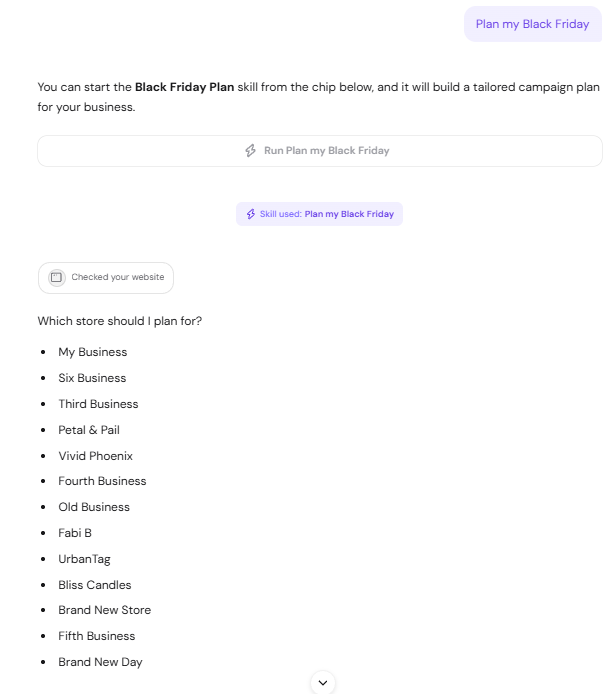
- Wait while Hostinger Agent reviews your store. A summary of the plan appears in the chat, together with the full plan as a downloadable Markdown (
.md) file.
What the Hostinger Agent Black Friday plan includes
The Hostinger Agent Black Friday plan file covers your offer, timeline, messaging, and launch tasks. It includes these sections:
- Takeaway: a one-paragraph summary of the recommended sale.
- Store snapshot: your store platform, currency, catalog, and setup status, such as whether payments are enabled.
- Offer decision: the recommended discount type and amount, with the reasons behind it.
- Campaign timeline: what to prepare, test, and publish from early November to the day after Cyber Monday.
- Messaging direction: a core promise, storefront headline, product badge ideas, and urgency rules.
- Channel plan: what to publish on your storefront, by email, and on social media, with dates.
- Measurement: the metrics to track before, during, and after the sale.
- Launch checklist: the tasks to complete before and after the sale.
- Assumptions: what Hostinger Agent assumed about your store, so you can correct anything that doesn’t fit.
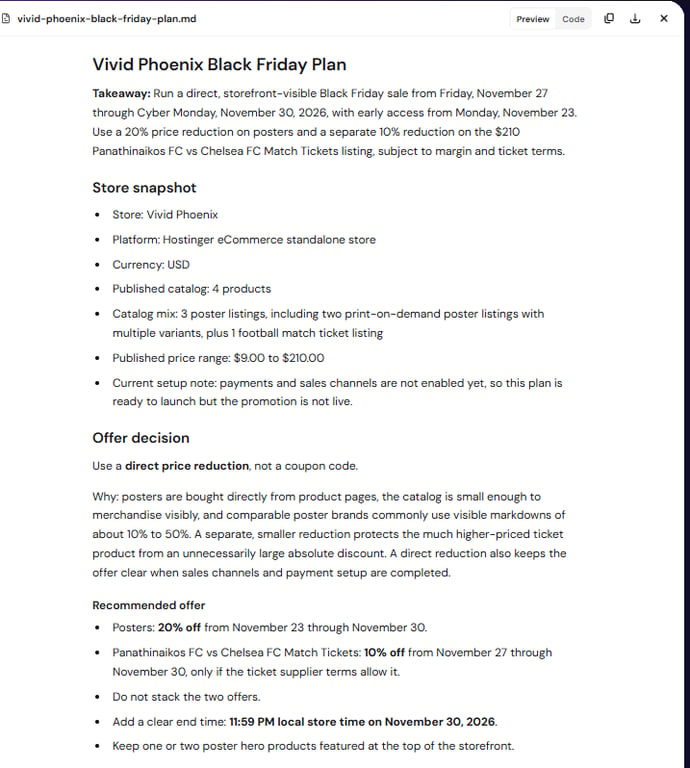
Review the recommended discount against your own margins and supplier terms before you publish it. The plan’s discount amounts are starting points, not confirmed figures for your business.
Create Black Friday promo copy, emails, and social posts with Hostinger Agent
After the plan is ready, select a card under the plan or ask in the same chat, and Hostinger Agent writes the campaign content based on your plan. Four cards appear: Create promo copy, Write sale emails, Create social posts, and Set up early access.
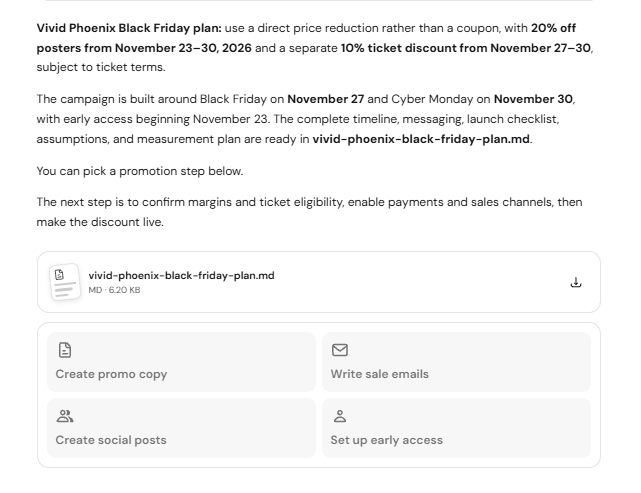
- Create promo copy: a homepage headline and subheadline, button text, product badge options, and short and urgency versions of the offer.
- Write sale emails: a series of sale emails, such as early access, public launch, and final hours, each with a send date, subject line, preheader, body text, and call to action.
- Create social posts: dated posts from teaser to final hours, each with a caption and hashtags. Hostinger Agent drafts the posts and doesn’t publish them.
Copy the content from the chat into your store, email campaigns, and social media accounts. To send the sale emails with Hostinger Reach, see Hostinger Reach: How to create an email campaign.
Set up early access for your Black Friday sale
Select Set up early access, or ask Hostinger Agent how to set up early access, to get steps for collecting subscribers before the public sale. For a Hostinger Ecommerce store, early access works by collecting marketing consent at checkout and sending the early access email to those subscribers with Hostinger Reach:
- Turn on marketing consent at checkout. See Hostinger Ecommerce: Enable email marketing consent at checkout.
- Connect your store to Hostinger Reach. See Hostinger Reach: How to connect and use the Hostinger eCommerce integration.
- Create a segment for your store subscribers. See how to use audience segmentation in Hostinger Reach.
- Send the early access email from your plan to that segment on the early access date.
Apply your Black Friday discount in your store
Apply the discount from your Hostinger Agent plan in your store before the sale starts. Choose the method that matches the plan’s offer decision:
- For a direct price reduction shown on product pages, see Hostinger Ecommerce: How to add a discount to a product.
- For a coupon code customers enter at checkout, see Hostinger Ecommerce: How to create discount codes in the online store.
Test the sale prices and checkout on mobile and desktop before you announce the sale.
Your Black Friday campaign now has a clear offer, a timeline, and ready-to-use copy, so you can focus on preparing your store for the sale.