Publish your Hostinger AI Builder agentic mode website to make it visible to visitors and update it after launch. Your website is set up as a private draft until published for the first time when you create a new project, whether you connect a domain or use a temporary one. Attempting to access an unpublished website may result in 404 or SSL protocol errors.
How to publish your website
To make your website public for the first time after creating it, follow these steps:
- Open the Hostinger AI Builder editor.
- Go to Hostinger dashboard → Websites.
- Locate your website and click Edit website.
- If you just created an unpublished website, it will show Your website is waiting to be published page, select Go to the project.
- Click the Publish button in the top-right corner.
 The Publish button is disabled while the website is being created. In that case, wait for the loading process to complete before publishing.
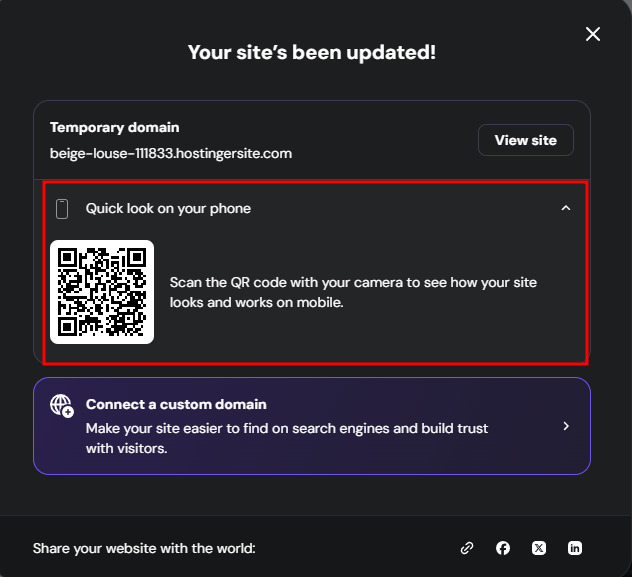
Preview your published website with Quick look on your phone
Once your website goes live for the first time, a success screen appears with a Quick look on your phone option. Select it to display a QR code, then scan it with a phone or tablet to open the published website without typing the address.
Update your website
You can edit your website at any time after it is live. To apply new changes to the live version, click the Publish button. If a dropdown appears, select Publish changes. Publishing also copies new Test data records to Live data, as explained in how to use test and live data in agentic mode. Wait a few minutes, and check your website in an incognito or private window to verify the applied changes.
When you click Publish, the editor displays a loading percentage indicator showing the progress of the publish process. You can see this in both the top-right button and the publish dropdown.
Once publishing completes:
- A completion sound plays to confirm the site is live.
- The publish dropdown shows two quick actions:
- Copy URL — copies the live site address to your clipboard.
- Go to Analytics — opens the built-in Analytics section directly.
Troubleshooting
If your website remains unreachable several hours after you publish it, check the following factors to identify the cause:
- Temporary domain: If you are using a temporary domain, clear your browser cache or open the site in an incognito window to access the latest version.
- Custom domain: Verify that your custom domain or subdomain is connected. The website should appear in your Websites list under the custom domain name rather than a temporary one.
- Domain pointing: Ensure your domain or subdomain is correctly pointing to your Hostinger AI Builder website.
- DNS propagation: If you recently updated your DNS records, wait for propagation to complete. This process can take up to 24 hours globally.
- Local caching. Clear your browser cache or test the website on a different device and connection, such as a phone using mobile data instead of a computer on Wi-Fi.
Related Hostinger AI Builder agentic mode features:
- Prompt Hostinger AI Builder effectively to get better results when building your web app.
- Manage your domain in agentic mode.
- Configure SEO settings for your agentic mode website.
- Use the integrated backend in Hostinger AI Builder agentic mode.
- Troubleshoot common issues in Hostinger AI Builder agentic mode.
For a quick guide on deploying your Hostinger AI Builder website, check this video tutorial.