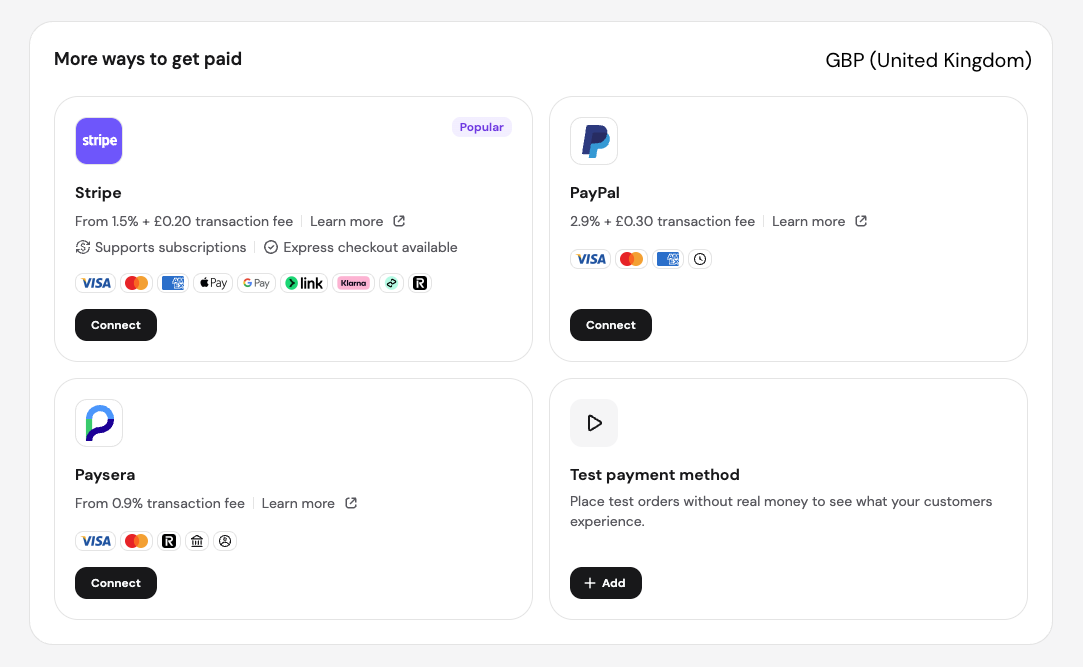
For Hostinger Ecommerce stores, there are various online payment gateways and methods to help you accept customer payments. Hostinger AI Builder websites use the same payment gateways when they’re connected to Hostinger Ecommerce. The availability of these options depends on the following factors:
-
Your store’s country and currency
-
Your customers’ location
You can access these payment settings from Settings → Payments in your Hostinger Ecommerce Store Manager. If you use Hostinger AI Builder, you can also reach them from the online store settings area.
Below are the main online payment providers in Hostinger Ecommerce.
Stripe
Stripe is a convenient and trustworthy online payment provider. Its default payment methods are credit and debit cards. However, it also allows enabling additional payment methods – Apple Pay, Google Wallet, Klarna, etc. – that are available depending on the store’s country and currency.
Apple Pay can now be enabled and toggled on or off directly from your Ecommerce admin page → Settings → Payments → Stripe integration, without leaving your store admin panel. Your domain is also submitted to Stripe automatically when you enable Express checkout: no manual steps in Stripe needed.
PayPal
PayPal is a well-known online payment gateway that’s widely used for online transactions and is accepted by many merchants and websites.
Razorpay
Razorpay is a platform that helps businesses in India accept and process online payments easily. It provides tools to handle payments from multiple sources like credit/debit cards, net banking, UPI, and digital wallets, all in one place.
Paysera
Paysera is an online payment gateway offering other financial services such as international money transfers, and currency exchange. Paysera is available as a payment gateway if your store location is set to Lithuania.
dLocal Go
dLocal Go accepts local payment methods across Latin America in Hostinger Ecommerce, including cards, bank transfers, and cash payments. dLocal charges processing fees.
Manual payment in Hostinger Ecommerce
Manual payment lets customers pay offline through cash on delivery, money orders, or bank transfers. You approve each manual payment order yourself by updating the payment status on the Orders page.
After you connect a payment provider, place a test order to confirm your Hostinger Ecommerce checkout works before you start selling.
NOTES
- If a payment isn’t working as expected, see how to fix payment and checkout issues.
- This article covers payment providers for accepting customer payments in your Hostinger Ecommerce store. To pay for Hostinger services, see What payment methods are available at Hostinger?
- The Payments settings page displays provider cards with the following information:

- Transaction fees are shown per your business location and currency. Stripe, PayPal, Paysera, and Razorpay each surface the applicable rate for your country and currency combination.
- Stripe cards display badges for subscription support and express checkout availability.
- Providers that do not support your current store currency are flagged inline; you can see which providers are incompatible before connecting.
- Payment providers that aren’t listed in this article aren’t available as built-in options in Hostinger Ecommerce.