Log in to your cPanel account at Hostinger to manage your existing legacy cPanel hosting plan. Shared cPanel hosting plans are no longer available for new purchase — Hostinger has fully transitioned to Hostinger dashboard as its primary control panel. If you have an existing cPanel plan, it’s managed from your Hostinger dashboard, along with any other related services you may have, such as domains or professional emails. If you specifically need cPanel today, it’s available via a VPS plan with a separately purchased license.
NOTES
- If you’re on a cPanel Reseller plan, note that new purchases are being phased out — see Hostinger cPanel Reseller hosting discontinuation for the timeline.
- If you have WHM access, see how to log in to WHM at Hostinger instead.
To log in to your cPanel and manage your hosting plan, you have two available methods:
Option 1 – From Hostinger dashboard
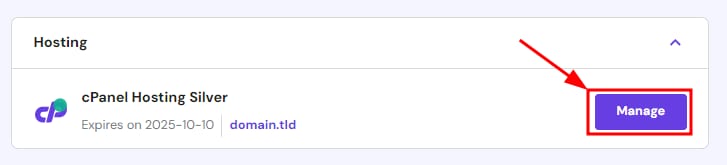
Access the Home page of your Hostinger dashboard and click on Manage next to your cPanel hosting:
On the next section, click on Login to cPanel:
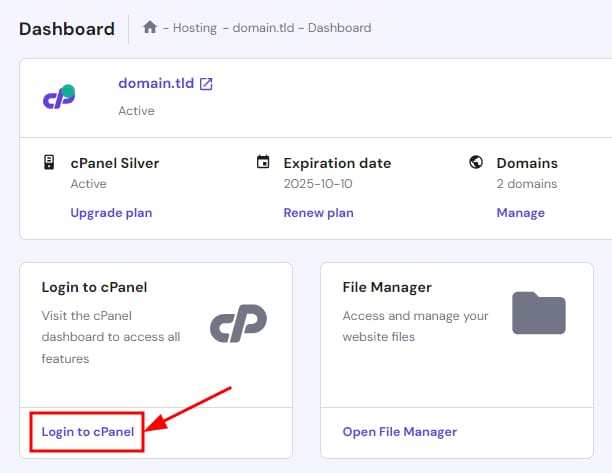
You will then be directed to your cPanel home without needing to enter your credentials.
Option 2 – Using cPanel Direct URL
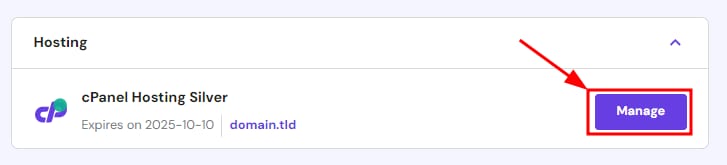
Access the Home page of your Hostinger dashboard and click on Manage next to your cPanel hosting:
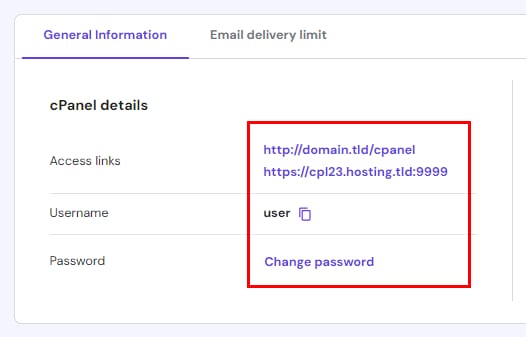
Next, scroll down to find the cPanel details:
-
Two alternative URLs to access the login page: via your domain name by adding /cpanel or using the Hostinger server and port
-
Your cPanel username and a button to copy it to the clipboard. See how to check your cPanel username at Hostinger if you need help finding it.
-
The password will not be displayed. If you forgot your password, click on Change password and set a new one
Just navigate to either URL and enter your username and password. You can also bookmark them on your browser for easier access.
Common cPanel tasks
Once logged in, here’s where to start with the basics:
- Add a website in Hostinger cPanel
- Add and remove A records in cPanel
- Create and manage email accounts on cPanel
- Create a new MySQL database in cPanel
- Find FTP details on cPanel
- Connect to your cPanel account via SSH
- Change the PHP version on cPanel
- Install SSL in Hostinger cPanel
- Create a full backup in cPanel
- Check resources usage on cPanel
- Deploy apps built with Codex on Hostinger
Once you’re logged in, you’re ready to manage every aspect of your hosting, from files and databases to email and security, directly from cPanel.