Create a new MySQL database in cPanel to store data for your website.
Create the database
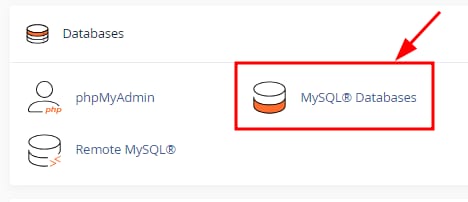
You can easily create a new MySQL database by opening your cPanel and clicking on MySQL Databases section:
Once there, enter the database name and click on Create Database:
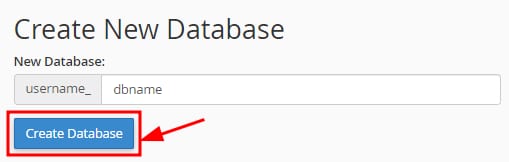
By default, the prefix will be your cPanel username followed by an underscore. eg. user_
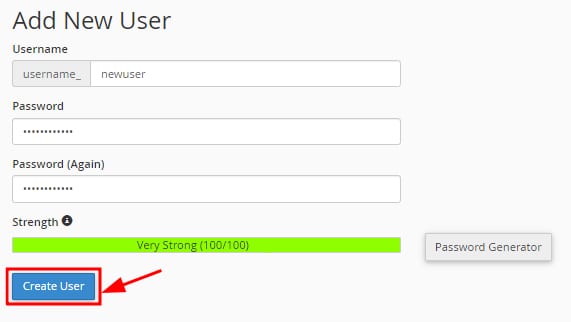
Select to Go Back after creating the database and scroll down to the Add New User section, taking the following into consideration:
-
The username name will have the same prefix as the database
-
Enter the database password twice. The password must be a minimum of 10 characters long; otherwise the database connection will fail. It is recommended to use the password generator tool to ensure a strong password is used, as it generates passwords that already meet this minimum length
Next, click on Create User:
Finally, on the Add User To Database section right below, connect your newly created user with the database. Select the user and database from the dropdownl ist and click on Add:
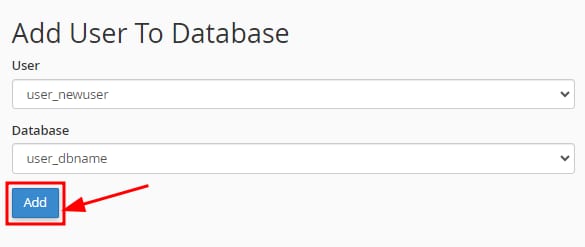
That’s it! Your MySQL database will be created with a user correctly associated with it.
If you are experiencing a “database connection failed” error, this is likely because the database password is shorter than 10 characters. Change the password to one with a minimum of 10 characters to resolve this.
Related database tasks