8 ways to use AI for email marketing
Oct 15, 2026
/
By Bruno S.
/
10 min Read
AI for email marketing uses machine learning and behavioral data to automate decisions that marketers previously had to make manually or skipped entirely because the data was too complex to process at scale.
It segments audiences by behavior, generates personalized content for individual recipients, predicts the best send time per contact, and flags deliverability risks before a campaign goes out.
In practice, behavior replaces static fields, send times are predicted per contact, and analytics shift from post-send damage control to forward-looking insight.
Audience segmentation, personalized content generation, send time optimization, predictive analytics, automated workflow creation, deliverability improvement, customer behavior analysis, and platform integration are the eight areas where AI has the most direct impact on campaign results.
1. Audience segmentation with AI
AI-powered audience segmentation groups subscribers by behavior, purchase history, and engagement patterns rather than static demographic fields used by traditional segmentation.
Manual segments use the data you assign at sign-up: job title, location, and plan type. AI segmentation, on the other hand, reads what subscribers actually do: which emails they open, which links they click, how long since their last purchase, and how likely they are to churn.
The practical difference is precision. While a rule-based segment groups everyone who bought in the last 90 days, an AI segment identifies buyers showing early disengagement signals and routes them into a re-engagement flow before they go cold, without you having to build that logic manually.
Tools like Klaviyo, ActiveCampaign, and HubSpot use predictive segmentation models trained on historical engagement data. Klaviyo’s predictive analytics, for example, estimates each contact’s lifetime value, churn risk, and next-order date – all of which can be used as segmentation criteria.
An AI-powered tool like Hostinger Reach works differently from how email marketing typically works: instead of configuring conditions manually, you describe your target audience in plain language, and the AI builds the segment logic for you.
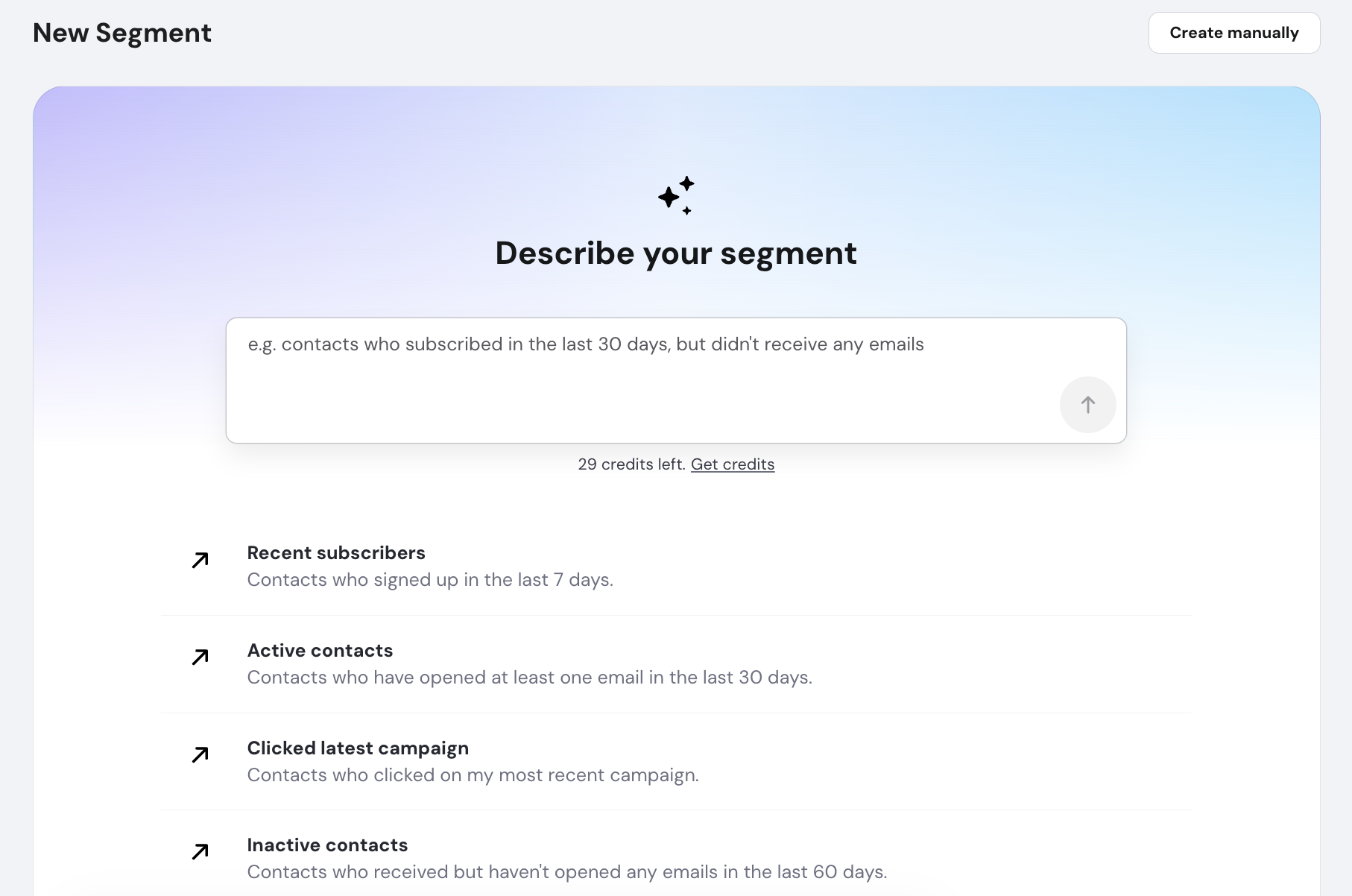
For anyone managing a growing list, that’s a meaningful difference, since segments stay accurate as behavior changes without requiring you to maintain the rules behind them.
2. Personalized email content generation
Name-based personalization is cosmetic. Behavioral personalization, on the other hand, changes what the email actually says, which images it shows, and which products it surfaces based on each subscriber’s actions. The contrast with a traditional template is significant:
Traditional template | AI-personalized email |
Same subject line for everyone | Subject line variation selected per contact’s engagement history |
Same promotional content for all | Product recommendations based on browsing and purchase history |
Generic imagery | Images matched to subscriber preferences or past interactions |
One call-to-action for the whole list | Call-to-action adjusted to where the subscriber is in the purchase cycle |
According to Twilio’s 2024 State of Customer Engagement Report, consumers spend an average of 54% more with brands that personalize effectively, and 64% say they’d quit a brand that doesn’t. Emails that reflect individual behavior consistently outperform batch-and-blast campaigns on open rate, click-through rate, and conversion.
Reach covers both sides of this: the AI-powered email template creator generates content adapted to your campaign goals, while personalization placeholders handle the baseline, automatically inserting each subscriber’s first name, last name, or email address into your messages.
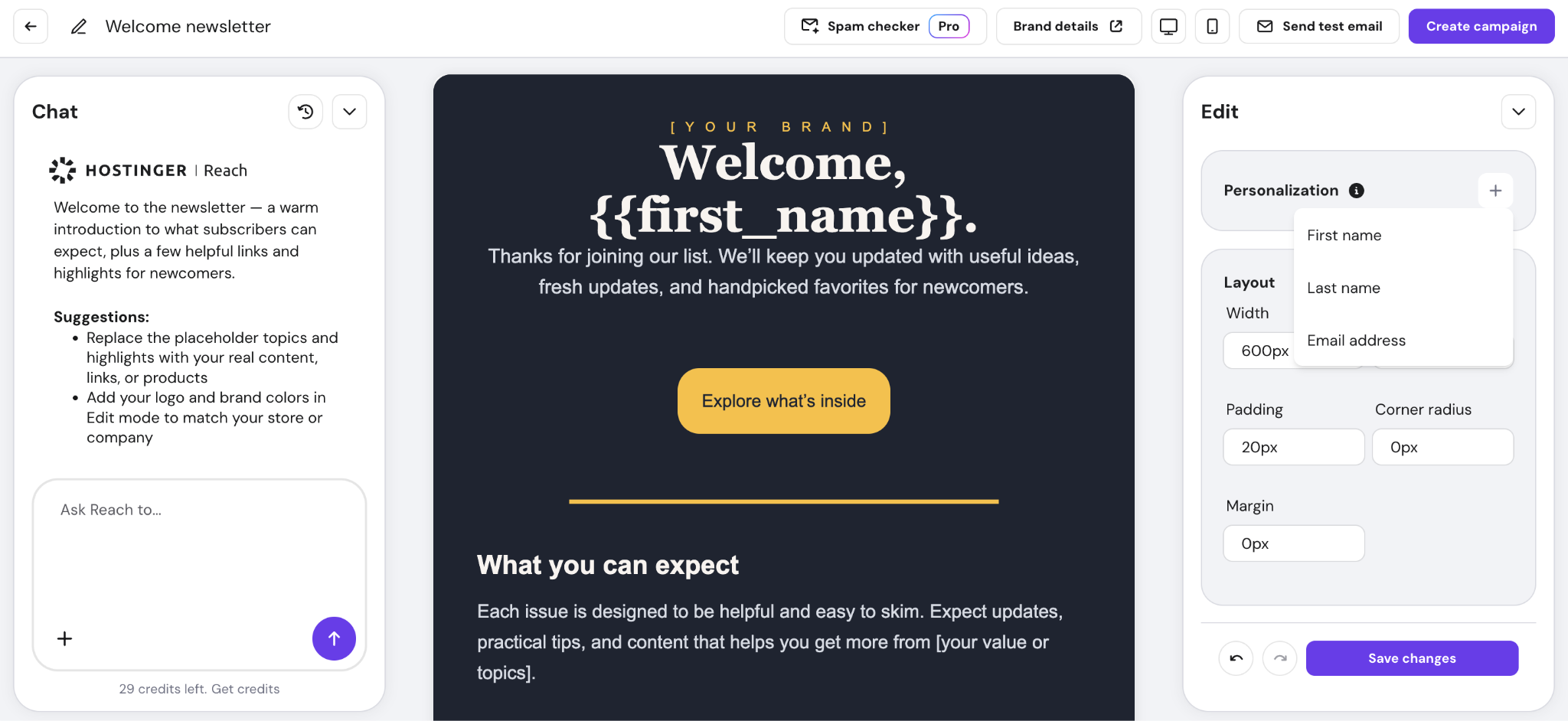
For small teams sending to large lists, good email copywriting combined with automated personalization is the most practical way to make campaigns feel individual without multiplying the work.


Pro tip
Write your base template as if you're writing to one person. AI-generated personalization performs best when the underlying copy is already strong – placeholders handle the variation, but the voice has to be yours.
3. Send time optimization
Send time optimization uses AI to predict when each subscriber is most likely to open their email, based on their individual engagement history, and delivers the campaign to each contact at that moment rather than blasting the whole list at once.
In practice, a subscriber who usually checks their email at 7 am on weekdays gets a different send time than one who engages primarily on weekend afternoons, for example.
Send-time personalization is a direct contributor: delivering to each contact at their individual peak consistently outperforms fixed-schedule sending across list sizes and industries.
Platforms that offer this include Klaviyo (Smart Send Time), Mailchimp (Send Time Optimization), and ActiveCampaign (Predictive Sending).
Hostinger Reach’s Smart Sending feature works the same way: it analyzes when each contact has opened your previous emails, then spreads delivery across a 24-hour window from your scheduled send time so every recipient gets it at their personal peak. It’s a paid plan feature, so if you’re on a free plan and wondering why open rates plateau despite solid content, this is worth upgrading for.
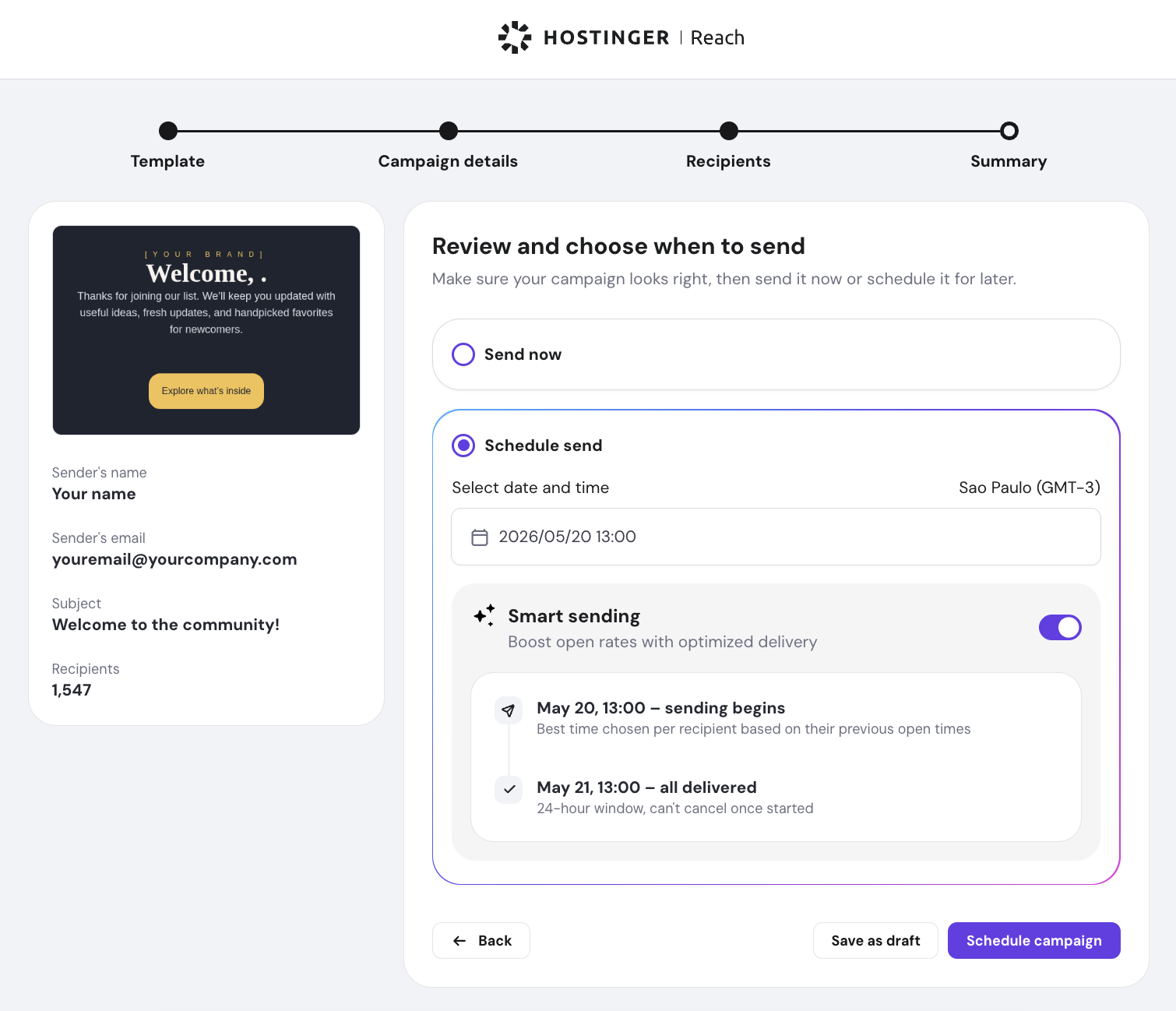
Important! Smart Sending requires an existing open history to personalize timing. Contacts with no previous opens receive the email at your original scheduled time. If you’re sending to a brand-new list, the feature still works; it just falls back to fixed scheduling for contacts it has no data on yet.
4. Predictive analytics for campaign performance
Predictive analytics uses machine learning to forecast how a campaign will perform before you send it. It estimates click-through rates, conversion likelihood, and unsubscribe risk based on historical data from similar campaigns and segments. The practical use case is to catch problems before they happen, rather than analyze the damage after.
Platforms that offer genuine predictive forecasting include:
- Klaviyo – assigns each contact a predicted lifetime value and an expected next-order date, which can be used as segmentation criteria for high-value sends.
- Salesforce Marketing Cloud – Einstein predicts send-time performance and content engagement at the contact level.
- HubSpot – predictive lead scoring surfaces contacts most likely to convert before a campaign goes out.
The real-time value is in what you do with those forecasts. If a model flags that a campaign is likely to generate above-average unsubscribes for a specific segment, you can adjust the content, swap the offer, or exclude that segment entirely before sending.
If predicted click-through rates come in low during an A/B test, you can pull the underperforming variant mid-send rather than waiting for final results. The goal is to treat every email marketing campaign as a feedback loop, not a one-shot send.
Pro tip
Not all platforms that market AI features offer true predictive forecasting. Many provide post-send analytics (open rates, click maps, unsubscribe rates) without any forward-looking modeling. Both are useful, but they answer different questions.
Reach sits in the post-send category: its Campaign Performance Tracking shows open rate, click rate, click-to-open rate (CTOR), unsubscribe rate, and per-contact delivery status after a campaign goes out, not before.
That’s not a limitation so much as a foundation: understanding how to read and act on those email marketing performance metrics is the prerequisite for using predictive tools effectively when you’re ready to layer them in.
5. Automated email workflow creation
AI-driven email automation triggers the right message at the right moment based on subscriber behavior without forcing you to map every branch of a decision tree.
The efficiency gain over manual setup is significant: building a complex drip campaign manually means configuring triggers, delays, conditions, and branch logic for every possible path, then rebuilding it whenever your audience behavior shifts.
AI-assisted workflow builders suggest the branching logic, generate content for each step, and adjust timing based on engagement data.
The core trigger types AI manages well:
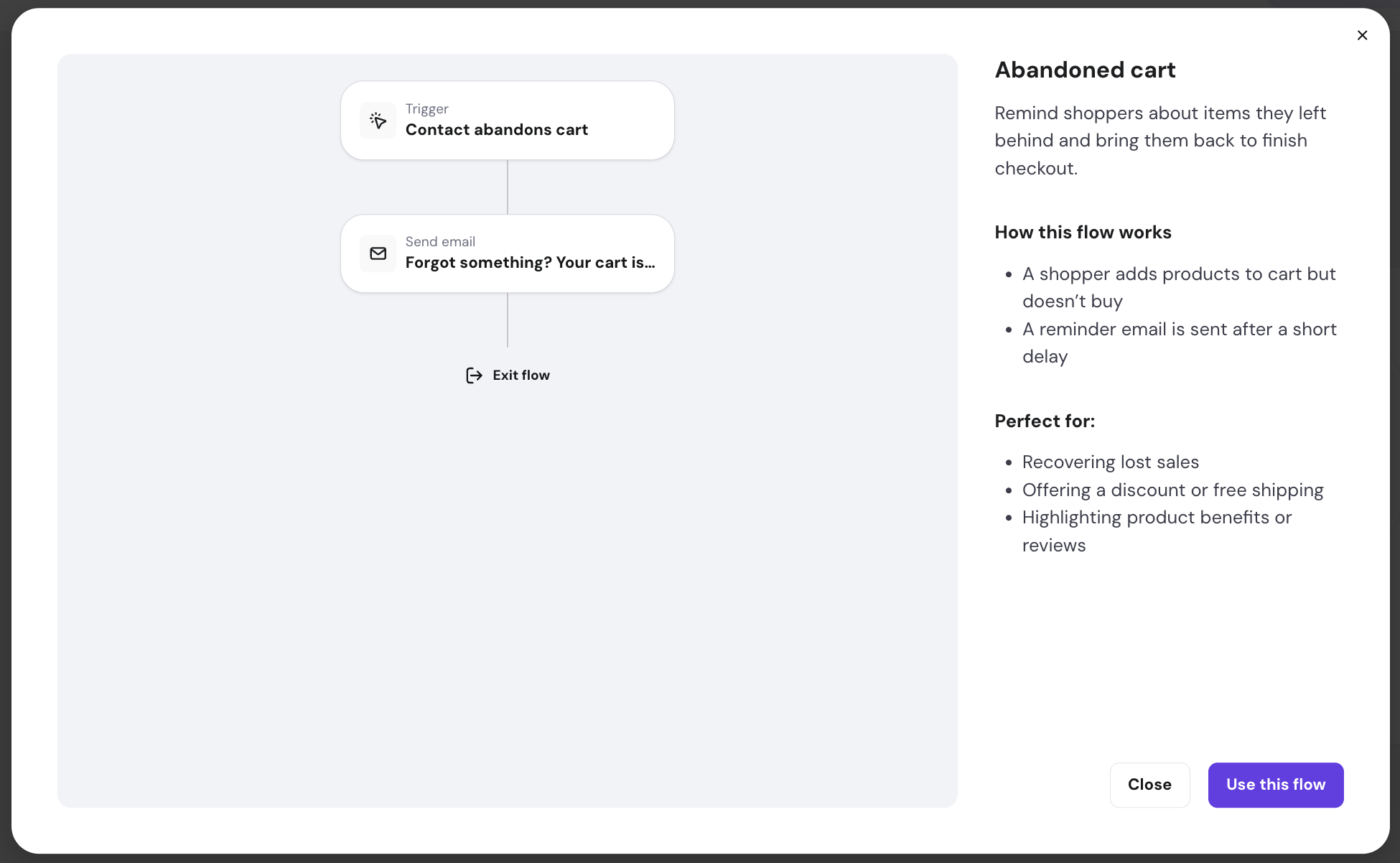
- Abandoned cart – fires when a subscriber adds to the cart but doesn’t complete checkout.
- Post-purchase – sends a thank-you, order confirmation, or a review request after purchase confirmation.
- Re-engagement – targets subscribers who didn’t open or click a specific campaign, following up with a different angle or offer.
For more advanced segmentation, platforms like Klaviyo, HubSpot, and Salesforce Marketing Cloud offer lead-scoring triggers that escalate contacts to a higher-intent sequence when behavior crosses a threshold.
CRM integration extends automation further on those platforms. Connecting to Salesforce, HubSpot, or Pipedrive means triggers can fire based on CRM events (such as a lead reaching a certain score, a deal moving to a new stage, or a support ticket closing), not just email behavior.
Reach’s automation builder covers the essentials out of the box: pre-built abandoned cart and post-purchase automations for WooCommerce and Hostinger AI Builder stores, plus a welcome series with configurable delay steps between emails. Each send step includes AI-assisted prompts to help you write the content.
6. Spam filter avoidance and deliverability improvement
AI improves email deliverability by analyzing the elements most likely to trigger spam filters and surfacing issues before you send, covering everything from subject line language and image-to-text ratio to sending frequency and authentication status.
Spam filters operate on two levels, and both affect whether your email lands in the primary tab, the promotions folder, or spam entirely.
- Content analysis – Gmail, Outlook, and Yahoo! Mail use machine learning to score emails based on language patterns, formatting, link reputation, and HTML structure.
- Sender reputation – Mailbox providers track your domain’s bounce rate, spam complaint rate, and engagement history over time.
The techniques AI applies at the content level include flagging subject line words and phrases with high spam-trigger rates, checking image-to-text balance (too many images and too little text is a common spam signal), identifying broken or suspicious links, and scoring your HTML for formatting patterns that filter algorithms penalize.
On the sending pattern side, AI monitors frequency relative to engagement. Ramping up send volume too quickly after a list import, for example, is a reputational risk that AI-assisted warmup tools automatically manage.
Sender reputation is where the long-term damage happens. According to Google’s email sender guidelines, a spam complaint rate above 0.1% affects inbox placement across your entire list, not just for the contacts who filed a complaint.
AI monitoring tools track complaint rates, bounce rates, and blocklist status in real time and alert you before metrics cross that threshold.
On the content analysis side, tools like Mailgun’s Inbox Placement testing, GlockApps, and Validity (formerly Return Path) analyze your email against major spam filter rulesets before sending.
List hygiene is the other half of the equation: hard bounces degrade your sender score immediately, and AI-powered tools like ZeroBounce and NeverBounce validate email addresses in real time at sign-up, removing invalid addresses before they reach your sending queue.
Important! SPF, DKIM, and DMARC authentication records are prerequisites that no AI tool can substitute. If those DNS records aren’t configured correctly, no amount of content optimization can recover inbox placement. AI tools assume you’ve handled authentication; they optimize what sits on top of it.
7. Customer behavior analysis
Every email open, link click, purchase event, and page visit is a data point. Tracked across your list, those patterns tell you who’s disengaging, who’s showing purchase intent, and what to send each contact before they tell you themselves, without requiring anyone to fill out a preference form.
The two highest-value applications are re-engagement and upselling.
Re-engagement starts with catching disengagement early: a subscriber who opened every email for 6 months and then went silent for 45 days is showing exactly that pattern. AI identifies it earlier than manual monitoring and triggers a sequence automatically – typically a “we miss you” campaign with a strong incentive – before the subscriber becomes unrecoverable.
For upselling, the logic is the same, but the signal is different. A customer who buys a web hosting plan and then visits your VPS hosting page three times without converting is showing purchase intent.
AI routes that contact into a targeted sequence that addresses the most common objections and offers a migration incentive. You don’t have to notice the pattern; the system does.
Beyond those two, behavior analysis powers a wider set of triggers:
- Browse abandonment – a subscriber views a product page multiple times without adding to cart.
- Category affinity – repeated engagement with a specific content category shifts future sends toward that topic.
- Purchase frequency drop – a previously active buyer goes longer than usual between orders.
- High-value page visit – a contact visits a pricing or upgrade page without converting.
- Post-purchase timing – a set number of days after a purchase, when a replenishment or complementary product offer is most relevant.
8. Integrating AI in existing email platforms
The first step in adding AI to your email program is checking what your current platform already offers.
Most major platforms, such as Mailchimp, Klaviyo, and ActiveCampaign, have introduced native AI features in the last two years covering content generation, send-time optimization, segmentation, and predictive analytics. Enabling them typically requires simply activating the feature in your account settings.
If your platform doesn’t include native AI, the next step is connecting it to an external AI layer through an automation tool like n8n, Make, or Zapier.
These tools act as a bridge: they route subscriber data to an AI model, process it (generating personalized content, segment assignments, or scoring) and push the results back into your platform without custom code.
Before committing to any AI integration, three considerations matter:
- Data handling – some integrations require access to subscriber PII. Confirm how the vendor stores, processes, and retains that data, and whether it’s compliant with GDPR and CAN-SPAM.
- Reliability – third-party integrations add a dependency to your sending infrastructure. An outage or API change in the integration layer can break time-sensitive triggered emails.
- Total cost – many AI add-ons are priced per contact or per API call, which scales quickly – factor that in before committing.
Hostinger Reach connects to n8n through the Hostinger API n8n Community Node, which lets you automatically add new contacts to Reach from other platforms in your workflow – form submissions, new leads, completed purchases – without manual imports.
One important caveat: community nodes only work on self-hosted n8n, not the cloud-hosted n8n.io plan. If you’re running n8n on a Hostinger VPS, the integration works out of the box; if you’re on n8n’s cloud plan, it doesn’t apply.
How to choose the best AI email marketing platforms
The right AI email marketing tool depends on which problems you’re actually solving. A creator with a 2,000-person list has different requirements than a DTC brand managing 200,000 contacts across multiple segments and automations.
The criteria that matter most map directly to what the previous sections covered: how the platform segments your audience, personalizes content, automates workflows, handles deliverability, and scales as your list grows.
Start with ease of use. Built-in AI, where segmentation, send-time optimization, and content generation are already part of the platform, is meaningfully different from assembling those capabilities through third-party integrations.
The latter gives you more flexibility but adds setup complexity, maintenance overhead, and additional failure points in your sending infrastructure. If you’re not running a dedicated marketing ops function, native AI is almost always the faster path to results.
From there, five criteria narrow the field:
- Available AI features – segmentation, personalization, automation, and predictions – not just a subject line generator.
- Integration quality – compatibility with your existing CRM and ecommerce platform, and whether that integration is native or requires a bridge tool.
- Deliverability infrastructure – authentication support, complaint rate monitoring, and whether the platform gives you visibility into inbox placement.
- Scalability – whether the pricing model still makes sense at 5–10x your current contact volume.
- Pricing vs. value – calculate the actual cost at your projected list size and weigh it against which features you’ll use – segmentation and send-time optimization tend to pay for themselves; a subject line generator alone rarely does.
Hostinger Reach is a practical option if the built-in AI path makes sense for your situation. The features covered in this article – such as AI-powered segmentation described in plain language, Smart Sending, drip automation with pre-built ecommerce triggers, and the AI template generator – are all available on one platform, with no third-party setup, across all paid plans.
For teams that want to extend further, the n8n integration handles contact syncing from external sources. If you want to see how it compares against other email marketing platforms, that guide covers the leading tools and their current pricing.
Whatever tool you choose, start where you’re losing the most performance today. Low open rates? Send-time optimization and subject line testing give you the fastest return. Decent opens but low conversions? Behavioral personalization and predictive segmentation address the deeper problem. Deliverability issues? No AI content tool fixes a damaged sender reputation – that starts with authentication and a list you’ve actually cleaned.
All of the tutorial content on this website is subject to Hostinger's rigorous editorial standards and values.

Bruno is a Content Writer at Hostinger, focused on creating and optimizing helpful, engaging articles about web development and marketing. With a background in journalism, he combines storytelling with practical insights to make complex topics easier to understand. He has also contributed to publications like MacMagazine and Jornal A Tarde. Outside of work, Bruno enjoys exploring art, cooking, and technology.