Hostinger weekly product updates: Week 46, 2026

These are the week’s highlights, from November 9 to 13, 2026, across Hostinger AI Builder, Managed OpenClaw, Hostinger Dashboard, and Hostinger Ecommerce:
- Hostinger AI Builder 3D games now use one consistent model style, with pre-made idle, walk, and run animations for characters.
- Hostinger AI Builder can build real-time features such as multiplayer games, room chat, live polls, and watch-together rooms.
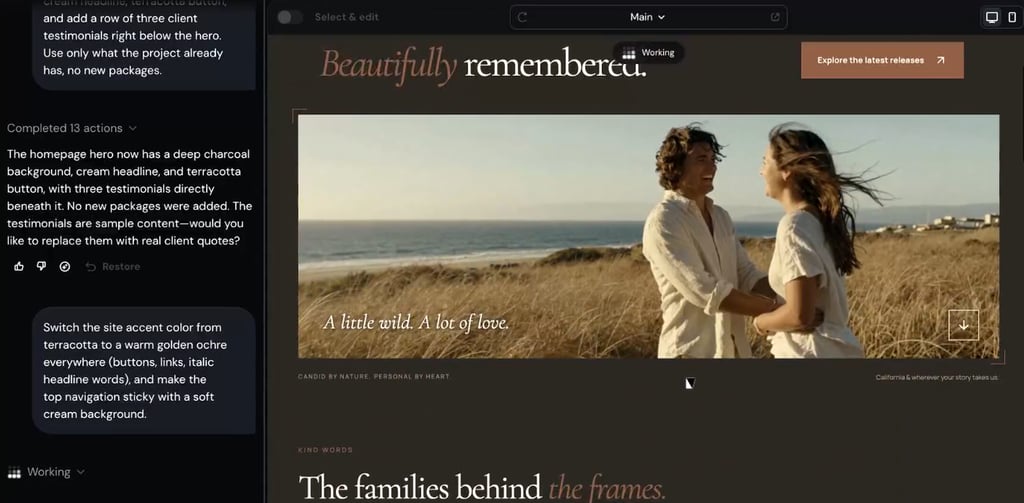
- Hostinger AI Builder agentic mode preview stays live and browsable while AI applies a follow-up request.
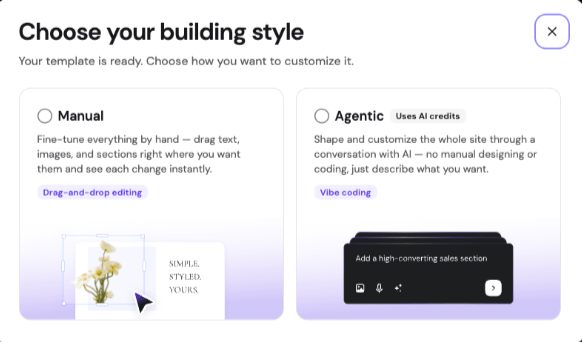
- Hostinger AI Builder manual templates can now be opened and edited in agentic mode.
- Every OpenClaw app now runs in its own microVM.
- Hostinger Dashboard can import larger databases from a .sql or .sql.gz file.
- Hostinger Malware Scanner shows infected files, recommended fixes, and a backup made before the infection.
- Hostinger Ecommerce stores in Lithuania can create LP Express shipping labels for parcel locker orders.
Here’s a closer look at each.
Create 3D games with consistent models and natural animations in Hostinger AI Builder
3D games you generate in Hostinger AI Builder now use one shared model style for characters, vehicles, and buildings, so the whole game looks consistent. Characters idle, walk, and run using pre-made animations, making their movement look natural. When nothing in the model library fits what your game needs, AI Builder draws the object itself, so you always get a result.
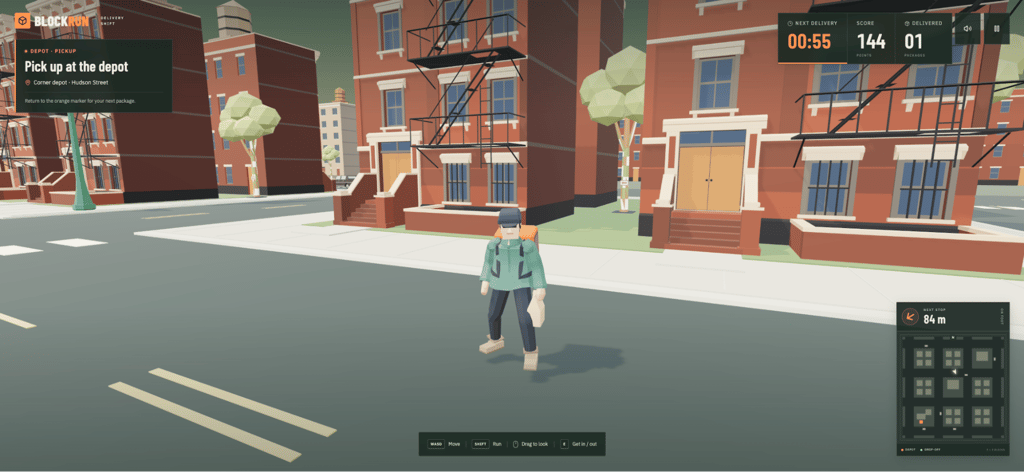
If you’re starting a new game, the guide to creating a game in agentic mode walks you through the process.
Build multiplayer games, live chat, and live polls with Hostinger AI Builder
You can now add real-time features to your Hostinger AI Builder website, so when one visitor does something, everyone else sees it right away. For example:
- Multiplayer games
- Room chat with typing indicators
- Live viewer counts, such as “12 people are viewing this”
- Live cursors on a shared board
- Live polls and quizzes whose results update for everyone as people vote or answer
- Watch-together rooms where visitors watch the same video in sync, and play or pause it for everyone
Ready to build one? Our guide on how to add real-time features in agentic mode shows you how to bring any of these to life.
Browse the live preview in Hostinger AI Builder agentic mode
The agentic mode preview in Hostinger AI Builder now stays live while AI applies a follow-up request. You can scroll, click, and open other pages of your website as AI works in the background. Every page you open already includes the latest applied changes, and only fully updated pages are shown.
A status label tells you what AI is doing at each step, such as Creating plan, Working, Reloading preview, or Checking code quality. You’ll see it at the top of the preview and in the chat panel, below your latest prompt.
Open any manual mode template in Hostinger AI Builder agentic mode
You can now switch any manual mode template in Hostinger AI Builder to agentic mode. Select Agentic, and your design opens with the same layout. From there, you keep editing it by chatting with AI. Editing in agentic mode uses AI credits.
Run each OpenClaw app in its own microVM
Each OpenClaw app on a Managed app plan now gets its own microVM, with dedicated CPU, RAM, and disk space. Hostinger handles the infrastructure, and you get root access to your app through a browser-based Web console.
After you buy it, set up OpenClaw on a Managed app plan by choosing an AI provider and, optionally, connecting a messaging app.
Import larger MySQL databases from Hostinger Dashboard
You can now import a larger database directly from Hostinger Dashboard. Go to Databases → Management and upload a .sql or .sql.gz file. Drag and drop it into the Import a database window, or pick it with Choose file.
Hostinger creates a new MySQL database and database user for the file, then imports your data into it. Once the import finishes, save the login details and update your website’s configuration file to connect to the new database.
For step-by-step instructions, see our guide on how to import a database from the Hostinger Dashboard.
Find and remove malware with Hostinger Malware Scanner
Malware Scanner runs automatically on your Hostinger website. It shows the site’s security status, any infected files it found, and recommended steps for your website type. It also suggests a backup made before the malware was first found.
To fix an infection, you can update vulnerable software, change your passwords, and remove the malware. You can remove it with the scanner’s built-in cleanup, by hand, or with Hostinger’s paid Site Cleanup service.
Create LP Express shipping labels from Hostinger Ecommerce
Hostinger Ecommerce now integrates with LP Express. Connect your LP Express business account to your Hostinger Ecommerce store, and you can create shipping labels for LP Express parcel locker orders without retyping each order in the LP Express Self-service panel.
The integration is available for stores with Lithuania set as their country. It creates labels for orders sent to LP Express parcel lockers in Lithuania.
For more information, you can go to the guide on how to connect LP Express and create shipping labels.
That’s all for this week
For the running log of every release, check our changelog, and for the story behind each week’s updates, browse our weekly product updates.

Gusti Ayu Sandra is a Brand Reputation Specialist at Hostinger, where she keeps conversations between the brand and its community honest and helpful. Her career started in Customer Success, which taught her what customers really care about. Today, she works closely with the community across different platforms to make sure every voice is heard. Follow her on LinkedIn.

Sebastian has been telling stories since he was a kid. He spent four years scriptwriting animated videos at an award-winning motion studio for U.S. and Canadian audiences. He then helped over 500 human trafficking survivors tell their stories for T visa applications. Those stories changed lives, and today he keeps writing with the same passion: to move and inspire people. Follow him on LinkedIn

