What are Hermes Agent skills and their key components
Aug 06, 2026
/
By Ksenija
/
7 min Read
Hermes Agent skills are reusable capability packages that teach the agent how to perform specific tasks across coding, research, productivity, media, DevOps, security, and other workflows.
Instead of relying only on one-off prompts, Hermes uses skills as reusable instructions and resources. A skill can define what it does, when to use it, what setup it needs, which tools or credentials it depends on, and which supporting files help the agent complete the task.
The core components of a Hermes Agent skill:
SKILL.mdfile. The main markdown file that defines the skill, including its purpose, instructions, setup notes, usage guidance, and any important constraints.- YAML frontmatter. The metadata block that identifies the skill declares fields such as its name, description, version, author, required environment variables, and required credential files.
- Skill directory. The folder that contains the skill’s definition and supporting files. Bundled skills are copied into
~/.hermes/skills/during installation, while optional skills live underoptional-skills/until installed. - Supporting files. Extra resources, such as
references/,templates/, andscripts/, that provide reusable context, examples, assets, or helper code.
How Hermes Agent skills work
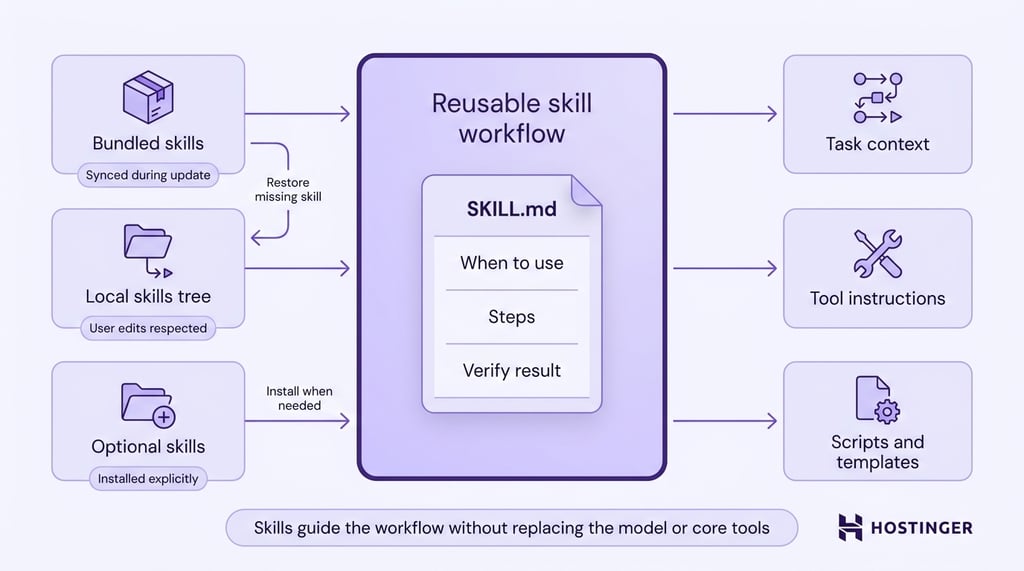
Hermes Agent skills work by giving the agent reusable workflow instructions for specific tasks.
Each skill is defined by a required SKILL.md file. This file explains what the skill does, when to use it, the steps the agent should follow, and how to verify the result.
A skill can also include supporting files such as helper scripts, references, and templates.
Bundled skills ship with Hermes and are copied into ~/.hermes/skills/ during installation.
Hermes Agent syncs these bundled skills during hermes update, while respecting local deletions and user edits.
If a bundled skill is missing from the local skills tree, you can restore it with hermes skills reset <name> --restore.
Optional skills ship under optional-skills/ and are not active by default.
Users install them explicitly with commands such as hermes skills install official/blockchain/solana or hermes skills install official/mlops/flash-attention, and remove them with hermes skills uninstall <skill-name>.
Once available, a skill gives Hermes a reusable task context. It does not replace the model or core Hermes tools.
Instead, it tells the agent which workflow to follow, which existing tools or shell commands to use, which supporting files are available, and what setup the task requires.
Key components of Hermes Agent skills
A Hermes Agent skill is built around a SKILL.md file, and can also include metadata, setup requirements, supporting files, and helper code.
SKILL.md definition
The SKILL.md file is the main instruction file for a Hermes Agent skill.
A strong SKILL.md starts with the most common workflow and moves advanced cases lower in the file. This keeps the skill practical during normal use while still giving Hermes enough detail for edge cases.
For example, a GitHub PR workflow skill can explain how to create a branch, make changes, open a pull request, check continuous integration results, and prepare a handoff. Hermes can reuse that process each time the same type of task appears.
YAML frontmatter
YAML frontmatter gives Hermes structured information about the skill before the main instructions begin.
The metadata block identifies the skill, describes where it fits, and tells Hermes what conditions or setup requirements affect skill usage.
At the basic level, frontmatter can define fields such as the skill’s name, description, version, author, and license. These fields make the skill discoverable and help users understand what it does before they open the full definition.
Frontmatter can control when Hermes should show the skill. For example, a skill can use platforms to limit itself to macOS, Linux, or Windows. A skill can also declare required tools or toolsets, such as web tools, or act as a fallback when a primary tool is unavailable.
Setup requirements also belong in frontmatter. Skills can declare required environment variables for secrets such as API keys, required credential files for OAuth tokens or service account files, and config settings for non-secret values such as file paths, domains, or user preferences.
Frontmatter makes a skill more than a prompt file. The metadata helps Hermes identify the skill, load it only in the right environment, and prepare the context the agent needs to run the workflow correctly.
Skill directory
The skill directory is the folder that contains a Hermes Agent skill and all of its supporting resources.
A typical skill directory includes a required SKILL.md file and may also contain subdirectories such as scripts/, references/, and templates/. The exact contents depend on the workflow the skill supports.
Bundled skills ship with Hermes and are organized into categories such as research, productivity, software development, media, and DevOps. During installation, Hermes copies bundled skills into ~/.hermes/skills/, making them available in the user’s local environment.
Optional skills use the same directory structure but live under optional-skills/ until a user installs them. For example, Hermes includes optional skills for blockchain workflows, financial modeling, machine learning operations, and web development that users can add only when needed.
A consistent directory structure makes skills portable and easy to share. Developers can package instructions, helper scripts, reference materials, and configuration requirements together rather than distributing workflow components across multiple locations.
Supporting files and helper scripts
Supporting files and helper scripts provide reusable materials for a Hermes Agent skill beyond the main SKILL.md instructions.
A skill can include references/ for background material, templates/ for repeatable output formats, and scripts/ for helper code.
Scripts are useful when a workflow needs parsing, formatting, data extraction, or other logic that should not be rewritten inside the prompt every time.
Hermes exposes the skill directory path when a skill loads, so instructions in SKILL.md can point the agent to bundled scripts directly.
For instance, a skill can tell Hermes to run a helper script from ${HERMES_SKILL_DIR}/scripts/ instead of making the agent recreate that logic from scratch.
Supporting files keep skills practical. The workflow stays readable in SKILL.md, while reusable code, examples, and reference material stay organized inside the skill directory.
Bundled vs optional Hermes Agent skills
Bundled skills ship with Hermes because they support common workflows that many users need, such as GitHub management, research, productivity, note-taking, and software development.
Optional skills cover specialized workflows, integrations, and tools useful to a smaller group of users.
The following table shows examples from both groups:
Category | Bundled skill examples | Optional skill examples |
Autonomous AI agents | Claude Code, Codex, OpenCode | Grok, OpenHands, Honcho |
Creative | Excalidraw, Pixel Art, Manim Video | Blender MCP, Concept Diagrams, Meme Generation |
DevOps | Kanban Orchestrator, Webhook Subscriptions | Docker Management, Pinggy Tunnel, Watchers |
GitHub and software development | GitHub PR Workflow, TDD, Systematic Debugging | Code Wiki, REST/GraphQL Debug |
Media and communication | Spotify, GIF Search, YouTube Content | AgentMail, Telephony |
MLOps | Hugging Face Hub, vLLM, DSPy | Axolotl, Whisper, Pinecone, Qdrant |
Productivity | Google Workspace, Notion, Airtable | Shopify, Canvas LMS, Memento Flashcards |
Research | arXiv, Blogwatcher, LLM Wiki | DuckDuckGo Search, OSINT Investigation, Domain Intel |
Security | — | 1Password, Sherlock, Web Pentest |
Finance | — | DCF Model, LBO Model, Excel Author |
How to install Hermes Agent skills
After you complete the initial Hermes Agent setup, you can install optional skills with the hermes skills install command. On Managed Hermes, this and other commands can be run from a full command-line terminal in your browser, without needing SSH access to a separate server.
1. Identify the skill you want to install
Bundled skills do not need installation because Hermes copies them into ~/.hermes/skills/ during setup.
Official optional skills use category-based identifiers. For example, the Solana skill uses official/blockchain/solana, while the DuckDuckGo Search skill uses official/research/duckduckgo-search.
2. Run the installation command
Pass the full skill identifier to hermes skills install.
Example:
hermes skills install official/blockchain/solana
Hermes downloads the skill and adds it to the local skills library.
3. Complete any required setup
Some skills require additional configuration before they can be used fully. Depending on the skill, Hermes may prompt for environment variables, API keys, OAuth credentials, credential files, or configuration settings declared in the skill’s metadata.
4. Use the installed skill
After installation, Hermes can access the skill’s SKILL.md instructions, metadata, helper scripts, and supporting files.
The skill becomes available alongside the bundled skills already installed on the system.
5. Remove the skill when it is no longer needed
Use hermes skills uninstall to remove an installed skill from the local skills library.
Example:
hermes skills uninstall solana
This removes the skill without affecting other installed skills.
How Hermes Agent skills use credentials
Hermes Agent skills use credentials through declared setup requirements rather than hardcoded secrets.
Skills use required_environment_variables for API keys, tokens, and other secret string values.
When a skill needs a variable such as an API key, Hermes prompts the user securely during setup. Hermes does not expose the raw secret value to the model.
Skills use required_credential_files for credentials stored as files.
OAuth tokens, client secrets, service account JSON files, and certificates belong in credential files, not environment variables. When the files exist, Hermes makes them available to local, Docker, or remote sandbox environments as needed.
Credential passthrough lets a skill’s scripts access approved secrets during execution. For example, a Python helper script can read an allowed API key from os.environ without requiring the user to configure the same value again for each sandbox.
Hermes Agent skills use cases
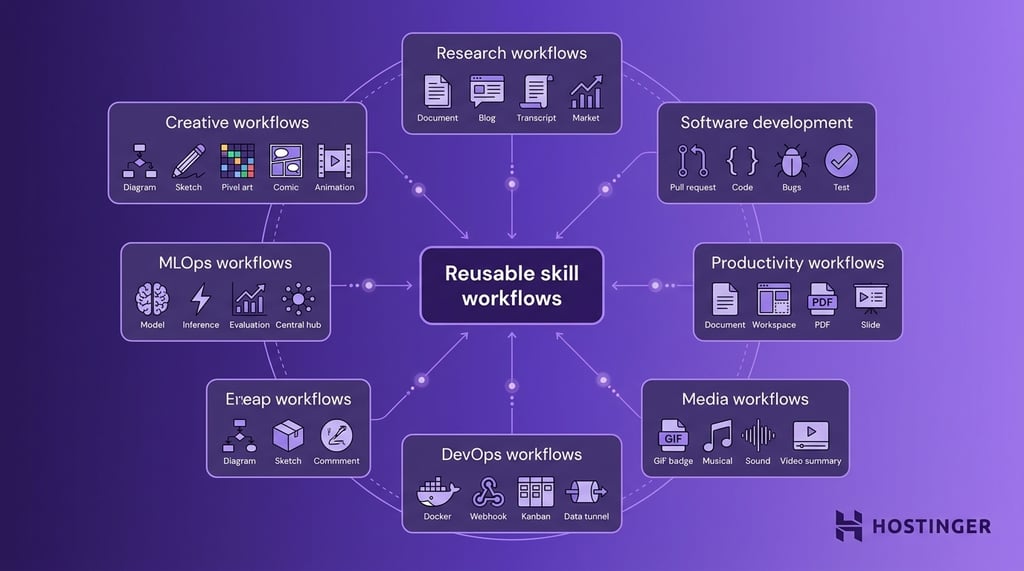
For users working across broader Hermes Agent use cases, skills turn repeated tasks into reusable workflows that Hermes can load, follow, and improve over time.
Common use cases include:
- Research workflows – searching arXiv papers, monitoring blogs, querying prediction markets, and turning YouTube transcripts into summaries.
- Software development workflows – reviewing GitHub pull requests, writing implementation plans, debugging Python or Node.js, and following test-driven development.
- Productivity workflows – working with Google Workspace, Notion, Airtable, PDFs, OCR, maps, and slide decks.
- Media workflows – searching GIFs, managing Spotify queues and playback, analyzing audio features, and creating YouTube content summaries.
- DevOps workflows – managing webhook subscriptions, Docker containers, Kanban workers, and local service tunnels.
- MLOps workflows – using Hugging Face Hub, running local inference with llama.cpp, serving models with vLLM, and evaluating language models.
- Creative workflows – generating architecture diagrams, Excalidraw sketches, pixel art, comics, infographics, and Manim videos.
How to choose the right Hermes Agent skill
Choose the right Hermes Agent skill by matching your task to the workflow category the skill supports.
Use case | Skill type | Skills to consider | Example workflows |
Coding | Software development or GitHub skills | github-pr-workflow, github-code-review, test-driven-development, systematic-debugging | Reviewing PRs, debugging code, writing plans, following TDD |
Research | Research skills | arxiv, blogwatcher, llm-wiki, youtube-content | Finding papers, monitoring blogs, building knowledge bases, summarizing transcripts |
Automation | DevOps or autonomous agent skills | kanban-orchestrator, kanban-worker, claude-code, codex, opencode | Delegating tasks, managing worker flows, coordinating implementation work |
Productivity | Productivity or note-taking skills | google-workspace, notion, airtable, obsidian, ocr-and-documents | Managing docs, notes, databases, PDFs, OCR, and workspace content |
Media | Media or creative skills | spotify, gif-search, songsee, excalidraw, manim-video | Managing music, finding GIFs, analyzing audio, creating diagrams or videos |
Infrastructure | DevOps or MLOps skills | docker-management, huggingface-hub, llama-cpp, serving-llms-vllm | Managing containers, downloading models, running inference, serving LLMs |
Security | Security or investigation skills | 1password, oss-forensics, sherlock, web-pentest, osint-investigation | Managing secrets, auditing repos, username lookup, authorized testing |
How to manage Hermes Agent skills at scale
Managing Hermes Agent skills at scale means keeping skills, credentials, updates, and long-running workflows consistent and available across repeated use.
A VPS setup is the right choice when Hermes Agent needs to remain available independently of a local machine, especially for scheduled tasks, messaging integrations, and workflows that depend on persistent memory or custom skills.
Hostinger’s Managed Hermes Agent deployment supports this setup with a preconfigured installation, Docker management, automatic backups, and dedicated VPS resources.
For teams or power users, this makes skill-based workflows easier to maintain because Hermes can keep running, updating, and using its configured skills without depending on a personal computer staying online.

All of the tutorial content on this website is subject to Hostinger's rigorous editorial standards and values.

Ksenija is a digital marketing enthusiast with extensive expertise in content creation and website optimization. Specializing in WordPress, she enjoys writing about the platform’s nuances, from design to functionality, and sharing her insights with others. When she’s not perfecting her trade, you’ll find her on the local basketball court or at home enjoying a crime story. Follow her on LinkedIn.