How to increase email open rate
Jun 05, 2026
/
By Ksenija
/
10 min Read
Increasing an email open rate starts with sending emails that people immediately recognize as relevant.
Most subscribers decide whether to open or ignore an email based on the subject line, sender name, and preview text. If the message looks generic or overly promotional, it gets skipped.
The biggest improvements come from clearer subject lines, better audience segmentation, and stronger deliverability.
Even small adjustments, such as shortening subject lines, cleaning inactive contacts, and sending emails based on subscriber behavior, can positively impact open rates.
1. Write clearer subject lines
Start by making the subject specific. A vague line like “Important update” gives the reader little context and no clear reason to open the email.
A clearer version, such as “Your subscription renews on July 1” or “New reporting dashboard now live,” explains the topic immediately and helps the reader understand why the message is relevant.
Setting accurate expectations is among the best email subject line practices. If the subject promises a discount, the email should display it immediately. If the subject mentions a guide, the email should link to that guide without making the reader search for it.
A mismatch can train subscribers to skip future emails because the subject line did not set the right expectation.
A strong subject line does one clear job. This includes:
- Announcing a useful update: “Your March report is ready.”
- Solving a specific problem: “How to reduce cart abandonment.”
- Giving a clear benefit: “Save 20% on annual plans this week.”
- Setting a deadline: “Registration closes Friday.”
- Personalizing the message: “Anna, your saved items are back in stock.”
Keep subject lines short enough to scan quickly. Long subject lines can hide the main point, especially on mobile screens.
Put the most important words near the start, such as the offer, deadline, product name, or action the reader needs to take.
Clear subject lines are one of the biggest factors behind a good open rate because subscribers immediately understand what the email contains.
2. Use a recognizable sender name
A recognizable sender name increases email open rates because subscribers immediately know who sent the message.
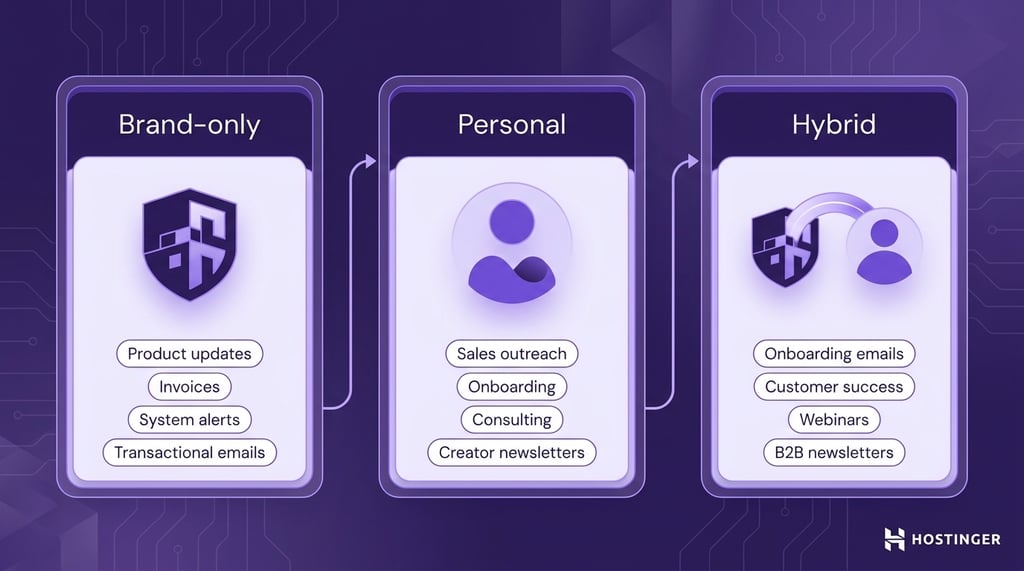
Use a sender name that matches your relationship with the audience. Established brands can send newsletters under their company name, such as “BrightMail.”
Personal names like “Laura Bennett” fit outreach and onboarding emails because the message reads like direct communication. Hybrid formats such as “Laura from BrightMail” combine brand recognition with a human identity.
Brand-only sender names work best for product updates, invoices, system alerts, and transactional emails where clarity and consistency matter most.
Personal names fit sales outreach, onboarding sequences, consulting services, and creator newsletters because the email reads like direct communication from a real person.
Hybrid sender names work well for onboarding emails, customer success updates, webinars, and B2B newsletters where subscribers benefit from seeing both the company name and a real person.
Keep the sender name consistent across campaigns. Frequent changes can reduce recognition and make subscribers hesitate before opening the email.
A subscriber who signed up for emails from “Asana” may ignore a message sent later from “Team Productivity Experts” because the connection between the sender and the brand is unclear.
3. Segment your email list
Email list segmentation improves open rates by sending more relevant emails to smaller groups of subscribers.
People are more likely to open emails that match their interests, activity, purchase history, or stage in the customer journey.
Start with simple email list segmentation and divide your subscribers based on how they interact with your business:
- Group new subscribers who need onboarding emails and welcome offers
- Separate existing customers interested in product updates and loyalty rewards
- Identify free trial users approaching the end of their trial period
- Track inactive subscribers who stopped opening recent emails
- Create location-based groups for regional promotions or shipping updates
Segmentation helps you write clearer and more targeted subject lines. For instance, “Your free trial expires tomorrow” speaks directly to trial users. “New analytics features for Shopify stores” targets subscribers with a specific interest instead of sending a generic update to the entire list.
4. Personalize the email content
Personalized email content improves engagement because subscribers receive messages connected to their interests, activity, and stage in the customer journey.
A first name in the subject line adds familiarity, but stronger personalization comes from using subscriber data to shape the email’s content.
Start with the information you already collect through your email platform, ecommerce store, or website analytics.
Subscriber activity can show which products someone viewed, which emails they opened, what they purchased, or where they left during signup or checkout.
That data helps you send follow-up emails that match recent actions, rather than sending the same generic campaign to every subscriber.
Use subscriber behavior to naturally guide the next email. Someone who downloads a beginner’s guide may need educational content next.
A subscriber who abandons a shopping cart may respond better to a reminder email showing the saved items.
Product recommendations can also reflect browsing history or previous purchases, making the email more relevant from the start.
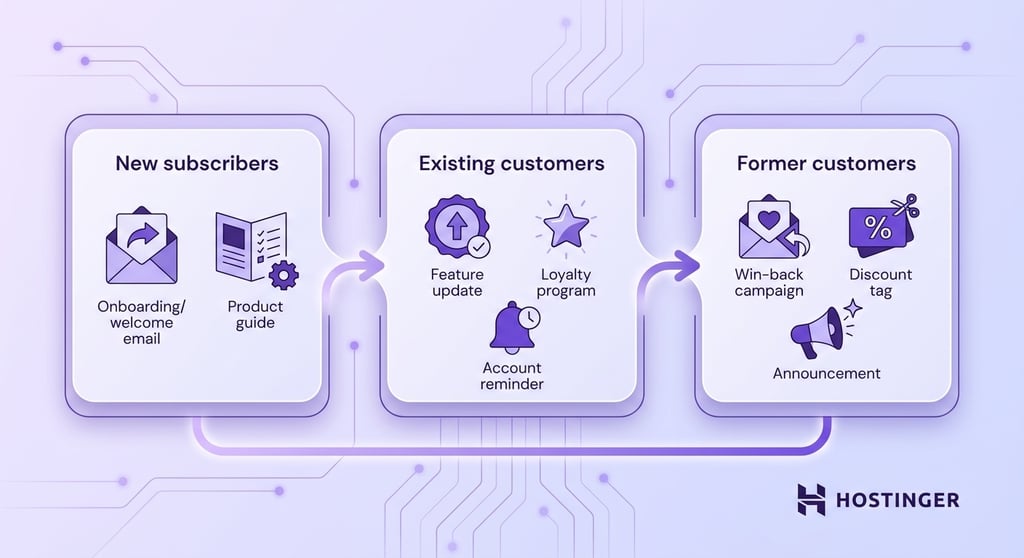
Lifecycle personalization builds on the same idea by matching emails to the subscriber’s current stage.
New subscribers need onboarding emails that explain the product clearly and help them get started.
Existing customers may respond better to feature updates, loyalty rewards, or account reminders.
Former customers can receive win-back campaigns with discounts or announcements about new products and services.
Interest-based personalization helps you organize content around the topics subscribers engage with most.
For example, a fitness brand can segment subscribers into those interested in strength training and those focused on running.
An electronics store can recommend gaming accessories to shoppers browsing gaming products instead of promoting unrelated categories.
Most email marketing platforms support personalization through tags, subscriber attributes, dynamic content blocks, and automation rules.
Start with a few simple personalized campaigns before building more advanced workflows. Smaller personalization steps are easier to manage, test, and improve over time.
5. Send emails at the right time
Send an email at the wrong time, and newer messages can bury it before subscribers even see it. Good timing helps your email stay near the top of the inbox when people are actively checking messages.
The best time to send an email depends on your audience and the type of email you send. A B2B software company may see stronger engagement during weekday work hours because subscribers check their email throughout the day.
Ecommerce campaigns may perform better in the evening or on weekends when customers have more time to browse products and offers.
Do not rely on generic industry benchmarks; use your own email data instead. A report may recommend Tuesday mornings as the best send time, but your audience may respond better on Thursday afternoons or Sunday evenings.
Subscriber behavior gives you more accurate direction than broad averages.
Start with small timing tests before changing your full email schedule. Send the same campaign to similar audience groups at different times and compare the results.
Open rates show when subscribers notice the email. Click rates help you understand when subscribers are willing to engage with the content itself.
Focus your testing on these variables, one at a time:
- Weekdays versus weekends
- Morning versus afternoon sends
- Business hours versus evening sends
- Different time zones for global audiences
Time zones become especially important when subscribers live in different regions. A campaign sent at 9 a.m. Eastern Time may arrive before subscribers on the West Coast start their day.
Most email marketing platforms let you schedule campaigns according to the subscriber’s local time, which keeps delivery closer to active hours.
Review your email analytics regularly and adjust your schedule based on real engagement patterns.
6. Clean your email list regularly
Email providers such as Gmail and Outlook monitor engagement signals to determine whether emails belong in the inbox, the promotions tab, or the spam folder.
Sending campaigns to inactive, invalid, or unengaged contacts can reduce engagement signals and make email providers more likely to treat future campaigns as low quality.
Start by identifying subscribers who no longer interact with your emails. Those who have not opened or clicked emails for several months may no longer be interested, may have abandoned the email address, or may be automatically filtering.
Remove hard bounces first because those email addresses are invalid or no longer exist. Spam complaints also weaken the sender’s reputation and signal that subscribers no longer want your emails. Both issues can hurt email deliverability and make future campaigns harder to see.
Inactive subscribers require a different cleanup approach, as their email addresses still work even though engagement has dropped.
Before removing those contacts, send a re-engagement campaign asking whether they still want to receive updates.
A subject line such as “Do you still want updates from us?” gives disengaged subscribers a clear chance to stay subscribed. Remove contacts who continue ignoring emails after the re-engagement sequence ends.
Smaller lists with active subscribers produce stronger open rates, better click rates, and healthier deliverability than larger lists filled with inactive contacts.
Maintain email list hygiene by scheduling regular list cleaning rather than waiting for performance problems to appear. Monthly or quarterly reviews help keep your subscriber database accurate and easier to manage.
7. Avoid spam trigger words
Email providers scan subject lines and email content for signs of spam before deciding where to route the message.
Misleading claims, aggressive sales language, and excessive punctuation can cause emails to land in spam folders.
Spam-like wording tries to create urgency or exaggerate results. Subject lines written in all caps, repeated exclamation marks, and phrases such as “ACT NOW!!!” or “100% GUARANTEED” can lower trust and hurt deliverability.
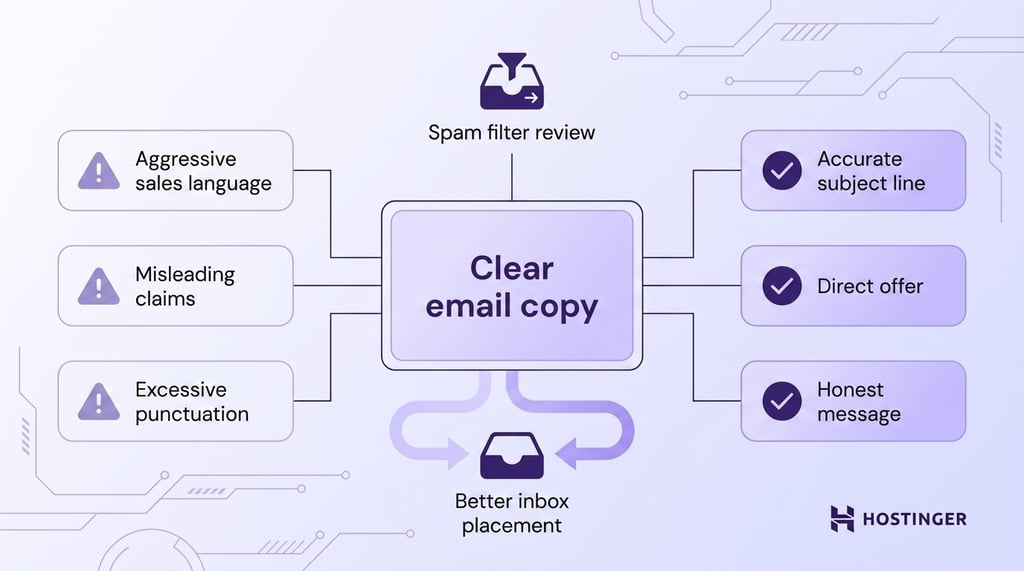
Emails promising unrealistic outcomes or hiding the real purpose of the message can also trigger spam filters.
Formatting also affects how email providers evaluate campaigns. Large blocks of capital letters, excessive emojis, misleading links, and too many sales-heavy phrases in a single email can increase the risk of spam.
Promotional language becomes a bigger problem when combined with poor engagement, low-quality email lists, or inconsistent sending patterns.
Focus on writing subject lines and email copy that match the content of the message. If the email promotes a discount, state the offer clearly. If it shares a product update, explain the update directly.
Review your emails before sending and remove wording that sounds exaggerated, vague, or misleading.
8. Improve preview text
Most inboxes display preview text next to or below the subject line, making it one of the first things people see when deciding whether to open the email.
Use the preview text to clarify the email’s value, continue the message naturally, or add missing details.
A subject line such as “Your free trial ends tomorrow” becomes more useful with preview text like “Upgrade now to keep your saved projects and account settings.” The second line explains why the email matters and what action the subscriber should take.
Preview text also helps shorter subject lines communicate more clearly. “New analytics tools available” says what changed. Preview text such as “Track conversion paths and customer activity in one dashboard” explains the benefit more directly.
Many email platforms automatically pull preview text from the beginning of the email when you leave the field empty.
That can create awkward previews showing navigation links, image labels, or unrelated sentences. Writing custom preview text gives you more control over how the email appears in the inbox.
Keep preview text short enough to display properly on mobile devices. Most inbox apps cut off longer text, so place the most useful information near the beginning.
Review the subject line and preview text together before sending a campaign. Both lines should work as a single message, not competing for attention or repeating the same wording.
9. Test one variable at a time
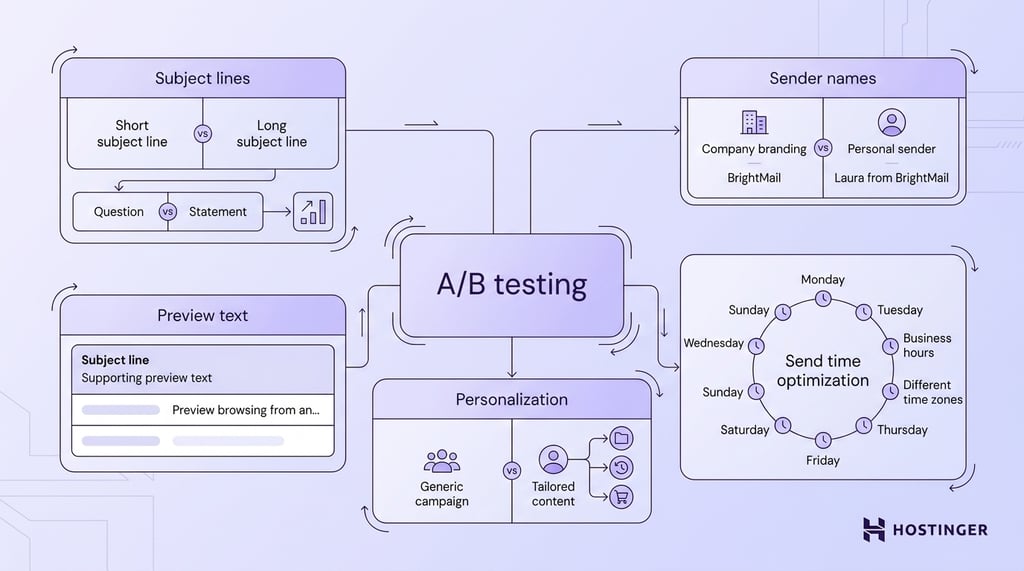
A/B testing helps you identify which email changes improve open rates.
Start with one email campaign and create two versions. Keep the audience, email content, and offer the same in both versions. Change only one element between them.
Good starting points for A/B testing include:
- Subject lines that compare short versus long wording, questions versus statements, or direct offers versus curiosity-based phrasing.
- Sender names that test company branding against personal or hybrid formats, such as “BrightMail” versus “Laura from BrightMail.”
- Preview text that measures which supporting message sparks more interest after the subscriber reads the subject line.
- Send days and times that compare engagement across weekdays, weekends, business hours, or different time zones.
- Personalization that compares generic campaigns against emails tailored to subscriber interests, browsing activity, or purchase history.
Use a large enough sample size to make the results useful. Testing two versions with a very small audience may yield inconsistent results because a few opens or clicks can skew the numbers too easily.
Track patterns across multiple campaigns instead of relying on a single test. A subject line style that performs well during a product launch may perform differently during a seasonal promotion or newsletter campaign.
Repeated testing helps you identify patterns that consistently improve open rates over time.
10. Set clear subscriber expectations
Clear expectations help attract subscribers who want to engage with the content, which improves long-term engagement and reduces list-quality issues later.
Start setting expectations during the signup process. Explain what subscribers will receive, how often emails will arrive, and what type of content you plan to send.
A signup form promising “weekly SEO tips” creates a clearer expectation than a generic message like “Join our newsletter.”
Consistency between the signup form and future emails helps maintain trust. Subscribers expecting monthly product updates may stop engaging if they suddenly receive daily promotional campaigns.
Large changes in email frequency or content type can increase unsubscribes and spam complaints because the experience no longer matches the original signup promise.
Review signup forms, welcome emails, and campaign frequency regularly to make sure expectations remain accurate.
Track the email metrics that affect open rates
Open rate shows whether subscribers notice and open your emails, but it does not measure the full performance of an email campaign.
Strong email marketing results depend on multiple metrics working together, including engagement, deliverability, and list quality.
Start by tracking the core email marketing metrics connected to email visibility and subscriber engagement:
- Deliverability rate – how many emails reach subscribers’ inboxes.
- Click-through rate (CTR) – the number of subscribers who clicked links inside the email.
- Bounce rate – how many emails failed to deliver.
- Unsubscribe rate – the percentage of subscribers who left the email list after a campaign.
- Spam complaints – the number of subscribers who marked the email as spam.
Each metric helps explain a different part of email performance. A high open rate with very low click-through rates may indicate that the subject line attracted attention while the email content failed to deliver value.
A high bounce rate can point to outdated or low-quality email lists. Rising spam complaints may signal misleading subject lines, excessive email frequency, or poor audience targeting.
Track metrics consistently across campaigns. Seasonal promotions, product launches, and changes in audience behavior can influence short-term performance. Long-term patterns give you a clearer understanding of what improves engagement over time.
Use the right platform to improve open rate
Your email marketing platform affects deliverability, testing, automation, and list management, all of which influence email open rates.
Strong campaigns can still perform poorly when emails fail to reach subscribers’ inboxes or when the platform lacks proper testing and segmentation tools.
Deliverability features are especially important because email providers verify that emails come from legitimate senders before deciding where to deliver them.
Most modern email marketing platforms support SPF, DKIM, and DMARC authentication records:
- SPF verifies which servers can send emails from your domain
- DKIM adds a digital signature that confirms the email was not modified
- DMARC tells email providers how to handle suspicious or unauthenticated emails
The right platform should also help you improve campaigns over time through A/B testing, audience segmentation, analytics, and engagement tracking.
Subject line testing, send-time testing, and subscriber segmentation become easier when those tools are built directly into the platform.
Choose a platform that supports both deliverability and campaign optimization. Hostinger Reach is an email marketing platform that provides subject line suggestions, audience segmentation, list management, and support for SPF, DKIM, and DMARC authentication records.
Built-in analytics help track open rates, click-through rates, bounce rates, and subscriber engagement from one dashboard.
All of the tutorial content on this website is subject to Hostinger's rigorous editorial standards and values.

Ksenija is a digital marketing enthusiast with extensive expertise in content creation and website optimization. Specializing in WordPress, she enjoys writing about the platform’s nuances, from design to functionality, and sharing her insights with others. When she’s not perfecting her trade, you’ll find her on the local basketball court or at home enjoying a crime story. Follow her on LinkedIn.