Integrated AI in Hostinger AI Builder agentic mode is built directly into the platform, ready to use in your projects from the moment you start. You don’t need third-party accounts, such as OpenAI or Gemini, model selection or configuration, or separate billing. Describe what you want your app to do, and Hostinger AI Builder automatically integrates AI into your project if it can enhance that functionality.
What can you build with Integrated AI?
You can build a wide range of AI-powered features and apps. Here are some examples to get you started:
Text-based apps
- Customer support chatbot
- AI writing assistant
- Personalized recommendations
- Horoscope generator
- Quiz or trivia generator
- Recipe suggester
- Cover letter or bio writer
- Product description generator
- Travel itinerary planner
- Mood journal with AI responses
Image-based apps
- Photo-to-cartoon or illustration converter
- Costume photo transformer
- AI coloring book generator
- Product mockup generator
- Avatar or profile picture creator
- Interior design visualizer
Tools & utilities
- Landing page heatmap analyzer
- AI-powered lead qualification form
- Personalized workout plan generator
- Budget or finance advice tool
- Resume reviewer
- Startup idea validator
Fun & viral apps
- “What celebrity do you look like?” tool
- Personality tests with AI results
- AI tarot card reader
- Custom bedtime story generator for kids
- “Roast my website” tool
These are just examples — you can build much more depending on your idea.
How do AI credits work?
Hostinger AI Builder uses a dynamic credit model. Credits are charged based on the actual computing resources used per request, not a fixed per-message fee.
- The number of credits deducted varies between requests, even for requests of similar complexity.
- Complex requests, such as heavy code generation or deep analysis, generally consume more credits than short or simple requests.
- All messages are included in the calculation, including general inquiries and non-coding interactions.
You can top up your AI credits anytime directly in Hostinger AI Builder. Your AI credit balance is shared with other products such as Hostinger Agent and Hostinger Reach, as explained in Hostinger AI credits: How the shared balance works.
How to check your AI credit usage?
To track your usage:
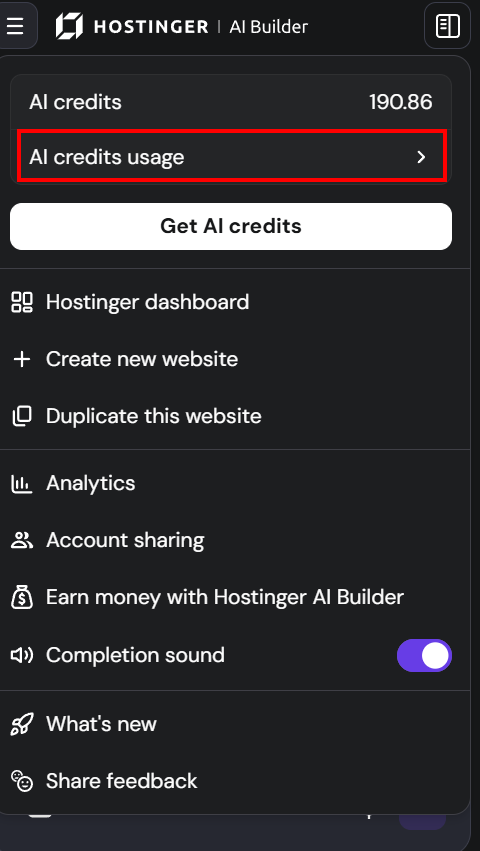
- In Hostinger AI Builder, click Menu
- Go to AI credits usage in your dashboard
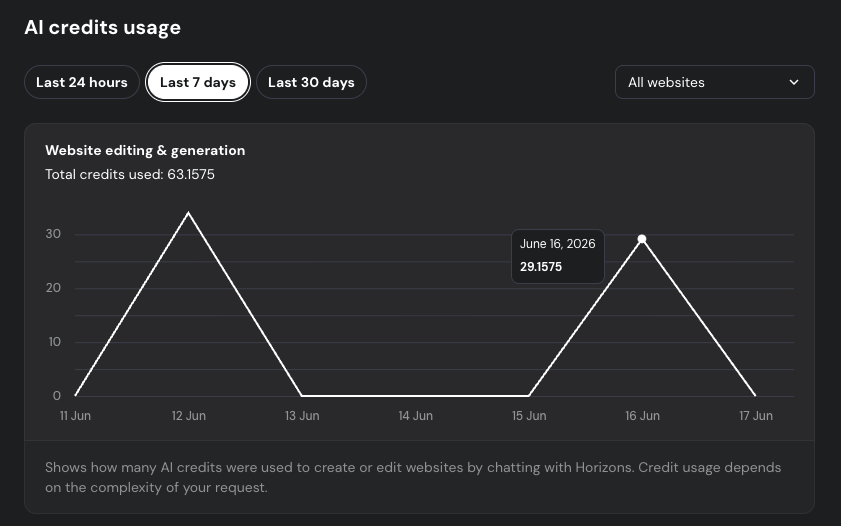
- See how many credits you’ve used for:
- Website creation & editing
- AI features inside your app
Core capabilities & limitations
Supported:
- Text generation and analysis
- Image generation and analysis
Not yet supported:
- Audio generation and analysis
- Video generation and analysis
If you want to use a specific provider and/or model, you’ll need to create an account with that provider, obtain the required API key, and include it directly in your prompt along with your desired setup.