Adjust how your product page displays on the mobile version of your Hostinger AI Builder manual mode online store.
Before you start
- Create an online store in Hostinger AI Builder manual mode if you haven’t already.
Customize the mobile product page layout
- Find the product page you want to edit.
- Switch to editing the mobile version of the website.
- Click the product section and select Edit section.
- Adjust the following settings under Layout:
- Text alignment: Left or Center.
- Gallery placement: Bottom or Left.
- Image ratio: Original, Square, Landscape, or Portrait.
- Padding: adjust the top/bottom and left/right spacing in pixels.

- Update your website for the changes to reflect online.
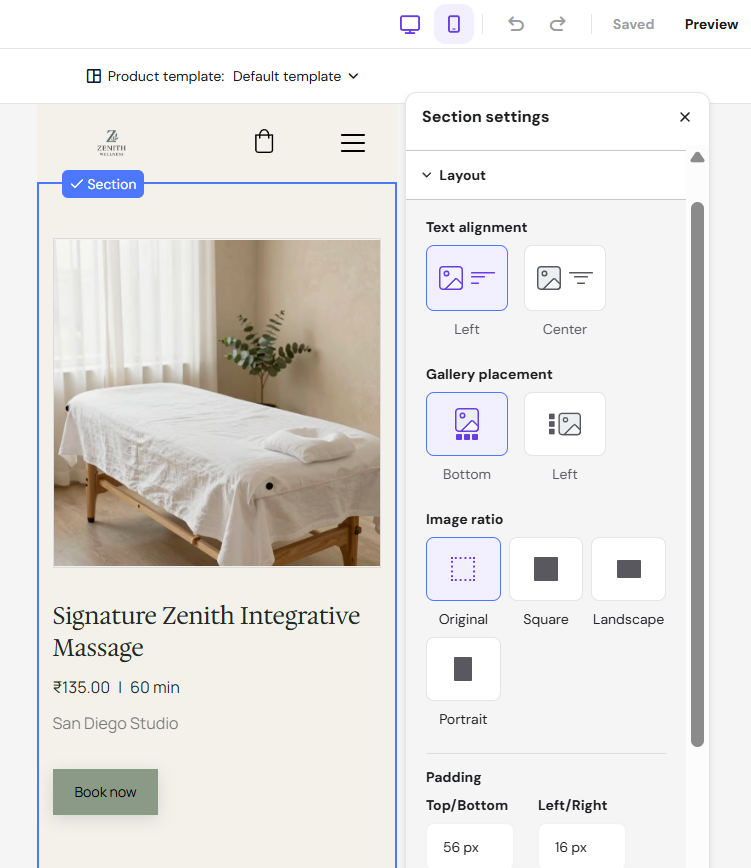
Your product page now displays with your chosen mobile layout.