DKIM stands for DomainKeys Identified Mail. It is a DNS record of CNAME type (default Hostinger Email DKIM records) and is used for signing and verifying the authenticity of emails. To be more precise, it involves adding a digital signature to outgoing emails that can be verified by the recipient’s email server. This way, it prevents your emails from landing in the spam folders of your recipients.
Before you start
This article is part of setting up a domain for Hostinger Email manually. If you haven’t gone through that guide yet, start there for full context on adding DNS records to your domain.
Hostinger DKIM records
If you use Hostinger Email with your domain, the default DKIM records are the following:
|
Type |
Host |
Points to |
TTL |
|
CNAME |
hostingermail-a._domainkey |
hostingermail-a.dkim.mail.hostinger.com |
300 |
|
CNAME |
hostingermail-b._domainkey |
hostingermail-b.dkim.mail.hostinger.com |
300 |
|
CNAME |
hostingermail-c._domainkey |
hostingermail-c.dkim.mail.hostinger.com |
300 |
DKIM records for subdomains
For subdomains, instead of the @ in the host field, enter the name of your subdomain; e.g. the DKIM records for the subdomain shop.domain.tld, will look similar to this:
|
Type |
Host |
Points to |
TTL |
|
CNAME |
hostingermail-a._domainkey.shop |
hostingermail-a.dkim.mail.hostinger.com |
300 |
|
CNAME |
hostingermail-b._domainkey.shop |
hostingermail-b.dkim.mail.hostinger.com |
300 |
|
CNAME |
hostingermail-c._domainkey.shop |
hostingermail-c.dkim.mail.hostinger.com |
300 |
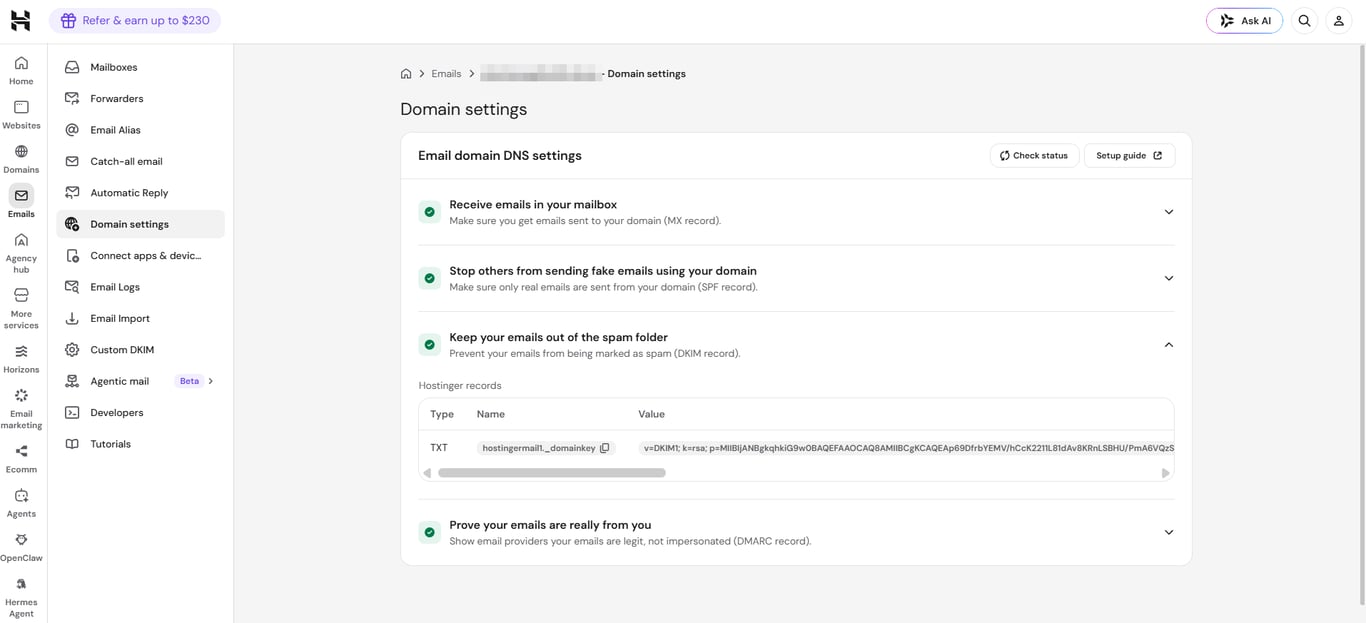
Find your DKIM records in Hostinger dashboard
You can also find the value Hostinger Email DKIM records on the Emails section of your Hostinger dashboard:
-
Click on the Mailboxes button next to the preferred email account
-
Select Domain settings on the left sidebar

Add DKIM records to your domain
To add these records to your domain, follow the steps depending on where your domain is pointing:
-
If your domain is pointing to Hostinger by nameservers, click on Connect automatically
-
If your domain is pointing elsewhere by nameservers, you will need to add them manually, making sure to delete any existing DKIM records before adding the new values. Check our guides for some popular domain registrars here: How to Change DNS Records in Other Registrars
- If you send email through a third-party service, see how to add a custom DKIM record instead of using the default records above.
After making any changes to your domain’s DNS zone, consider a few hours during which the DKIM records may be unavailablee due to DNS propagation. Once propagation is completed, your DKIM records will be fully operational 💡