The Hostinger Agent Android app brings Hostinger Agent to your phone, with push notifications when your agent has something ready and the same projects, apps, jobs, skills, and files as Hostinger Agent in Hostinger dashboard. Install the app from Google Play or from the Hostinger Agent web version. The app is currently in open beta, and an iPhone version is not yet available.
Install the Hostinger Agent Android app
Install the Hostinger Agent Android app from Google Play, either by searching the store or from the Mobile option in Hostinger Agent.
Option 1 – Install from Google Play
- Open Google Play on your Android device.
- Search for Hostinger Agent and install the app.
Option 2 – Install from Hostinger Agent in Hostinger dashboard
- Open Hostinger Agent in Hostinger dashboard.
- In the navigation sidebar, select More → Mobile.
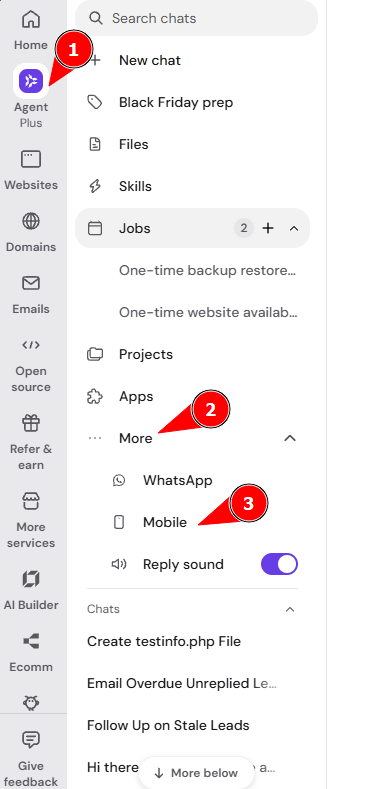
- In the Hostinger Agent is on Android window, scan the QR code with your Android camera, or click Open Google Play if you are on your Android device.
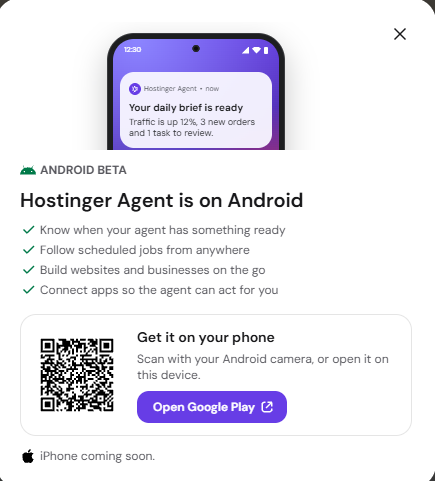
- Install the app from Google Play.
Hostinger Agent Android app features
The Hostinger Agent Android app supports the same features as Hostinger Agent on the web, plus notifications on your phone. The app includes three main capabilities:
- Push notifications: get notified about jobs, background prompts, and messages your agent sends proactively.
- Proactive agent: Hostinger Agent checks your account several times a day and sends important information directly to your phone, such as security patches or daily briefings.
- Full Hostinger Agent features: use projects, apps, jobs, skills, and files, just as in Hostinger Agent on the web.
Hostinger Agent Android app open beta
The Hostinger Agent Android app is available on Google Play as an open beta. Google Play shows a beta notice on the app, and public reviews are not available yet.
Send feedback about the Hostinger Agent Android app directly in the app or through Google Play. An iPhone version of Hostinger Agent is not available yet.
With the Hostinger Agent Android app installed, you get notified as soon as your agent has something ready and can follow your jobs and projects from anywhere.