Connect Google Analytics 4 (GA4) and Meta Pixel to your Hostinger Ecommerce store by entering a tracking ID for each sales channel in Store Manager → Integrations. Hostinger Ecommerce then loads the tags on your published Quick link store, Custom sales channel, and Hostinger AI Builder websites, and reports store events automatically, from product views to purchases. Tracking depends on visitor consent, so every store needs a cookie banner. Hostinger AI Builder agentic mode stores created before this feature need a short update first.
Before you start
- These steps apply to Hostinger Ecommerce Quick link stores, Custom sales channels, and Hostinger AI Builder websites. WordPress websites aren’t listed on the Integrations page. For the manual mode editor settings, see How to connect Google Analytics in manual mode and How to connect Meta Pixel in manual mode.
- Have your GA4 Measurement ID (
G-XXXXXXX), your Meta Pixel ID, or both ready.
Connect Google Analytics and Meta Pixel to a Hostinger Ecommerce store
Add Google Analytics and Meta Pixel to your store from the Integrations page of the Store Manager, without code. Each sales channel has its own ID field, and sales channels without an ID aren’t tracked.
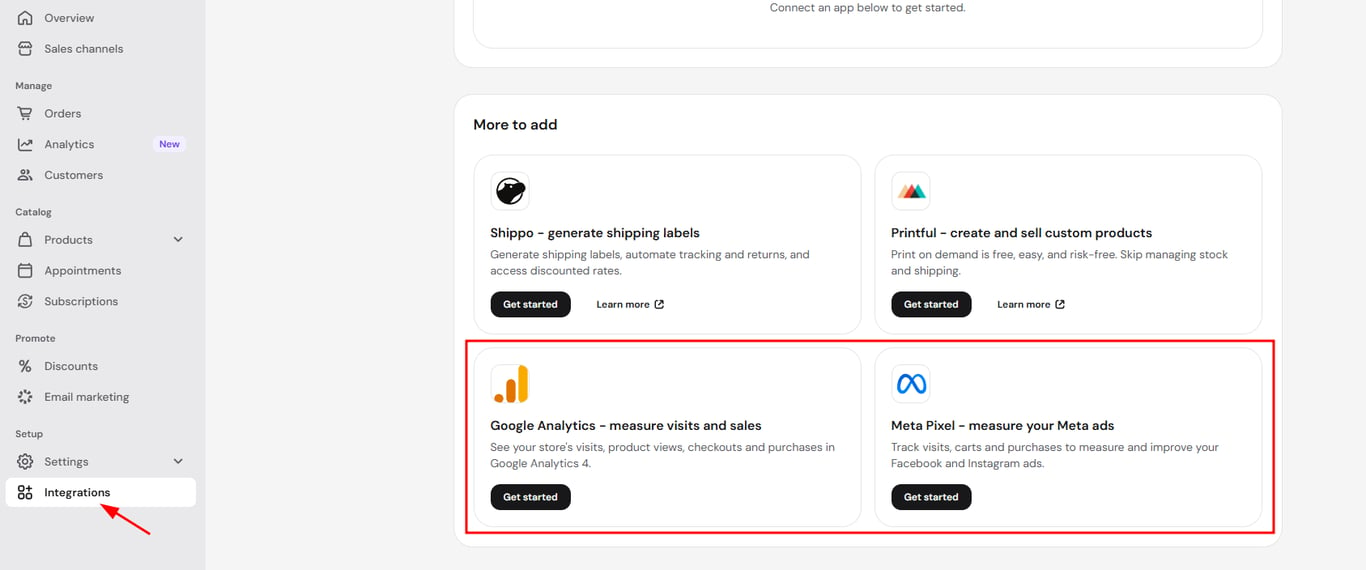
- In the Store Manager, go to Integrations.
- Under More to add, click Get started next to Google Analytics or Meta Pixel. If the integration is already added, click Manage next to it under Your integrations.
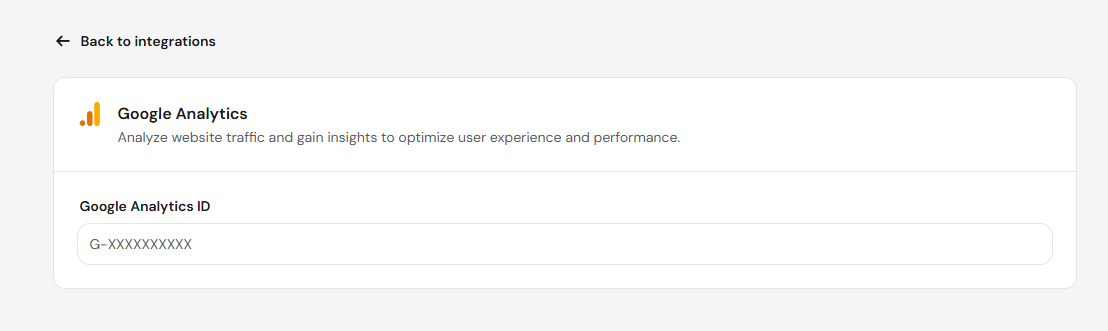
- Enter your Measurement ID in the Google Analytics ID field next to each sales channel you want to track.
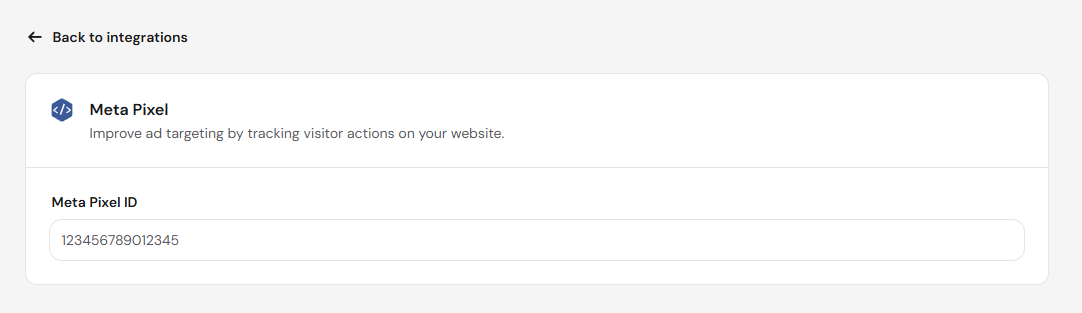
Or enter your Meta Pixel ID in the Insert Meta Pixel ID field next to each sales channel.
- Click Save.
Hostinger Ecommerce loads the tags on your published store and sends store events without extra setup. For Hostinger AI Builder websites, changes apply after you publish your site. To check your Meta Pixel data, click Meta Events Manager at the top of the Meta Pixel page.
Store events tracked by Google Analytics and Meta Pixel in Hostinger Ecommerce
Hostinger Ecommerce sends store events to Google Analytics and Meta Pixel automatically once a tracking ID is saved. The events sent depend on the store type.
Store events from Hostinger AI Builder agentic mode stores
Hostinger AI Builder agentic mode stores send store events to Google Analytics automatically, in three groups:
- Storefront events:
view_item,select_item,add_to_cart,remove_from_cart, andview_cart. - Checkout events: one event for each checkout step.
- Purchase events:
purchase, sent when the buyer returns from checkout.
Meta Pixel receives Meta standard events from agentic mode stores, including PageView, InitiateCheckout, AddShippingInfo, AddPaymentInfo, and Purchase.
Store events from Hostinger Ecommerce Quick link stores
Quick link stores send these events to Google Analytics 4:
- Storefront events:
page_view,view_item, andadd_to_cart. - Checkout events:
begin_checkout,add_shipping_info, andadd_payment_info.
Cookie consent for Google Analytics and Meta Pixel in Hostinger Ecommerce stores
Google Analytics and Meta Pixel only collect full tracking data after the visitor accepts cookies on your store’s cookie banner. Manage tracking consent with Hostinger’s cookie banner or a third-party consent management tool.
- Google Analytics runs in Google Consent Mode v2 (advanced mode) in agentic mode stores. The tag is on every page, but it sets no cookies until the visitor accepts analytics cookies.
- Meta Pixel loads only after the visitor accepts marketing cookies.
- The cookie banner covers three categories: Analytics, Marketing, and Platform analytics.
Quick link stores show a cookie banner automatically on a visitor’s first visit. For Hostinger AI Builder agentic mode stores, the agent writes a cookie banner for each store, in the store’s language and design.
Without a cookie banner, visitors can’t accept cookies. Google Analytics then receives only cookieless pings, which don’t appear in Realtime or reports.
Enable Google Analytics and Meta Pixel tracking on older Hostinger AI Builder agentic mode stores
Agentic mode stores created before Google Analytics and Meta Pixel integrations were available need a cookie banner and store events before tracking works.
- Open the store in the Hostinger AI Builder editor. Opening the store updates its template.
- Ask the agent to add a cookie banner and the store events.
- Publish the store again.
NOTES
- Hostinger AI Builder manual mode websites can connect Google Analytics and Meta Pixel either in Store Manager → Integrations or in the integrations settings in the manual mode editor.
- Standalone stores with only a manual sales channel don’t show these integrations.
- Google Analytics 4 and Meta Pixel both work for Quick link stores on the hostinger.store subdomain. See Hostinger Ecommerce: How to create and manage a Quick link store for other details about Google Analytics in Quick link stores.
Your Hostinger Ecommerce store now sends visits, cart activity, checkouts, and purchases to Google Analytics and Meta Pixel once visitors accept cookies.