Secure your Hostinger Email account by changing your password, enabling two-factor authentication, checking for unauthorized access, and securing any linked devices and applications. Act on these steps immediately if you suspect your account has been compromised, since compromises often spread through unprotected devices and outdated applications linked to the email.
It’s vital to safeguard not only the email account itself but also any linked devices and applications.
The steps below will help you protect your email account and prevent future security issues.
Step 1 – Change the password
First, change the password of your Hostinger Email account to a secure password of 15–20 characters. Note that changing your main password doesn’t revoke existing app passwords — review and remove any you don’t recognize. Read more on Web Hosting security.
Step 2 – Enable two-factor authentication
Add an extra layer of protection so a password alone isn’t enough to access your account. See how to set up two-factor authentication in Hostinger Webmail.
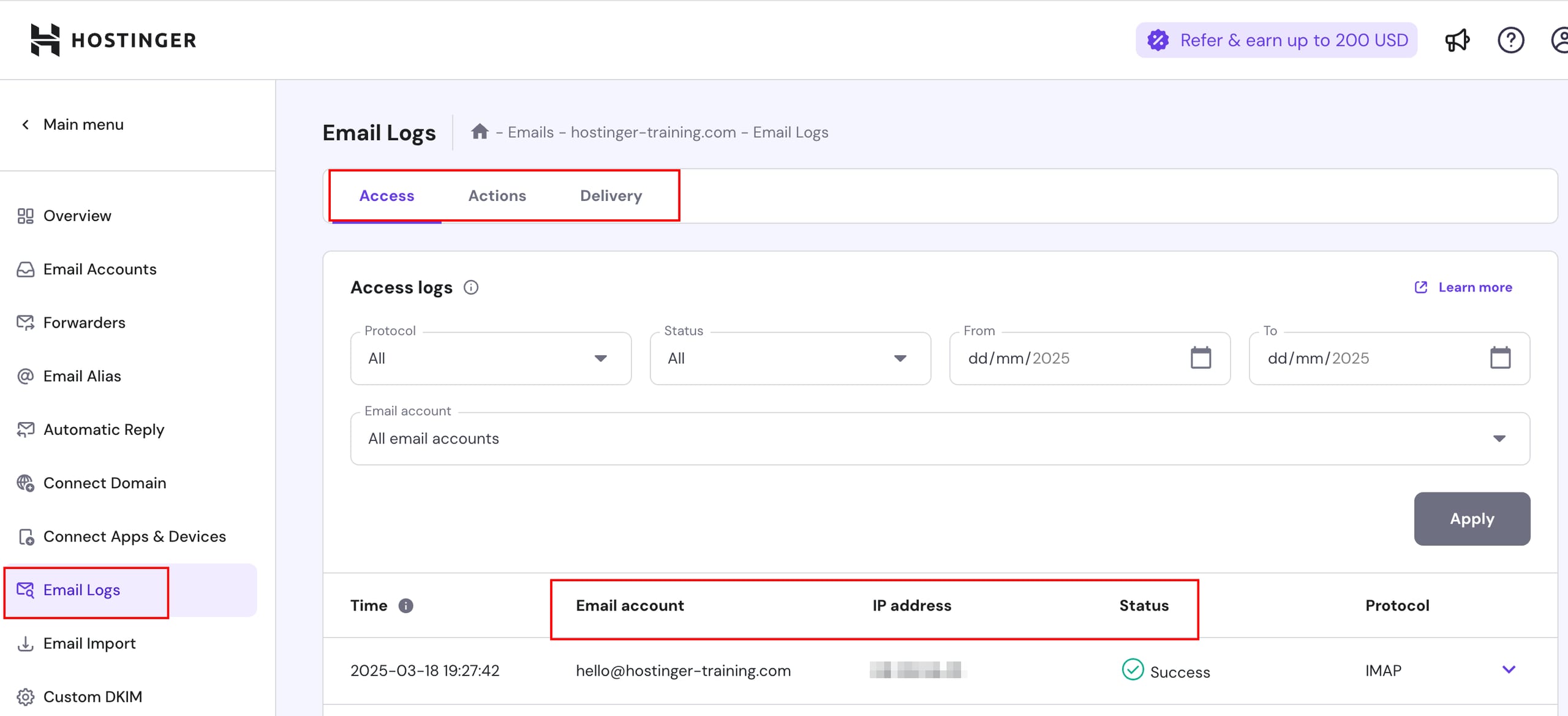
Step 3 – Check for unauthorized access and activity
Go to Email section in Hostinger dashboard, then access Emails logs > Access to see who has accessed your email account and when. Furthermore, check delivery logs to find out who has sent emails from your account and when.
Step 4 – Secure linked applications and devices
Securing your devices, applications, and websites is key to protecting your email account. Often, email compromises stem from unprotected devices and applications:
-
Poorly secured devices may easily get infected with malware; this malware steals passwords and may access your email accounts without your knowledge
-
Outdated applications have security flaws; if not secured and regularly updated, the websites, e-commerce platforms, and CRM systems you manage become vulnerable
By taking basic security steps, you can prevent unauthorized use of your email account:
Secure web applications
-
Add reCAPTCHA to contact forms
-
To learn more about it, please refer to help articles collection on Website Security
Secure other applications and devices
-
Keep your antivirus software updated and run regular scans
-
Regularly update the applications you use to the latest version
These steps keep your Hostinger Email account protected and help prevent future security issues.
NOTES
- If your Hostinger Email mailbox is already suspended, secure it first, then follow What to do if your Hostinger Email mailbox is suspended to reactivate it.
- Hostinger Email’s spam protection can block sending even when you sent the flagged emails yourself. Check your sending against the Parameters and limits of Hostinger Mail, then follow the suspended mailbox steps to restore sending.
- Sending unsolicited emails to people who did not opt in is not allowed on Hostinger Email. Check what you can send in Is mass mailing supported at Hostinger?.