Hostinger Reach Zapier templates sync contacts from Facebook Lead Ads, Shopify, and HubSpot into your Reach audience automatically. Start a template from its card on the Reach Integrations page, then connect both apps, map your fields, and publish the Zap in Zapier. Each card also has a How it works page that summarizes the setup before you start.
Hostinger Reach Zapier templates
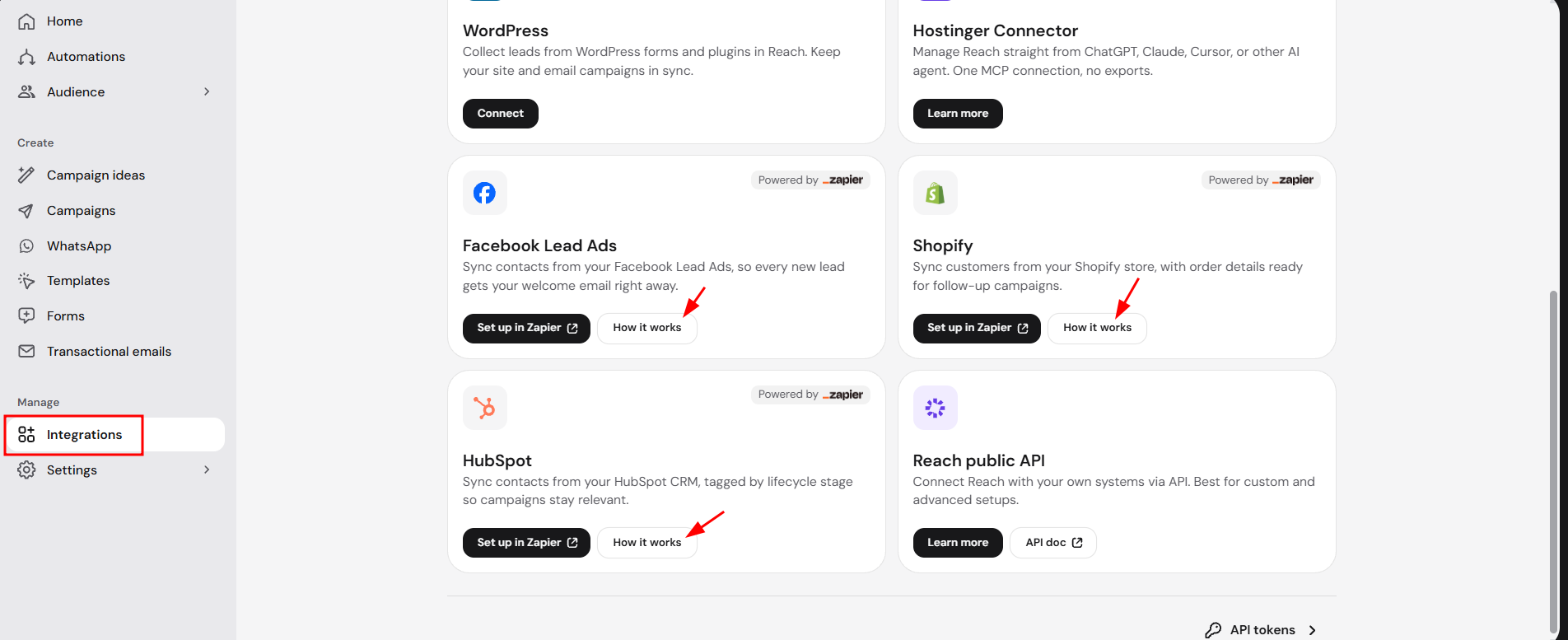
Hostinger Reach offers three Zapier templates, each with its own card on the Integrations page marked Powered by Zapier.
|
Zapier template |
What it syncs to Reach |
|
Facebook Lead Ads |
Leads from your Facebook and Instagram ad forms, including answers to custom questions. |
|
Shopify |
Shopify store customers, with order details for follow-up campaigns. |
|
HubSpot |
New and updated HubSpot CRM contacts, tagged by lifecycle stage. |
Start a Zapier template from Hostinger Reach
Start a Zapier template from its card on the Reach Integrations page.
- Open the Reach dashboard and click Integrations under Manage in the left sidebar.
- Find the card for the Zapier template you want.
- Click Set up in Zapier to open the template in Zapier.
To read about the template first, click How it works on the card. The page summarizes what the template syncs and the setup steps, and has its own Set up in Zapier button.
Complete the Zapier template setup
The template opens in Zapier ready to use. Complete the setup in three steps:
- Connect both apps by signing in to Facebook Lead Ads, Shopify, or HubSpot, and to Hostinger Reach.
- Map the app’s fields to Reach fields.
- Publish the Zap.
Once the Zap is published, new contacts from Facebook Lead Ads, Shopify, or HubSpot appear in your Reach Audience automatically, ready for welcome and follow-up campaigns.