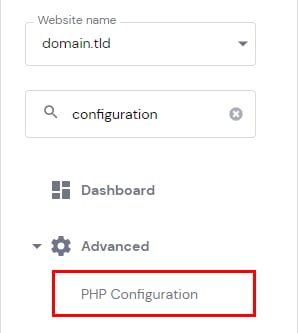
To change the PHP version of your hosting plan, go to the Websites section and click on Dashboard next to the website in question. Then, search for PHP Configuration on the sidebar and click on the given result to access those settings:
On the PHP Configuration page, select the PHP version you wish to use and click on Update:
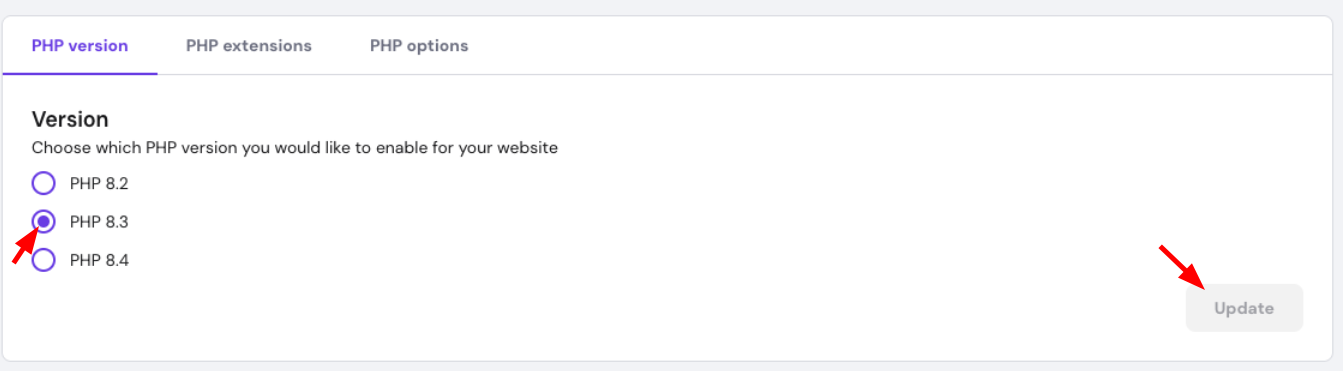
The PHP version will be updated within a couple of minutes.
The selected version will apply to all the websites added to your hosting plan (except for websites created using Hostinger AI Builder).
Unsupported PHP versions
It’s recommended to make sure that your website code is compatible with the latest PHP version. For security reasons, deprecated versions (8.2 and lower) are unavailable on Hostinger dashboard. In addition, using an unsupported version may cause stability and performance issues on your website.
To ensure optimal security and performance, Hostinger has deprecated PHP versions that no longer receive official security updates and patches. Here’s what this means for your websites:
For new websites:
- PHP 8.3 is selected by default
- You can only select PHP versions 8.2 and higher up to PHP 8.5
- Older PHP versions (8.1 and below) are no longer available as options
For existing websites with older PHP versions:
- Your current PHP version remains active
- You can upgrade to any higher PHP version
- Downgrading to lower versions is not possible (except within the same login session if an issue occurs)
However, sometimes, an older PHP version may be necessary, e.g., for testing and troubleshooting. In that case, you can temporarily change the PHP version on a specific by editing its .htaccess file. Make sure to revert it back to a supported version as soon as you’re ready.
NOTES
-
To change the PHP version of a specific website, you can edit the htaccess file.
-
The PHP version cannot be changed if you only have websites created with Hostinger AI Builder.