Manage your website’s PHP extensions and options directly from Hostinger dashboard to enable additional functionality or adjust configuration limits without contacting support. The PHP Configuration page has two tabs: PHP extensions, where you enable or disable installed extensions beyond the built-in ones, and PHP options, where you toggle basic settings and edit parameters such as disabled functions and resource limits.
To manage your website’s PHP extensions and options, go to the Websites section and click on Dashboard next to the website in question. Then, search for PHP Configuration on the sidebar and click on the given result to access those settings:
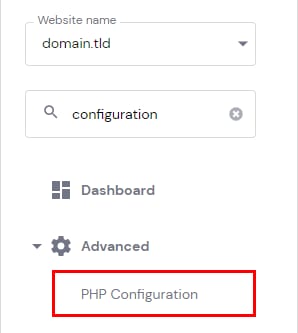
On the PHP Configuration page, open the preferred tab – PHP extensions or PHP options:

PHP extensions
At the top of the page, you’ll find a list of Built-in Extensions that come with your current PHP version. These extensions cannot be disabled. Below, you’ll find a list of all the installed extensions and be able to enable or disable them according to your needs:

Available PHP extensions depend on the current PHP version of your website
After making any changes, remember to save them by clicking on Save at the bottom of the page. To confirm which extensions are active, check the PHP information of your website.
To set all the values to default, click on Reset, which can be found at the bottom of the page:

PHP options
At the top of the page, you’ll find a list of basic options that you can enable or disable depending on your needs:

Below, you’ll find parameters that you can edit. For instance, a list of disabled functions. There, you can change values of some limits which by default are set to the maximum value available for your hosting plan.
More PHP extension and option guides
These guides cover specific PHP extensions and settings on Hostinger:
- How to set up New Relic at Hostinger.
- How to fix the missing MySQL extension WordPress error at Hostinger.
- Is zlib compression enabled in Hostinger.
Your PHP extensions and options now match your website’s requirements, and you can reset them to the default values anytime with Reset.