When running an online store, communication with customers is key. By default, transactional emails like order confirmations and shipping updates are sent from a generic address. With Hostinger, you can connect your own domain to use as the sender address for your standalone store.
Using a branded sender address builds customer trust, improves email deliverability, and ensures your store maintains a professional appearance.
Before you start
-
You must have an active Hostinger store. New to Hostinger Ecommerce? See what is Hostinger Ecommerce first.
-
You must have a domain registered at Hostinger.
Set up the custom sender domain
Follow these steps to update your transactional email settings:
-
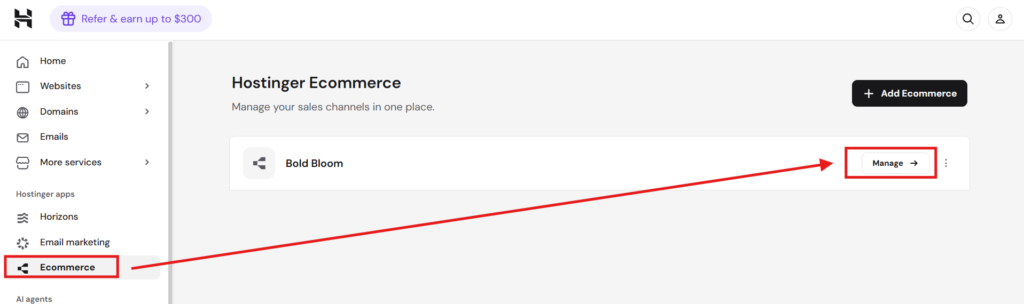
Open your store management dashboard.
-
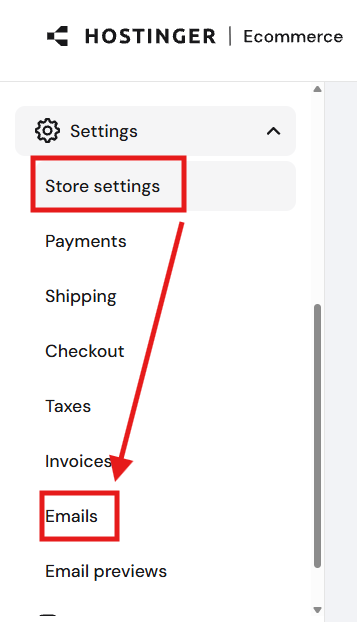
Navigate to Settings ❯ Emails.
-
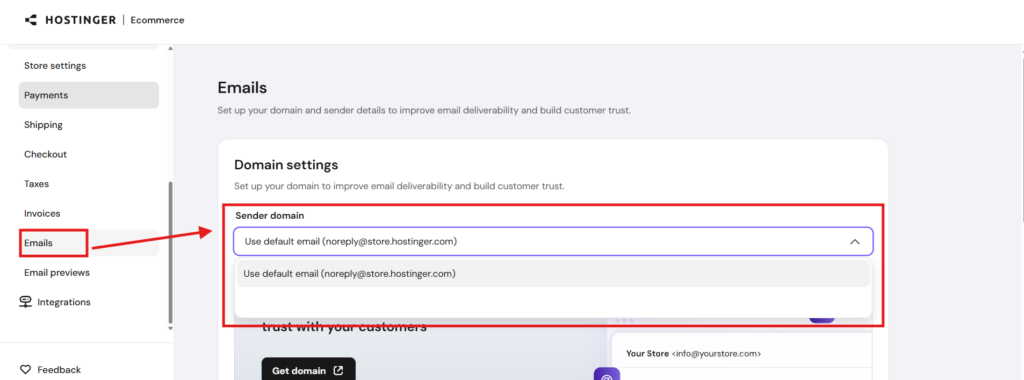
Locate the sender domain option and open the dropdown menu.
-
Select your preferred Hostinger domain from the list.
-
Save your changes.
Once saved, all future automated store emails will be sent directly from your branded domain address.