Set up automatic replies with Titan Email at Hostinger to notify senders when you’re unavailable. This feature, sometimes called a vacation responder, works directly through Titan Webmail without needing any extra configuration.
Enable automatic replies
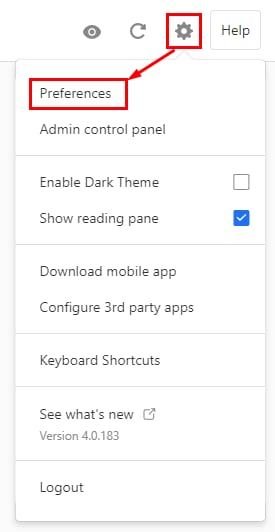
To do so, log in to your Titan Email account, click on the gear icon in the top-right, and choose Preferences:
Click on Vacation Responder, and enable the Vacation responder On option:
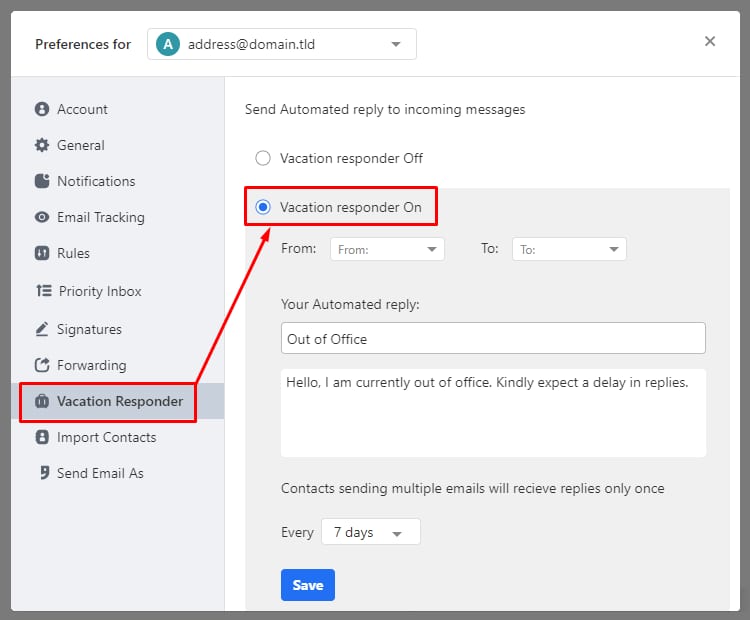
You can set the start and end dates, add a custom subject line, and compose a message to be automatically sent out. For contacts that send multiple messages, you can also control how frequently they receive the autoresponder.
Once you’ve added all the information, click on Save, and that’s it! All the messages sent to that email address will receive the scheduled automatic reply.