Hostinger auto-renewal charges your saved payment method before a service expires, so your hosting plan, domain, or other Hostinger product stays active without manual renewal. To turn it on, add a payment method and enable the auto-renewal toggle for each subscription in the Billing section.
Step 1 – Add a payment method
You can start by adding a payment method to your account. It’s automatically added after a successful payment if the used method is eligible, or you can add it manually at any time.
Step 2 – Enable Auto-Renewal
Once the payment method is added, go to the Billing section of your Hostinger dashboard. Auto-renewal is now managed via a toggle switch on the subscription row. Click the toggle to enable or disable auto-renewal for each service individually.
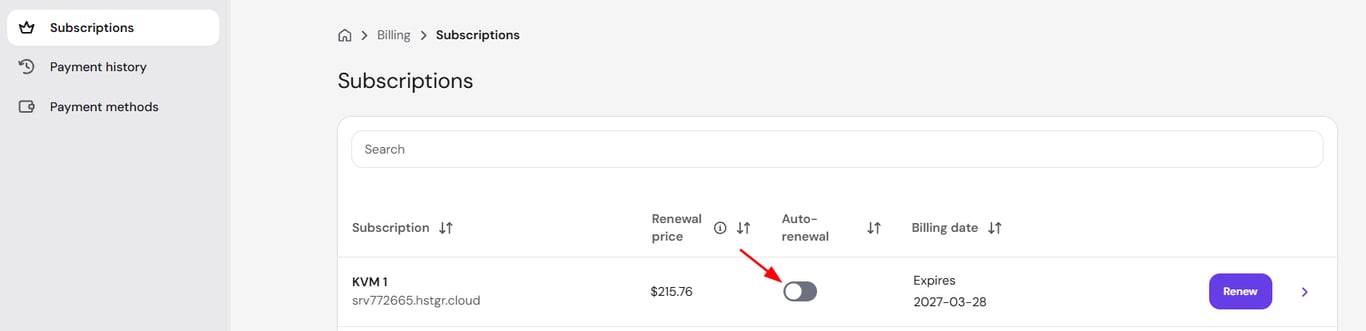
From now on, Hostinger renews your selected product automatically by charging your added payment method on this schedule:
-
27 days in advance for domain names
-
14 days in advance for yearly hosting plans or greater
-
On expiration day for monthly plans
It’s recommended to make sure there are enough funds on your payment method around the date of the charge to ensure your service can be renewed automatically.
With auto-renewal enabled and a valid payment method saved, your Hostinger services renew before they expire and stay online without manual renewal.
NOTES
-
If the renewal date is one day away or less, you will need to renew manually for this cycle. You will be able to enable auto-renewal afterward.
-
The date of the automatic charge may vary.
- See How to renew a hosting plan at Hostinger for other details about manual hosting plan renewal.
-
Some product renewals, e.g., domain renewals, are non-refundable; for more information, refer to our Refund Policy.