This article explains how the auto-renewal feature works for your domains and provides essential information regarding the eligibility for refunds once a renewal is processed.
For auto-renewal on other Hostinger services, see how to automatically renew Hostinger services.
Understanding Hostinger domain auto-renewal
By default, auto-renewal is enabled for all domains purchased at Hostinger to prevent service interruptions or the accidental loss of your domain name. When this feature is active, the system automatically attempts to process the renewal payment before the domain’s expiration date.
NOTES
- Domain renewal payments are non-refundable. Once a domain has been renewed, it is no longer eligible for a refund according to Hostinger’s policy.
- Ensure you disable auto-renewal at least 27 days before the expiration date if you do not wish to keep the domain.
- If payment was processed but your domain still isn’t renewed, see what to do if the domain is not renewed after payment at Hostinger.
How to enable or disable auto-renewal
Follow these steps to manage the renewal settings for your domain:
- Log in to your Hostinger account.
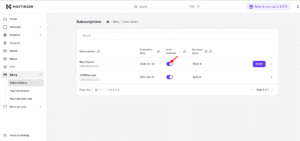
- Navigate to the Billing section and select Subscriptions.
- Locate your domain name in the list of active subscriptions.
- Toggle the Auto-renewal switch to the desired position.
Alternatives for renewed domains
If your domain has already been renewed and is no longer eligible for a refund, you have several options to make use of the subscription:
-
Keep the domain active: You can continue using the domain for its full registration period.
-
Transfer the domain: You may transfer the domain to another provider once 60 days have passed since the renewal.
-
Sell the domain: If you no longer need the domain, you can list it for sale on a domain marketplace after the 60-day period.
Managing your auto-renewal settings ensures you maintain control over your domain portfolio and billing. By verifying these settings in advance, you can avoid unwanted charges for domains you no longer require, as renewed domains are not eligible for a refund.