A fraud payment at Hostinger is a transaction flagged as suspicious for possible unauthorized activity, and it may be refunded automatically. To reactivate your services, confirm that you agree to repay, upload payment proof such as a card photo or bank statement, and notify Hostinger support.
What is a fraud payment?
A fraud payment occurs when a transaction is flagged as suspicious due to potential unauthorized activity. This can happen when a payment method is used without the owner’s consent, or when unusual activity is detected on an account. As a precaution, payments identified as fraudulent may be refunded automatically to protect both the account holder and the company.
How does a fraud payment happen?
Several factors can trigger a fraud detection, such as:
-
Unusual transaction patterns – Payments made from a new or unexpected location.
-
Multiple failed payment attempts – Several unsuccessful attempts using different payment methods.
-
Mismatched billing details – Discrepancies between the payment method and the account information.
-
Chargebacks or disputes – A history of disputed transactions linked to the payment method.
-
High-risk payment sources – Payments made through high-risk or blacklisted financial institutions.
-
Use of VPNs or Proxies – Transactions processed through masked or anonymous IP addresses.
-
Unusual device activity – Payments made from a new or unrecognized device.
-
Rapid large transactions – Sudden high-value payments that do not match normal spending behavior.
-
Use of stolen or compromised payment information – Payments made using credit card or banking details obtained through fraudulent means.
How to resolve a fraud payment issue
If your payment has been refunded due to unusual activity, follow these steps to resolve the issue and reactivate your services:
1. Confirm payment intent
-
Let us know if you agree to repay the refunded amount to continue using Hostinger’s services.
2. Provide payment verification
-
Gather a photo of the credit card used, showing the first 6 and last 4 numbers only:
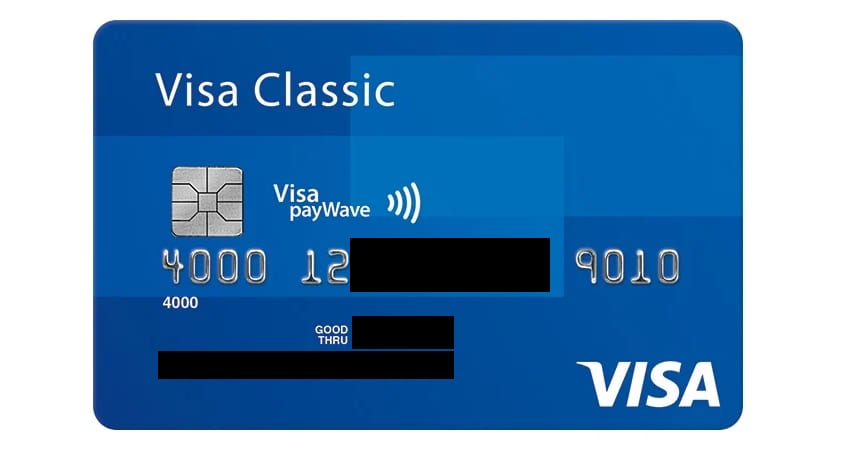
Or your bank statement showing the date and amount of the payment. The statement should clearly display:
-
Payment date
-
Amount paid
-
Transaction destination (Hostinger)
-
3. Upload your payment proof
-
Open the Payment Verification form.
-
Select Payments – verifying details from the dropdown list.
-
Enter the email address associated with your Hostinger account.
-
Upload your card photo or bank statement as a document or image. The bank statement must show the date, the amount, and Hostinger as the destination. Invoices, confirmation emails, and SMS screenshots aren’t accepted.
4. Notify customer support
-
Once you have submitted the required documents, contact our support team through your panel’s help page with the confirmation that you agree to the payment.
-
Our team will review your submission and guide you through the next steps to reactivate your service. If your account also needs identity verification, follow the steps in How to complete Hostinger identity verification (KYC).
Preventing future fraud payment issues
To avoid payment disruptions in the future, consider these best practices:
-
Use a consistent and secure payment method.
-
Ensure your billing details match your payment account.
-
Avoid making payments from public or high-risk networks.
-
Monitor your transactions and report unauthorized activities immediately.
Once Hostinger reviews your payment proof and confirms the repayment, your services can be reactivated.