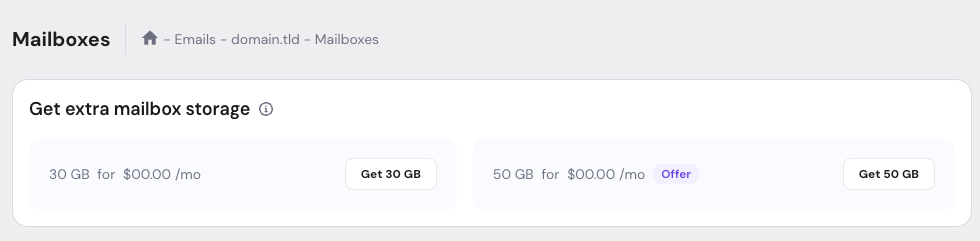
Increase your Hostinger Business Email mailbox storage with the Hostinger Email Storage Add-on, which adds 30 GB or 50 GB of extra storage that you assign to specific mailboxes on the same domain. Upgrading the Business Email plan instead increases storage for all mailboxes at once.
The add-on allows you to purchase extra storage and assign it to specific mailboxes under the same domain.
How the Hostinger Email Storage Add-on works
The Flexible Storage Add-on is available for the following email plans:
- Business Starter
- Business Standard
- Business Premium
It can be purchased once per domain and follows the same renewal cycle as your email plan. Payment is made upfront.
You can distribute the additional storage across your mailboxes as needed.
The Flexible Storage Add-on is not available for Free Email plans. To increase storage for Free Email, you need to upgrade all mailboxes to a Business Email plan.
How to get the Hostinger Email Storage Add-on
To buy additional mailbox storage:
-
Go to the Email section of Hostinger dashboard and click on Mailboxes next to the email service you want to expand.
-
From the left-hand menu, select Mailboxes.
-
In the Get extra mailbox storage section, select the preferred package: 30GB or 50GB.
-
Complete the payment
Once the payment is completed, the add-on becomes available for allocation.
How to manage add-on storage
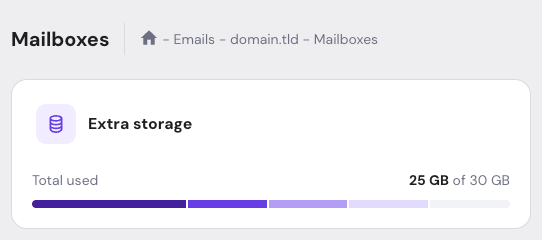
After purchasing the Flexible Storage Add-on, the available storage and current usage are shown on the Mailboxes page.
To assign extra storage to a mailbox:
- Open Email → Mailboxes
- Locate the mailbox you want to modify
- Select options (⋮) → Manage storage
- Use the – and + buttons to change the allocated storage in 1GB increments and click on Update storage to confirm
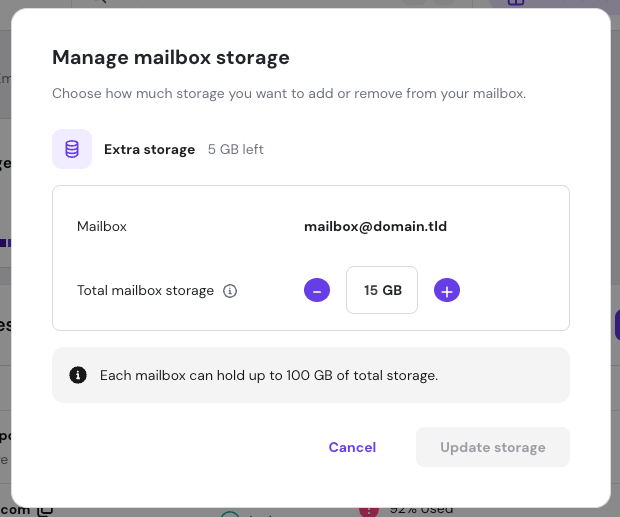
You can use the same steps to reduce the allocated storage. Any freed add-on storage can be reassigned to another mailbox under the same domain.
With the add-on assigned, each selected mailbox gets its extra space, and you can move unused add-on storage between mailboxes on the same domain whenever you need to.
NOTES
- A mailbox cannot have reduced storage below the base storage from the plan or have a total size greater than 100GB.
- Storage can only be allocated within the domain where the add-on was purchased.
- Additional storage is non-refundable.
- For other ways to free up or add storage, see How to manage your email storage with Hostinger Email.