What is an agentic email?
Sep 11, 2026
/
By Ksenija
/
9 min Read
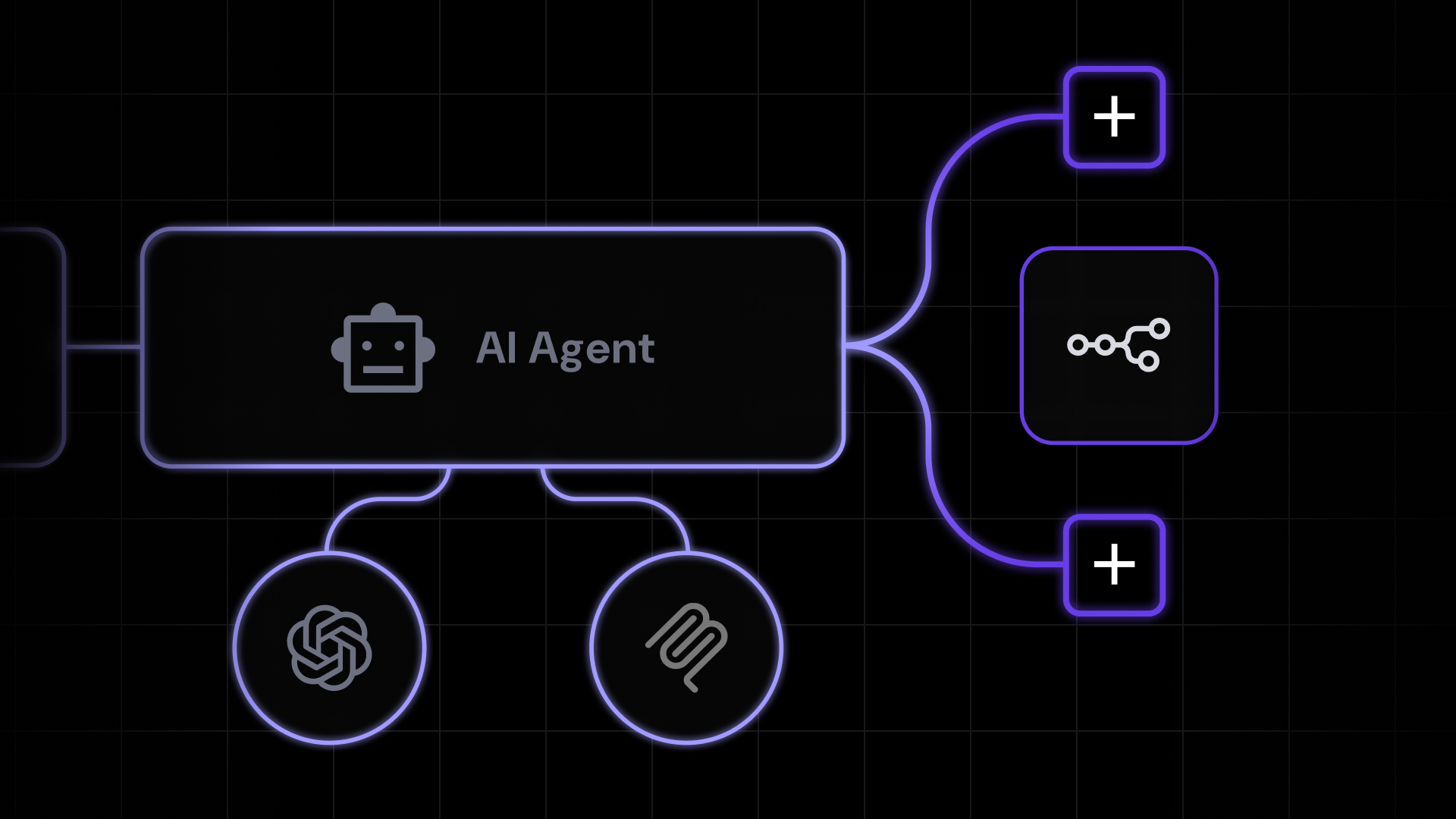
Agentic email is an email system designed for AI agents and automated workflows, where incoming messages can trigger software actions without waiting for a human to read and process them first.
In a traditional inbox, each message sits there until someone opens it, understands what it means, and decides what to do.
With agentic email, the arrival of a message can start a workflow immediately. An AI agent or automation can interpret the email, extract relevant details, route the request, prepare a response, or pass information to another system.
Human oversight still matters. Businesses can allow low-risk tasks to run automatically while requiring approval for actions that are sensitive, costly, or difficult to reverse.
Understanding agentic email means looking beyond the inbox to the workflows, infrastructure, security controls, and business processes that make this approach possible.
How does agentic email work?
Agentic email works by turning incoming messages into events that AI agents and automated workflows can process.
Suppose a customer sends the following email to a business:
I’d like to change my booking from Friday to Saturday.
From that point, the email moves through five stages before a response is sent.
1. The email arrives in a dedicated inbox
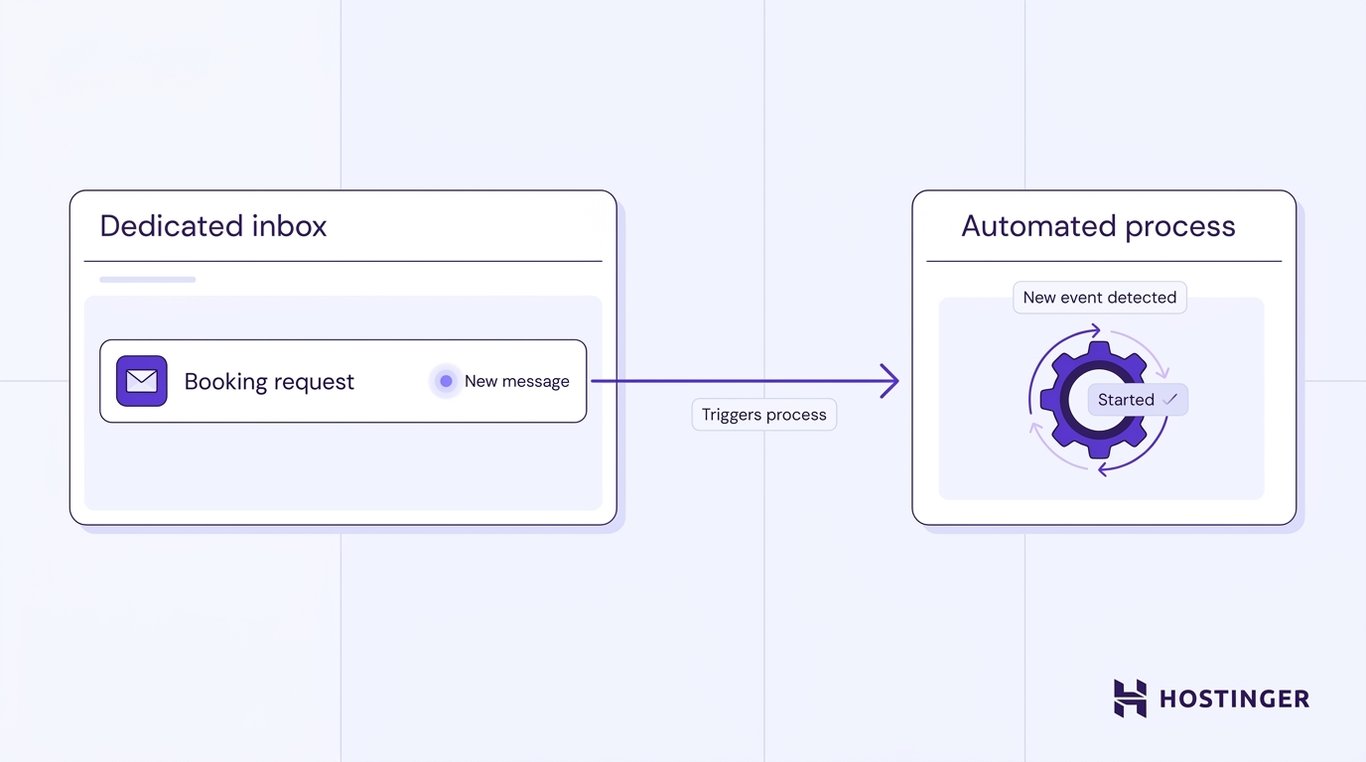
The booking request is sent to an email address monitored by the workflow. Unlike a traditional mailbox, this inbox is intended for an AI agent or automated proces.
Once the message arrives, the email service recognizes it as a new event and automatically starts the process.
2. The email service notifies the workflow
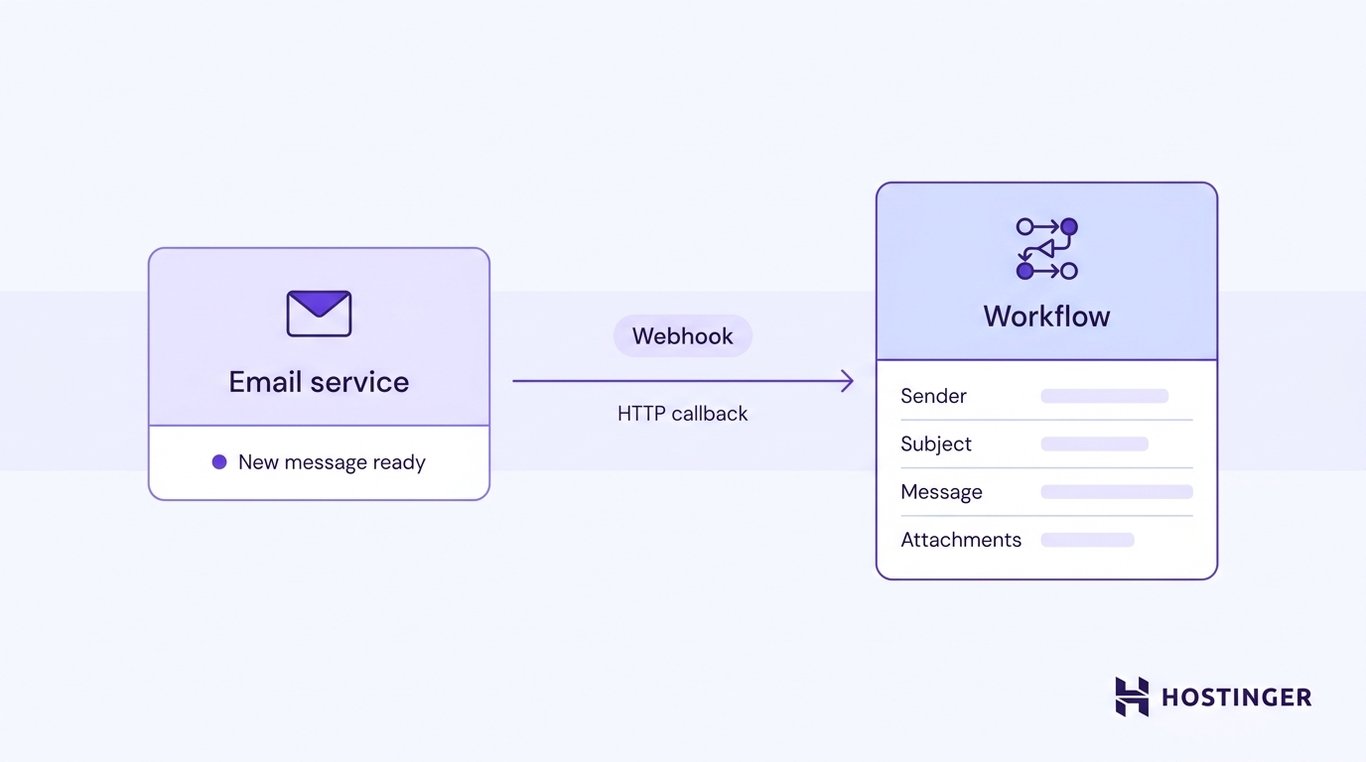
The email service sends a notification to the connected workflow that a new message is ready for processing.
Many agentic email systems do this via a webhook—an HTTP callback that automatically sends event information to another application.
Rather than forwarding the email itself, the webhook delivers the information the workflow needs to continue, such as the sender, recipient, subject, message content, attachments, and other relevant metadata.
3. The agent determines what the email is about
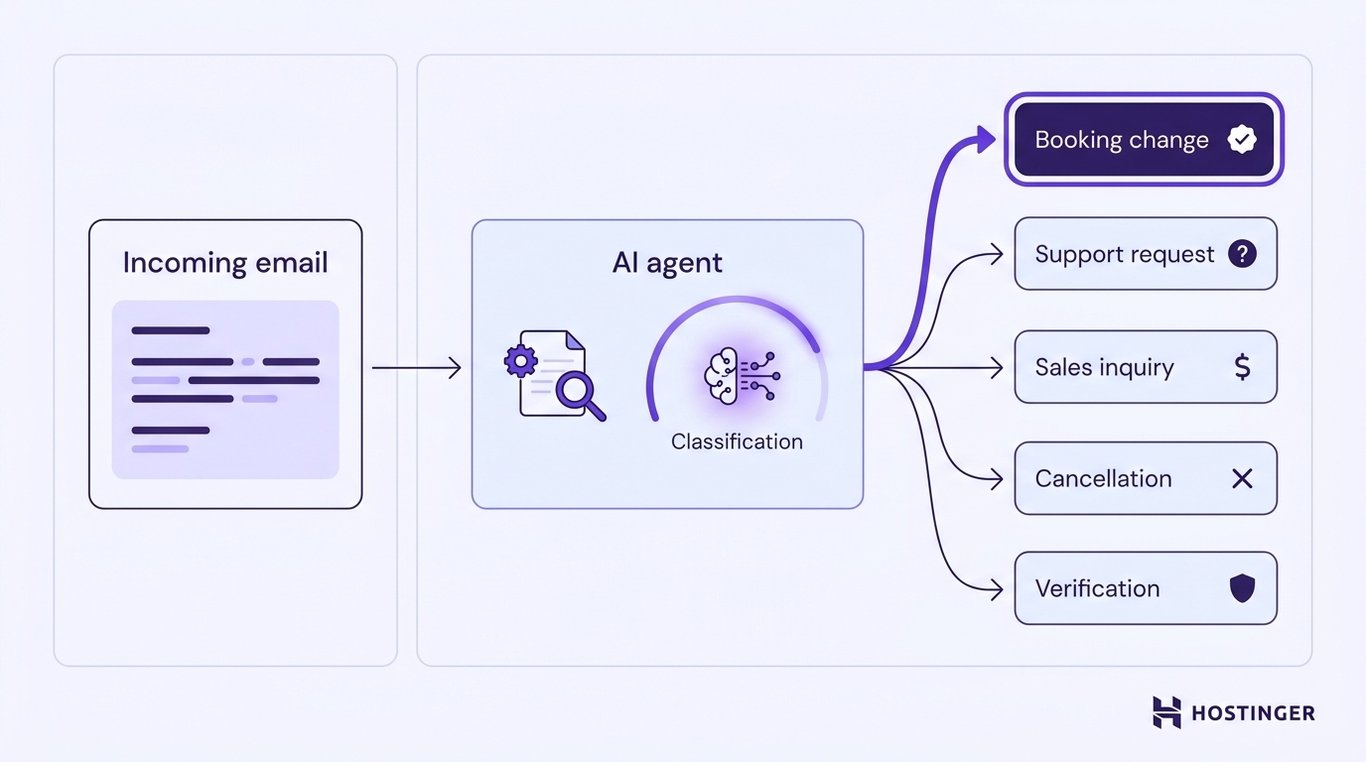
The workflow passes the email data to an AI agent, which analyzes the message to determine what the sender is asking for.
In this example, the agent recognizes that the customer wants to change an existing booking. In other agentic workflows, it might identify the message as a support request, a sales inquiry, a cancellation, a verification email, or another type of request.
That interpretation determines which workflow should handle the message next.
4. The workflow chooses the next action
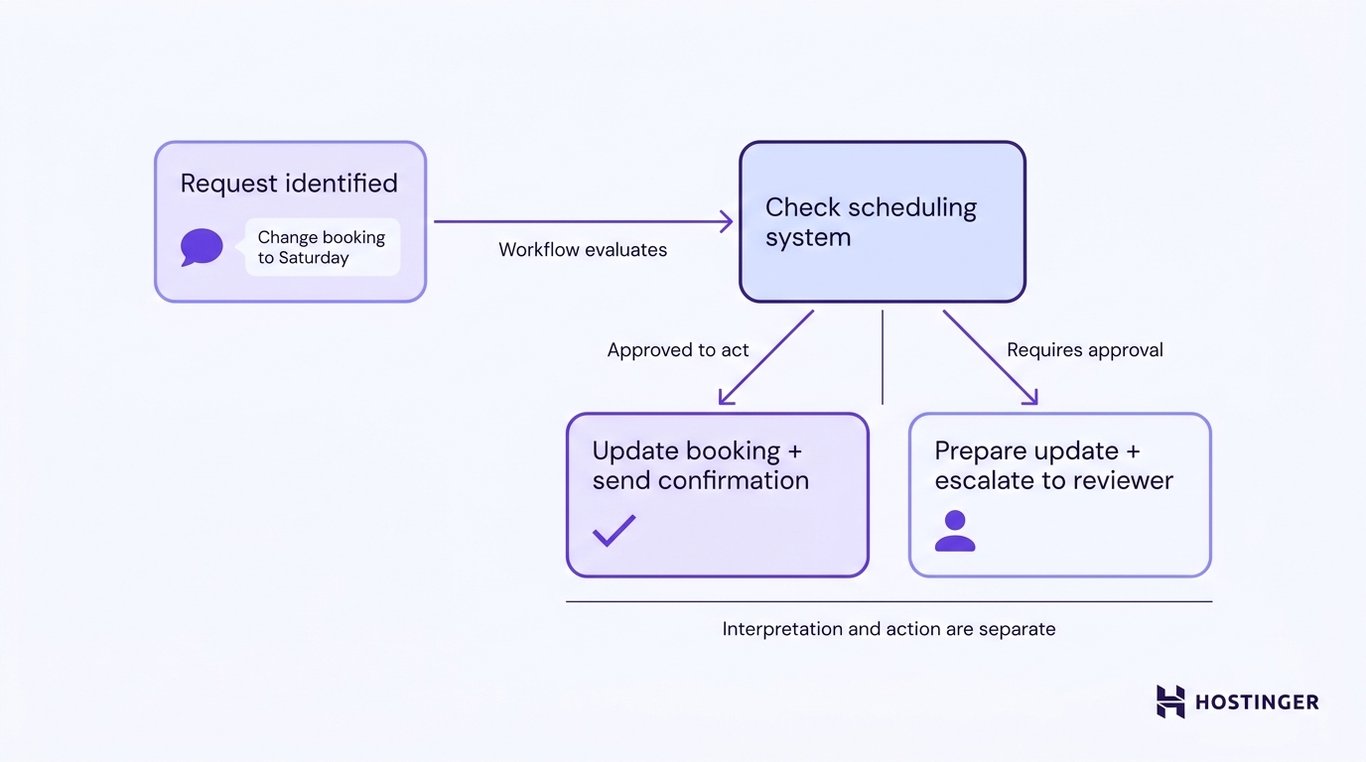
Once the request has been identified, the workflow determines what happens next based on the agent’s permissions and the rules defined for that process.
For the booking change, the next step could be checking the scheduling system to see whether Saturday is available.
If the agent is allowed to update bookings directly, the workflow can make the change and prepare a confirmation email.
If changing a booking requires approval, the workflow can instead prepare the proposed update and pass it to a person for review.
Interpretation and action are separate. The agent first understands the request; only then does the workflow decide whether to act automatically, call another system, prepare a response, or escalate the request.
5. The workflow completes the task and records the result
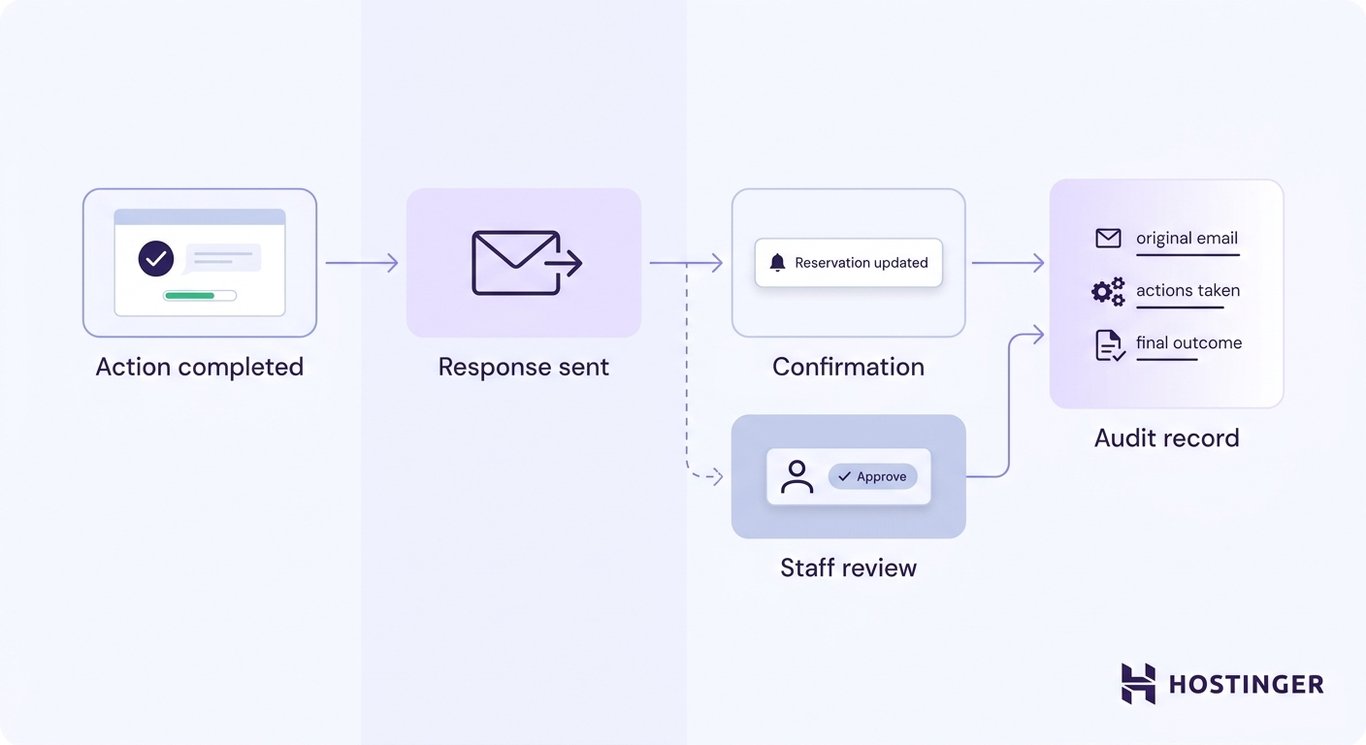
After the required action has been completed or approved, the workflow sends the response or passes the result to the appropriate business system.
In the booking example, the customer receives a confirmation that the reservation has been updated, or a member of staff reviews and approves the change before the confirmation is sent.
The workflow also records what happened along the way, including the original email, the actions taken, and the final outcome.
Those records make it possible to review decisions, troubleshoot problems, and verify how a particular request was handled.
What are the main components of agentic email?
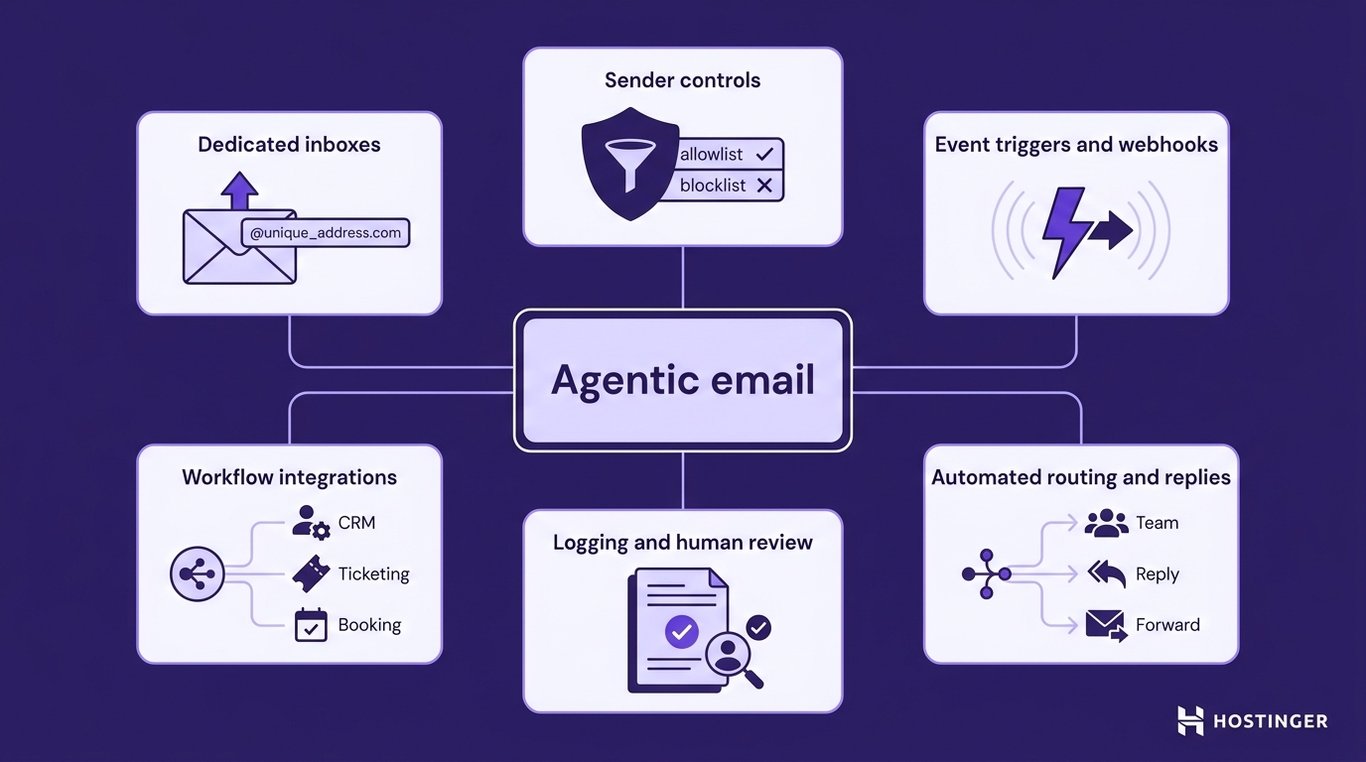
The main components of agentic email are dedicated inboxes, event triggers and webhooks, workflow integrations, automated routing, sender controls, and logging with human review.
Together, these components allow AI agents to receive email, trigger workflows, interact with other systems, and operate securely.
- Dedicated inboxes. Agentic email typically assigns each agent or workflow its own email address, separating automated communication from human inboxes. Separate inboxes define which messages the agent can access, which workflows receive them, and which email identity is used when replies are sent.
- Event triggers and webhooks. Event triggers detect when something happens, such as a new email arriving. A webhook then sends information about the event to another application in real time, allowing the workflow to begin without continuously checking the inbox.
- Workflow integrations. Agentic email becomes more useful when it connects to other systems. Depending on the workflow, an AI agent might retrieve information from a CRM, update a booking system, create a support ticket, or trigger another business process.
- Automated routing and replies. After interpreting a message, the workflow can decide what should happen next. It might route a support request to the correct team, draft a response, forward the email, or send an automatic reply when the action has been approved and the risk is low.
- Sender controls. Allowlists restrict workflows to messages from approved senders or domains, while blocklists prevent known unwanted senders from reaching the workflow. These controls help reduce unnecessary or untrusted messages, but should be used alongside broader security measures.
- Logging and human review. Logs record the emails received, the actions taken, and the outcome of each workflow, making it easier to troubleshoot problems and audit decisions. Human review adds a checkpoint for requests in which the consequences of an incorrect action are too significant to be handled by full automation.
Agentic email vs. regular email
Regular email is designed for people to read, manage, and respond to messages, while agentic email is designed for AI agents and automated workflows to process email programmatically.
Both use the same email protocols, but they serve different purposes.
The following comparison shows how the two approaches differ in the way they receive, process, and act on email:
Area | Regular email | Agentic email |
Primary user | Person | AI agent or automated workflow |
Inbox purpose | Human communication | Workflow input and output |
Message processing | Person reads and decides what to do | Software interprets the message and determines the next step |
Trigger | Person opens the inbox or responds to a notification | A new email automatically starts a workflow |
Integration model | Email clients and productivity apps | Webhooks, APIs, AI agents, and automation platforms |
Actions | Usually carried out manually | Can be automated or routed for human approval |
Access model | User mailbox permissions | Dedicated permissions for agents and workflows |
Oversight | Person manages the inbox | Logging, sender controls, and human review |
Agentic email vs. email automation
Traditional email automation follows predefined rules, while agentic email allows an AI agent to interpret a message and choose an appropriate action within defined boundaries.
Both approaches automate email workflows, but they differ in how they decide what to do.
The table below compares AI agents vs. automation key differences:
Traditional email automation | Agentic email |
Follows predefined rules and conditions. | Interprets the message before selecting an approved action. |
The workflow already knows which condition triggers which action. | The agent determines the nature of the request and chooses the appropriate workflow. |
Works best with predictable, structured inputs. | Can understand less structured emails written in natural language. |
Every matching message follows the same predefined path. | Similar messages can follow different approved workflows depending on their context. |
Decision logic is explicitly defined by the workflow. | Decision-making combines AI interpretation with predefined permissions and workflow rules. |
Traditional email automation might be configured to forward every email labeled “Billing” to the finance team or to send an automatic reply whenever a customer submits a contact form.
The workflow already knows both the condition and the action before the email arrives.
An agentic workflow starts differently. A customer might describe an invoice problem without mentioning the word billing at all.
The AI agent interprets the message, identifies the customer’s intent, extracts the relevant details, and selects the appropriate approved workflow, such as routing the request to the finance team or preparing a draft response.
Agentic email does not replace rules or operate without boundaries. The workflow still defines which actions the agent can take, which systems it can access, and when human approval is required.
The difference is that the agent can interpret unstructured messages and make context-dependent decisions within those constraints.
Agentic email use cases
Agentic email is used across customer support, sales, booking systems, automated business processes, and other workflows where incoming email should trigger more than a notification.
A ChatGPT email integration is one way to connect these workflows to OpenAI’s models. Teams using Anthropic models can achieve the same result through a Claude email integration.
Support and inbox triage
Support inboxes often receive a mix of billing questions, technical issues, feature requests, and account problems.
An agentic workflow can distinguish between those requests, collect the details needed for each one, route them to the appropriate team, and prepare a draft reply.
Complex or sensitive cases can still be escalated to a support specialist before anything is sent.
Lead qualification and customer follow-ups
Sales inquiries rarely follow the same format. One prospect might ask for pricing, another for a product demo, and someone else for enterprise features.
Instead of relying on keywords, an AI agent can interpret each inquiry, identify the customer’s intent, update the relevant business systems, and prepare a follow-up tailored to that conversation.
Booking and service requests
Changing an appointment usually involves more than replying to an email.
A workflow can recognize the requested change, verify that the message contains the necessary information, check availability in the scheduling system, and either prepare the update for approval or confirm the booking automatically when the action is permitted.
Verification and machine-generated emails
Many automated processes rely on emails, such as account verification messages, password reset links, or system notifications.
A dedicated agent inbox allows those messages to be received and processed automatically without involving a person’s mailbox.
Email-triggered business workflows
Email often serves as the entry point for a larger business process.
An incoming message can trigger an AI assistant to interpret the request, extract the required information, and pass it to the appropriate workflow, whether that involves updating a CRM, creating a support ticket, or preparing a response for approval.
Is an agentic email safe?
Agentic email can be used safely, but only when the agent’s access, permissions, and interactions with email are carefully controlled.
Unlike a person, an AI agent can process messages at scale and interact with other systems automatically, making clear boundaries and oversight essential.
A secure agentic email workflow should include the following safeguards:
- Isolated mailboxes. Give each AI agent or workflow its own inbox instead of sharing employee mailboxes. Separating human and automated communication limits what the agent can access and reduces the risk of acting on unrelated messages.
- Sender controls. Use allowlists and blocklists where appropriate to limit which senders or domains can interact with the workflow. Although these controls reduce unwanted messages, they should be combined with other security measures rather than relied on alone.
- Protected webhook endpoints. Authenticate webhook requests and reject callbacks that cannot be verified. Without authentication, another system could attempt to impersonate a trusted email service.
- Least-privilege permissions. Give agents access only to the mailboxes, systems, and actions required for their specific task. Restricting permissions reduces the impact of mistakes or compromised workflows.
- Input validation. Every incoming email should be treated as untrusted input. The workflow should verify the sender, evaluate the request against its permission rules, and confirm that the requested action is allowed before interacting with other systems. Emails can contain malicious links, attachments, misleading instructions, or prompt injection attempts designed to manipulate an AI agent.
- Sensitive data controls. Define which customer, employee, financial, or business information the workflow is allowed to process, store, or share, and prevent access to data that is not required for the task.
- Logging and auditing. Record the emails received, the decisions made, and the actions performed. Detailed logs make it possible to investigate unexpected behavior, troubleshoot problems, and demonstrate how a particular action occurred.
- Human approval for high-risk actions. Financial transactions, account changes, legal commitments, and other consequential actions should require explicit human approval before they are carried out.
Security controls can also vary between agentic email providers. For example, Hostinger Agentic Mail and LobsterMail take different approaches: Hostinger provides sender allow and block lists alongside its existing email security controls, while LobsterMail includes dedicated prompt-injection scanning for incoming messages.
When should you use agentic email?
Agentic email is most useful when it needs to function as part of an AI-driven or automated workflow rather than simply serving as a communication channel. Whether it’s the right choice depends on what happens after an email arrives.
Agentic email is a good fit when:
- An AI agent or automated workflow needs its own email identity.
- Incoming messages should trigger workflows as soon as they arrive.
- Email data needs to be migrated to other business systems, such as a CRM, help desk, or booking platform.
- An AI agent needs to interpret unstructured requests before deciding what to do.
- Routine tasks, such as routing, drafting replies, or extracting information, can be automated safely.
- People only need to review exceptions or high-impact decisions.
Regular email or conventional automation is often enough when:
- A person still reads and responds to most messages.
- The workflow follows a small number of predictable rules.
- Email volume is too low to justify dedicated infrastructure.
- AI interpretation would not improve the decision-making process.
- The requested actions are too sensitive to delegate, even with human approval.
A simple way to decide is to consider the inbox’s primary purpose. If it’s mainly a place for people to communicate, regular email is usually the better choice.
If it needs to become a programmable entry point for AI agents and business workflows, agentic email provides the infrastructure to support that.
Can Hostinger Agentic Mail power AI agent workflows?
Yes. Hostinger Agentic Mail provides the email infrastructure that allows AI agents and automated workflows to receive messages, trigger actions, and send emails programmatically.
It serves as the communication layer between email and the systems that process it.
A typical workflow starts when an email arrives in a dedicated mailbox. Hostinger Agentic Mail detects the new message and sends a real-time webhook notification to the connected workflow.
An AI agent or automation platform can then interpret the request, decide what should happen next within its configured permissions, and interact with other business systems before preparing or sending a response.
Hostinger’s Agentic mail service supports several building blocks that make these workflows possible:
- Dedicated agent inboxes that separate automated workflows from personal or shared mailboxes.
- Real-time webhooks that notify connected applications as soon as a new email arrives.
- REST APIs for reading, sending, and managing emails programmatically.
- Allowlists and blocklists that control which recipients an automated mailbox is allowed to contact.
- An MCP (Model Context Protocol) server that lets compatible AI agents interact with Hostinger Mail without building a custom API integration.
Because Agentic Mail focuses on the email layer, it works alongside AI frameworks and automation platforms.
Depending on your workflow, it can connect to tools such as OpenClaw, n8n, Make, LangChain, and Zapier, which handle the reasoning, orchestration, or business logic behind the workflow.
Agentic email providers can offer similar core building blocks while differing in how they package and price them. Hostinger Agentic Mail and AgentMail both support custom-domain inboxes, APIs, real-time webhooks, MCP, and sender controls, but differ in areas such as pricing model, integrations, and whether human webmail is included.
How to get started with agentic email
Start with a single, low-risk workflow in which faster interpretation or routing would eliminate meaningful manual work.
Once that workflow is reliable, you can gradually expand automation to more complex processes.
A practical rollout looks like this:
- Choose one specific email workflow to automate.
- Give the workflow a dedicated inbox.
- Define which senders and messages it should accept.
- Decide which actions the AI agent can perform automatically.
- Require human approval for consequential actions.
- Connect the inbox to the required AI agent or automation platform.
- Test expected, unexpected, and malicious messages.
As the workflow matures, email no longer has to be limited to receiving and interpreting requests.
More advanced implementations can also send email using ChatGPT once the business logic determines that a response should be generated.
The same progression applies to Anthropic-based workflows. After the agent has gathered the required context and any necessary approvals, it can also send an email in Claude as part of the same automated process.
This article is a localized version of What is an agentic email?, originally published in English.
All of the tutorial content on this website is subject to Hostinger's rigorous editorial standards and values.

Ksenija is a digital marketing enthusiast with extensive expertise in content creation and website optimization. Specializing in WordPress, she enjoys writing about the platform’s nuances, from design to functionality, and sharing her insights with others. When she’s not perfecting her trade, you’ll find her on the local basketball court or at home enjoying a crime story. Follow her on LinkedIn.