Monday November 2, 2026
Gusti S. & Larassatti D.
Hostinger weekly product updates: Week 44, 2026
Here’s what shipped the week of October 26 to 30, 2026, across Hostinger Agent, Hostinger AI Builder, the Hostinger CLI, Hostinger dashboard, and Hostinger Ecommerce:
- Hostinger Agent works within the WordPress admin panel, where it answers account questions and performs WordPress admin actions via chat.
- Hostinger AI Builder’s new Secret Storage Manager keeps API keys and other credentials out of your code and chat history.
- Hostinger AI Builder websites on SSR now load in about 0.12 seconds after a quiet period, down from about 1.9 seconds.
- The Hostinger CLI can deploy a Node.js app or static HTML website to your hosting plan with a single command.
- You can see an AI visibility score on your Hostinger dashboard. The tool rates how well AI tools can read your website, out of 100.
- The Hostinger Agency Directory is available on the Hostinger dashboard. Users can browse vetted digital service professionals, including those specializing in web development, SEO, or website maintenance, who are official Hostinger partners.
- Newly created empty websites on Hostinger now automatically display a Coming soon page.
- Hostinger Ecommerce merchants can create free shipping discount codes.
- Hostinger Ecommerce now includes Apple Pay or Google Pay parcel lockers during express checkout.
- Hostinger Ecommerce’s Quick Link stores can now send storefront page views, product views, and add-to-cart events to the merchant’s Google Analytics 4 (GA4) property once shoppers accept analytics cookies.
Here’s a closer look at each.
Get help from Hostinger Agent inside your WordPress admin dashboard
If you’re subscribed to Hostinger’s managed hosting for WordPress, we’re bringing Hostinger Agent into the WordPress admin panel.
After logging in to your Hostinger account, you can manage email, DNS, domains, hosting, and billing, or hand your request over to a human support specialist. It also nudges you when your website needs attention, for example, when a domain still needs to be connected.
Hostinger Agent can also perform WordPress admin actions directly from the chat. You can ask it to manage plugins and themes, search and edit site content, moderate comments, organize categories and tags, update WooCommerce products and coupons, and adjust site settings.
Read our support guide to learn more about how to use Hostinger Agent in WordPress.
Keep API keys safe with Secret Storage Manager in Hostinger AI Builder
Hostinger AI Builder includes a Secret Storage Manager, so you can keep API keys and other credentials out of your code and chat history.
You can add, edit, and delete keys from one panel. Your preview and published website each have their own values, and publishing automatically syncs your secrets to the live site.
When you paste a key into the chat, including keys from Stripe, OpenAI, Anthropic, GitHub, AWS, and Google, Hostinger AI Builder offers to save it as a secret. From then on, the AI works with a reference to the secret and never sees the raw value.
Keys already in a project’s .env file move into Secrets automatically the first time you open the project. Non-sensitive configuration stays where it is.
Our support article explains in more detail how to store API keys in Hostinger AI Builder’s agentic mode.
Load SSR pages faster with node-level page caching
Hostinger AI Builder websites on SSR now load faster for the first visitor after a period of inactivity. In our measurements, a page requested after 40 minutes of inactivity loads in about 0.12 seconds, compared to about 1.9 seconds before.
SSR websites render pages in a container that sleeps when idle. The hosting server now keeps a copy of every successfully rendered page and serves it directly, even while the container is asleep.
Your visitors no longer wait for the container to wake up. This makes the biggest difference for websites with modest traffic, which most often hit quiet periods.
Deploy with a single command from the Hostinger CLI
The Hostinger CLI can now deploy a Node.js app or a static HTML website to a Hostinger hosting plan with one command: hostinger up.
The command asks which website and hosting plan to use, detects the app type and build settings, and links your project folder to the website. Later deployments then need no extra details.
If you’d rather save or remove a project’s details yourself, use hostinger link and hostinger unlink.
Learn how to deploy a website using the Hostinger CLI.
Check how well AI tools can read your website with the AI visibility score
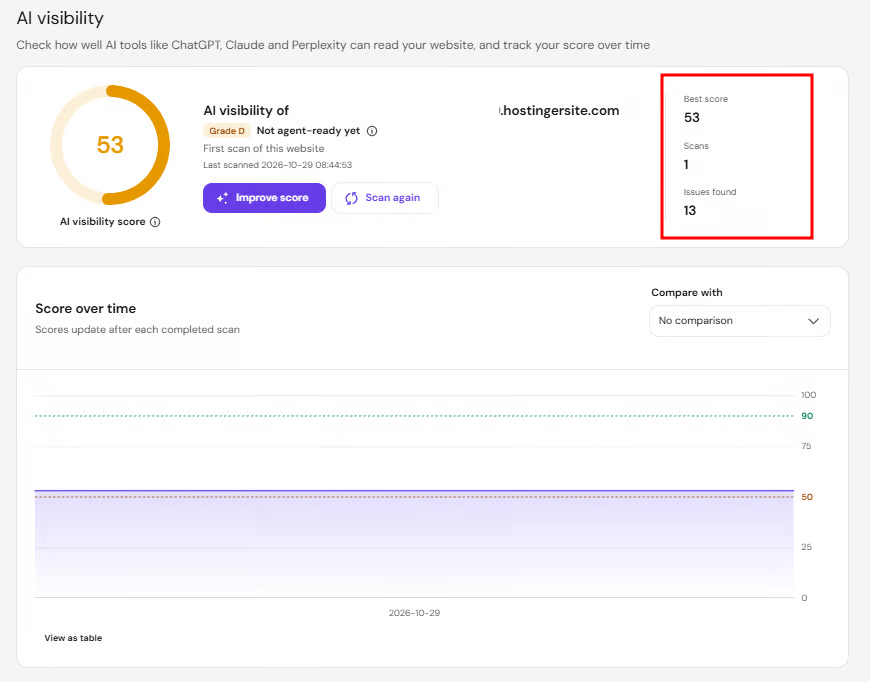
Hostinger dashboard now includes an AI visibility score that shows, on a scale of 100, how well AI tools such as ChatGPT, Claude, and Perplexity can read your website. It runs the same checks as the Hostinger AI Visibility Checker and saves every scan, so you can track your score over time.
To get started, run a scan from the Analytics section on your Hostinger dashboard, review your score, and get the full report. Click Improve score to learn what you should do to make your site more visible to AI, then follow how the score progresses over time.
Read the full guide on how to check your AI visibility score on the Hostinger dashboard.
Find a web professional in the Hostinger Agency directory
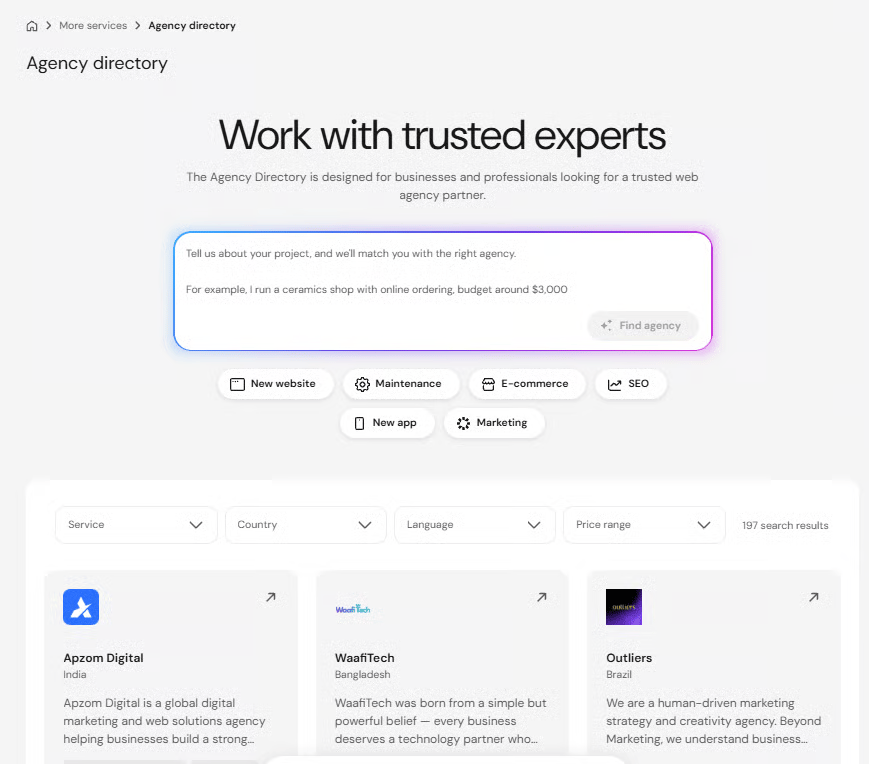
You can now browse professional digital service agencies from the Hostinger Agency directory in the Hostinger dashboard. It’s a curated list of vetted web agencies and freelance professionals who are trusted Hostinger partners.
Our support article explains how to find a professional in the Hostinger Agency Directory.
A “Coming soon” page is automatically shown on empty websites
Newly created empty websites on Hostinger now display a Coming soon page. Anyone who visits your domain before you publish will see the page while you’re building the site.

Offer free shipping with discount codes in Hostinger Ecommerce
Now, Hostinger Ecommerce users can create a free shipping coupon – it’s categorized as a discount code type. You can choose whether it applies to all shipping methods or only to the zones and methods you select. The code appears at checkout, on the order confirmation, and on invoices and receipts.
Keep in mind that free shipping applies only to the zones and methods covered by the code. Orders shipped to other zones or with other methods won’t get free shipping.
You can’t switch a code to or from the Free shipping type after you create it, so choose the type carefully when you set it up.
Learn more about creating multiple discount codes, including free shipping, in Hostinger Ecommerce.
Offer parcel locker delivery in Apple Pay and Google Pay through Hostinger Ecommerce
If you’ve enabled Express Checkout in your Hostinger Ecommerce store, your shoppers can now choose a parcel locker directly in the Apple Pay or Google Pay sheet, pay, and have their order delivered there.
The wallet shares the shopper’s address. For each locker shipping option (Omniva, DPD, and LP Express), the sheet then shows the three nearest lockers, listed after the courier options.
The chosen locker is saved to the order. If the shopper closes the sheet, the checkout form stays as it was.
Learn more about how you can set up shipping in Hostinger Ecommerce.
Track Hostinger Ecommerce’s Quick Link storefront activity in Google Analytics 4
Quick Link stores now send storefront activity to Google Analytics 4 (GA4), so you can see how shoppers browse your store before they reach checkout.
Once you set a GA4 ID on your Quick Link channel:
- Storefront page views, product views, and add-to-cart events are sent directly to your GA4 property.
- Tracking starts as soon as a shopper accepts analytics cookies.
- Checkout continues in the same session, so you can follow the full journey from storefront to checkout as a single funnel.
- Checkout events report products by variant ID, so they line up with your storefront data.
This works only for Quick Link stores. Meta Pixel tracking isn’t included yet. Visit our support article for a step-by-step walkthrough on creating and managing a Quick Link store.
That’s all for this week
For the running log of every release, check our changelog, and for the story behind each week’s updates, browse our weekly product updates. You can also see what’s coming next on our roadmap.

Gusti Ayu Sandra is a Brand Reputation Specialist at Hostinger, where she keeps conversations between the brand and its community honest and helpful. Her career started in Customer Success, which taught her what customers really care about. Today, she works closely with the community across different platforms to make sure every voice is heard. Follow her on LinkedIn.

Larassatti Dharma is a content writer with 5+ years of experience in the web hosting industry. She has populated the internet with over 100 YouTube scripts and articles around web hosting, digital marketing, and email marketing. When she's not writing, Laras enjoys solo traveling around the globe or trying new recipes in her kitchen. Follow her on LinkedIn