Monday October 26, 2026
Gusti S. & Simon L.
Hostinger weekly product updates: Week 43, 2026
Here’s what shipped the week of October 19 to 23, 2026, across Hostinger AI Builder, web and cloud hosting, Hostinger Reach, and Hostinger Ecommerce:
- Eligible Hostinger AI Builder websites can move to server-side rendering (SSR) with a one-click migration, so search engines and AI tools receive the full page content immediately.
- Web hosting and cloud hosting plans now include Anti-DDoS events in Hostinger Dashboard, which lists each DDoS attack with the affected IP address, websites, and start and end times.
- AI prompt windows in Hostinger Reach now accept PDF files as well as images.
- Every Hostinger Reach form now shows its views, submissions, and submission rate.
- The Hostinger Ecommerce CSV product importer can now import as many products as a store has available product slots in a single upload.
- You can export Hostinger Ecommerce orders as one CSV file and import it into LP Express to create labels for multiple orders at once.
Here’s a closer look at each.
Migrate Hostinger AI Builder websites to server-side rendering
Eligible existing Hostinger AI Builder websites can now switch to server-side rendering (SSR) with a one-click migration. With SSR, pages are prepared on Hostinger’s servers before they reach the browser. Search engines, AI answer engines, and social media previews receive the full page content immediately instead of after the page loads. Visitors also see real content right away.
Every Hostinger AI Builder website on SSR generates proper page titles and descriptions, a robots.txt file, and a sitemap. The sitemap includes dynamically generated pages, such as product or blog pages. All new Hostinger AI Builder websites use SSR automatically.
For an existing website, you switch to SSR from the migration modal. You decide when to start, and Hostinger AI Builder converts your project to the SSR framework. The migration option appears only for eligible websites.
See DDoS attacks on your hosting plan with Anti-DDoS events
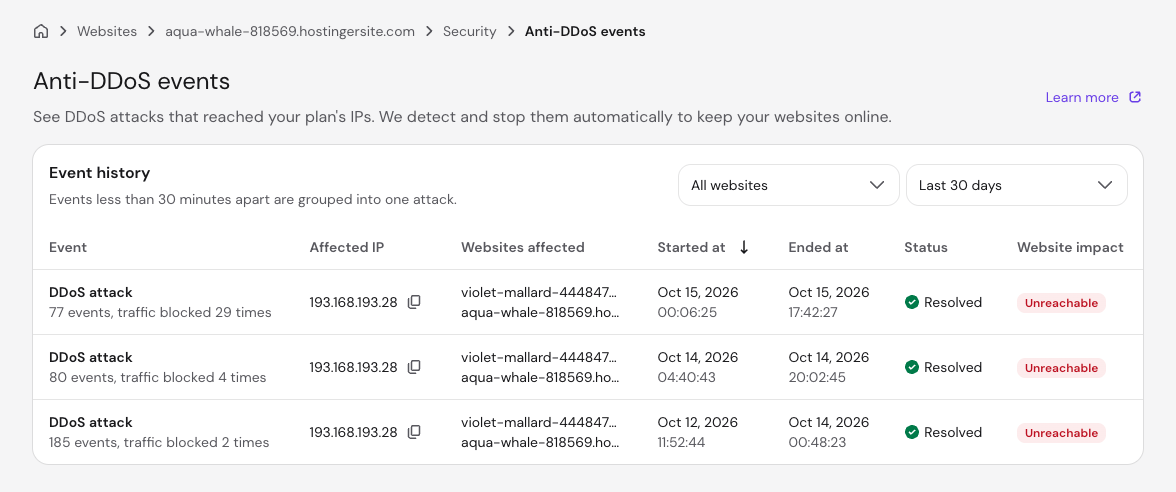
Hostinger web hosting and cloud hosting plans now include Anti-DDoS events, a page in Hostinger Dashboard that shows the DDoS attacks that reached your plan’s IP addresses. Hostinger detects and stops these attacks automatically.
You’ll find it under Security → Anti-DDoS events in your website’s dashboard. The Event history table lists each attack with the affected IP address, the affected websites, the start and end time, the status, and the impact on your websites. You can filter the table by website and by time period.
While an attack is active, a notification also appears on your website dashboard and on the Plan Details page. Agency hosting plans don’t include Anti-DDoS events yet.
Attach PDF files to AI prompts in Hostinger Reach
The AI prompt windows in Hostinger Reach now accept PDF files alongside images. Attach a brief, a product sheet, or any other document, and the AI uses its content to write campaigns, email templates, and signup forms.
Track views, submissions, and submission rate for Hostinger Reach forms
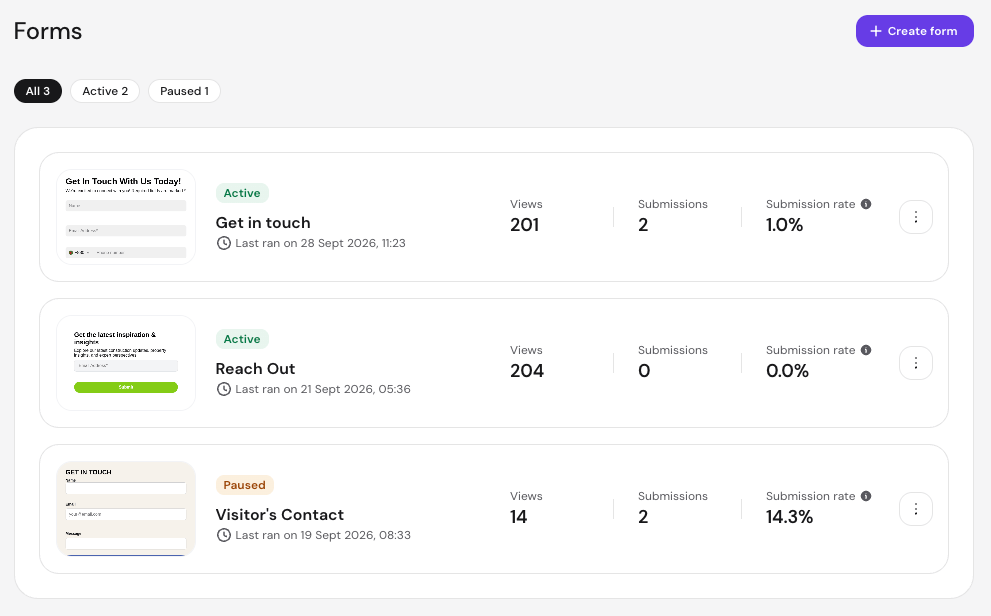
Every form you build with the Hostinger Reach Form Builder now comes with built-in analytics. The forms list shows three numbers for each form:
- Views. How many times the form was seen.
- Submissions. How many times the form was submitted.
- Submission rate. The share of views that turned into a submission.
With these side by side, you can see which forms grow your list most effectively and which get plenty of views but few submissions. That shows you where to adjust the copy, incentive, or placement, and whether the change helped.
Import larger product catalogs via CSV in Hostinger Ecommerce
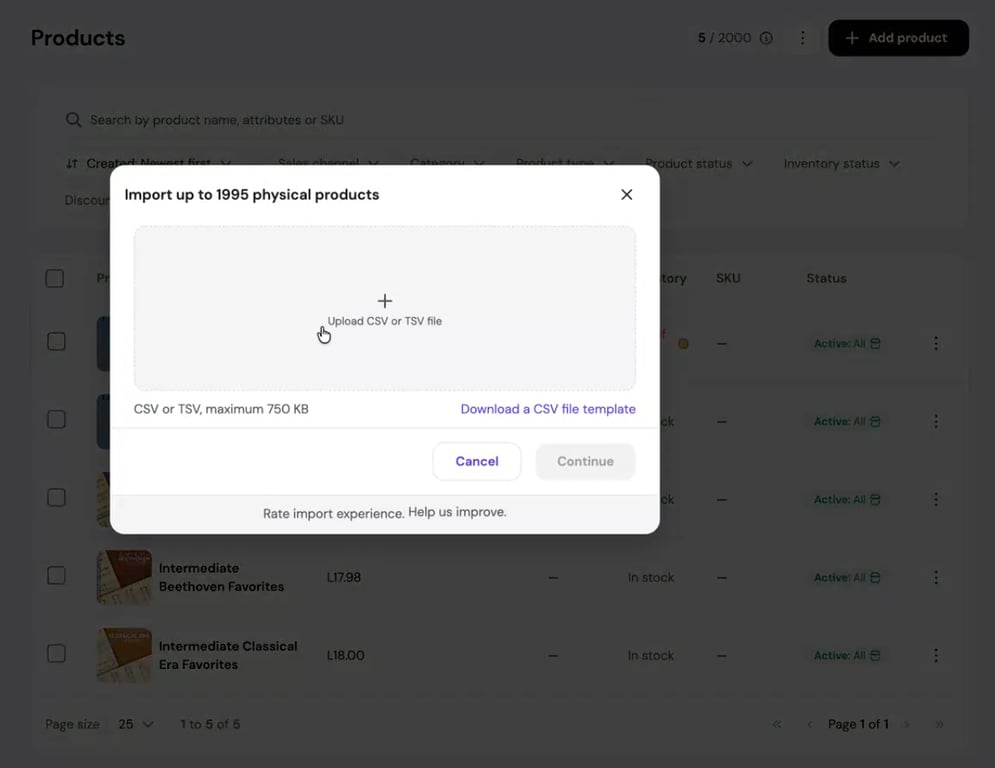
The CSV product importer in Hostinger Ecommerce now handles larger catalogs. You can import products up to your store’s available product slots in a single upload, and the import window shows the exact number. For example, a store using 4 of its 2,000 product slots can import up to 1,996 physical products at once.
Create LP Express labels for multiple Hostinger Ecommerce orders
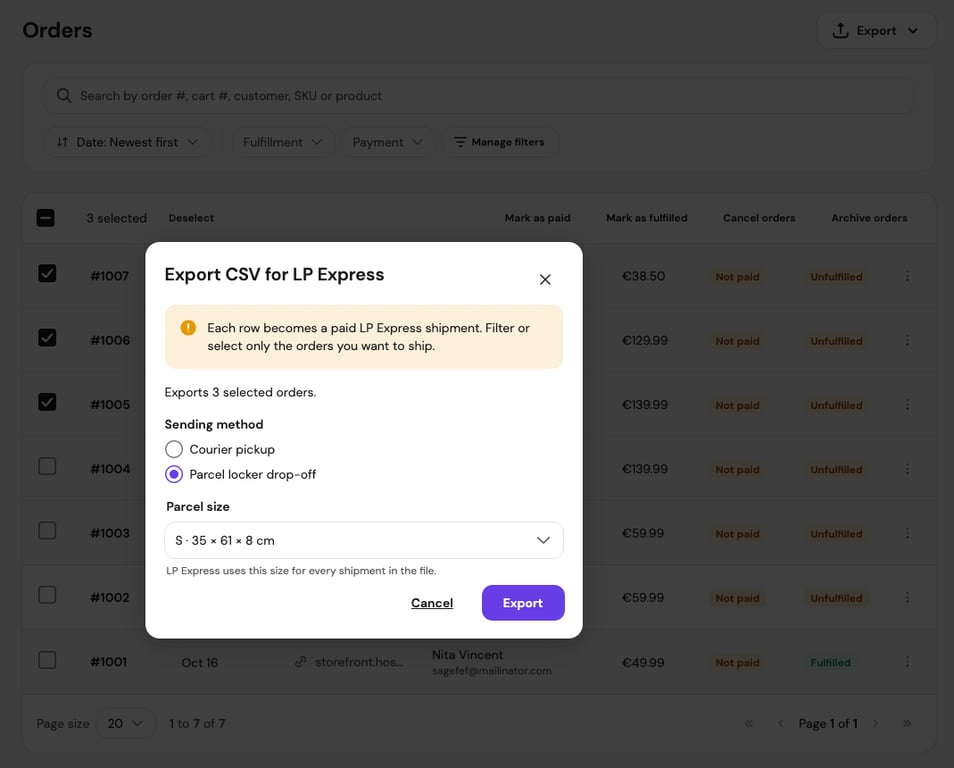
If you ship with LP Express, you can now create LP Express labels for multiple orders at once. Select the Hostinger Ecommerce orders you want to ship and export them as a single CSV file. In the export window, choose a sending method (courier pickup or parcel locker drop-off) and a parcel size, which applies to every shipment in the file.
Then import the file in the LP Express self-service panel. It includes each order’s receiver name, phone number, and parcel locker, so you don’t have to enter details order by order. One import adds every shipment to your LP Express cart.
Each row in the file becomes a paid LP Express shipment, so export only the orders you’re ready to ship.
That’s all for this week
For the running log of every release, check our changelog, and for the story behind each week’s updates, browse our weekly product updates.

Gusti Ayu Sandra is a Brand Reputation Specialist at Hostinger, where she keeps conversations between the brand and its community honest and helpful. Her career started in Customer Success, which taught her what customers really care about. Today, she works closely with the community across different platforms to make sure every voice is heard. Follow her on LinkedIn.

Simon is a dynamic Content Writer who loves helping people transform their creative ideas into thriving businesses. With extensive marketing experience, he constantly strives to connect the right message with the right audience. In his spare time, Simon enjoys long runs, nurturing his chilli plants, and hiking through forests. Follow him on LinkedIn.