Monday July 20, 2026
Gusti S. & Larassatti D.
Hostinger weekly product updates: Week 29, 2026
Last week’s Hostinger updates mainly introduced new ways to create, edit, and manage your websites, email accounts, domains, and online business.
Create and edit emails more easily in Reach 📨
The busiest updates we have from week 29 are coming from Reach. It gets several updates designed to make email creation faster and more precise.
A simpler way to start creating emails
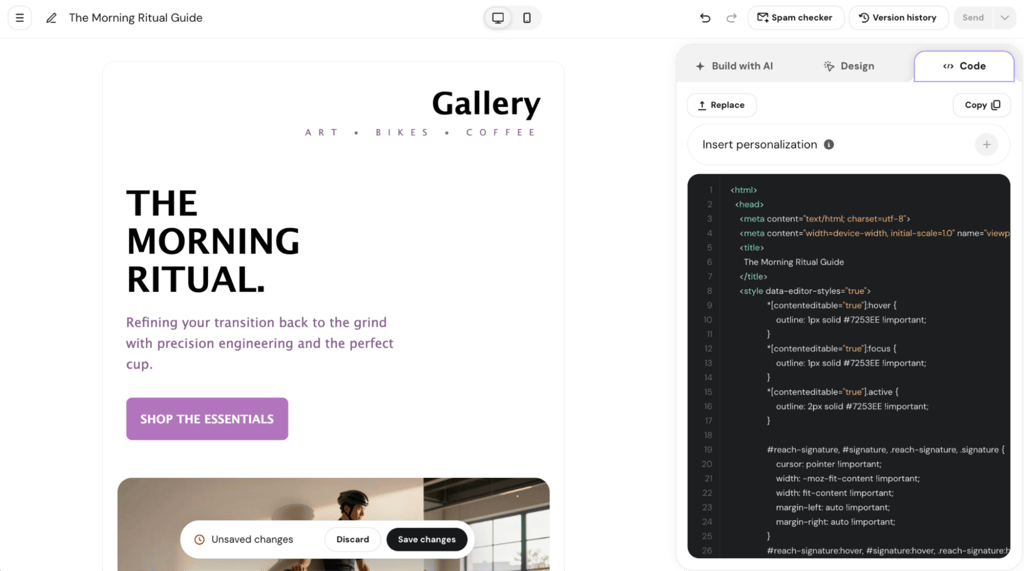
The Reach team has made it easier to get started with email creation.
When creating your first newsletter with Hostinger Reach, you can now start with a cleaner layout, use AI prompt suggestions to turn an idea into a first draft, or upload an existing HTML template.
Add custom pre-header text
Additionally, you can now add a custom pre-header to both campaign and automation emails.
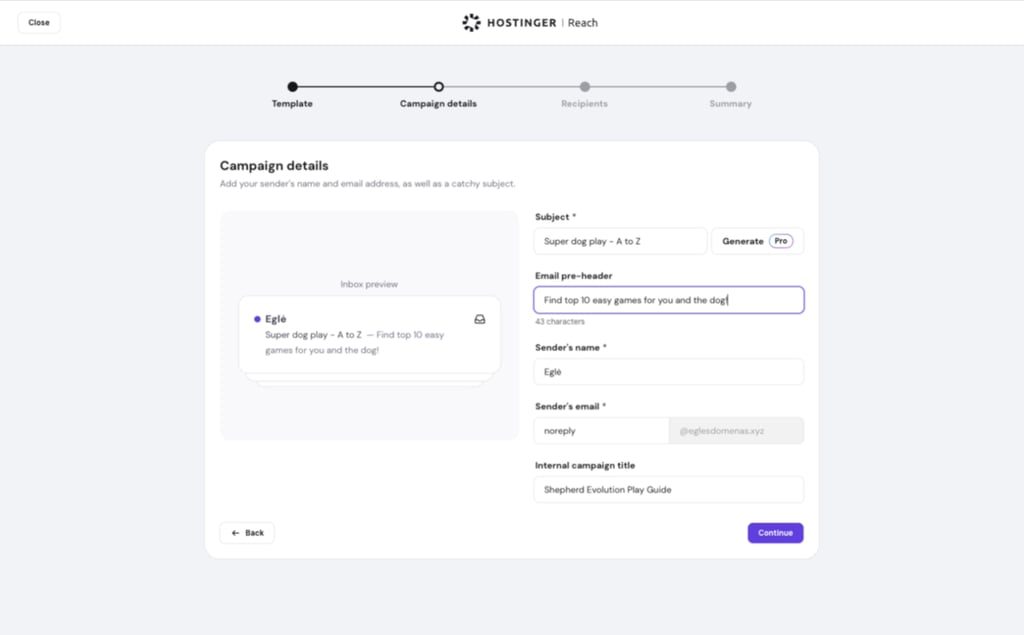
The pre-header is the preview text that appears alongside or below the subject line in many inboxes. Being able to customize it gives you another way to provide context, reinforce your message, and make your emails more compelling before they’re opened.
Make more precise AI edits
AI email editing is now more targeted. Instead of asking the AI to modify an entire template, you can select a specific section in the preview and prompt the AI to edit only that section.
The rest of your email stays untouched, making it easier to make small changes without having to redo parts of the design you already like.
Build automation drafts without a sending domain
Following the recent campaign drafts update, you can now create automation drafts even if you haven’t connected a sending domain yet.
This means you can prepare your automations first and handle the sending setup when you’re ready.
More convenient email management in Hostinger Mail 📩
Hostinger Mail also got a handful of practical improvements in the previous week.
Calendar invitations are easier to understand
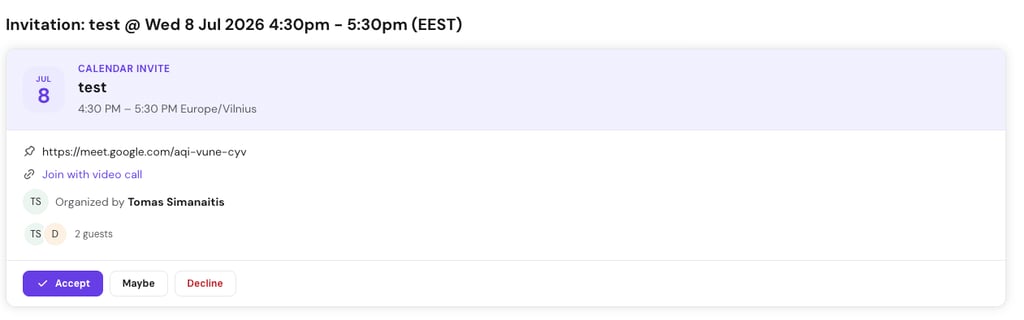
You can now display a native calendar invitation card directly from an attached ICS file.
Emails containing calendar invitations show a calendar badge in the email list and details header. Different colors help indicate the event’s current state, while additional safeguards have been added for external meeting links.
Six additional supported languages
To support greater accessibility, Hostinger Mail now has six additional languages:
- Hindi
- Japanese
- Romanian
- Spanish (Colombia)
- Spanish (Mexico)
- Ukrainian
Adjust your mailbox plan capacity
You can now reduce the number of allowed mailboxes in your Hostinger email plan directly from Hostinger dashboard, so there’s no need to cancel or downgrade your subscription plan anymore.
Our support article explains how you can reduce the number of mailboxes in Hostinger Mail.
Easier multi-page editing in AI Builder 🌍
Building a website through prompting with our AI Builder is becoming more flexible with the new visual editor updates.
A new page selector lets you quickly move between different pages of your website. And you can also use the content editing mode to make multiple changes across multiple pages, making it easier to work on your site without jumping back and forth between separate editing sessions.
Visit our support article if you’d like to learn more about the AI Builder’s visual editor changes.
More control over orders and faster checkout in Ecommerce 🛒
Last week’s Hostinger Ecommerce updates focus on making it easier to manage orders and helping customers check out faster.
Filter orders your way
Order filtering has been expanded with more ways to find exactly what you’re looking for. You can now filter orders by:
- Fulfillment status
- Payment status
- Date
- Product type
- Shipping method
- Country
- Order notes
- Discounts
You can also choose which filters appear in the More Filters menu and arrange them in your preferred order, giving you more control over how you manage your orders.

Stripe Express Checkout comes to Quick Link stores
Once Stripe is configured as a payment method and Express Checkout is enabled, customers with a supported digital wallet can complete their purchase directly from the product page.
That means fewer steps between discovering a product and completing the purchase.
New ways to manage domains 🔓
Domain management got two useful updates last week.
Change your .uk IPS tag from Hostinger dashboard
Previously, changing an IPS tag required contacting support. Now, .uk domain owners can handle it themselves in just a few clicks through Hostinger dashboard.
A new Change action is available in the Transfer section of the Domain → Overview page for .uk domains, including .uk, .co.uk, .org.uk, and other supported extensions.
The option is available for domains in active status and only to the actual domain owner.
Set up multiple domains at once
Bulk domain setup is now available in the Domain portfolio.
Instead of setting up domains one at a time, you can select multiple domains and use the action bar to trigger bulk registration, making larger domain management tasks much quicker.
More rewards for agency partners and a new Hostinger Agent skill 🚀
There are two notable updates on the partner and AI side this week.
Recurring commissions are now live for agency partners
Approved agency partners can now earn recurring commissions through the Hostinger Partner Program.
The new structure includes:
- 20% on new referrals
- 10% on cross-sells, upgrades, and renewals
- 20% off for referred friends on new purchases
The regular Referral Program remains unchanged for new purchases: referrals still earn 20% commission, and referred friends still receive 20% off. Cross-sell commissions, however, are now exclusive to agency partners.
Hostinger Agent can help remove your data from data brokers
Hostinger Agent has also added a new skill: Remove my data from data brokers.
You can ask the agent to find your listings across major people-search and data-broker sites and prepare opt-out requests for you. Nothing is sent without your approval.
Once the process is complete, the agent provides a report showing what’s been removed and what still needs your input. You can also set up a monthly re-scan to check for new listings over time.
The skill is designed to work only with your own data, giving you a simpler way to manage your online exposure.
That’s it for week 29
From more precise AI-powered email editing to easier multi-page website management, week 29’s updates are all about giving you more control while taking a few repetitive steps off your plate.
And there’s more on the way that you can check out on the Hostinger product roadmap.

Gusti Ayu Sandra is a Brand Reputation Specialist at Hostinger, where she keeps conversations between the brand and its community honest and helpful. Her career started in Customer Success, which taught her what customers really care about. Today, she works closely with the community across different platforms to make sure every voice is heard. Follow her on LinkedIn.

Larassatti Dharma is a content writer with 5+ years of experience in the web hosting industry. She has populated the internet with over 100 YouTube scripts and articles around web hosting, digital marketing, and email marketing. When she's not writing, Laras enjoys solo traveling around the globe or trying new recipes in her kitchen. Follow her on LinkedIn