Jev AI in practice: 5x faster, but is it accurate enough?
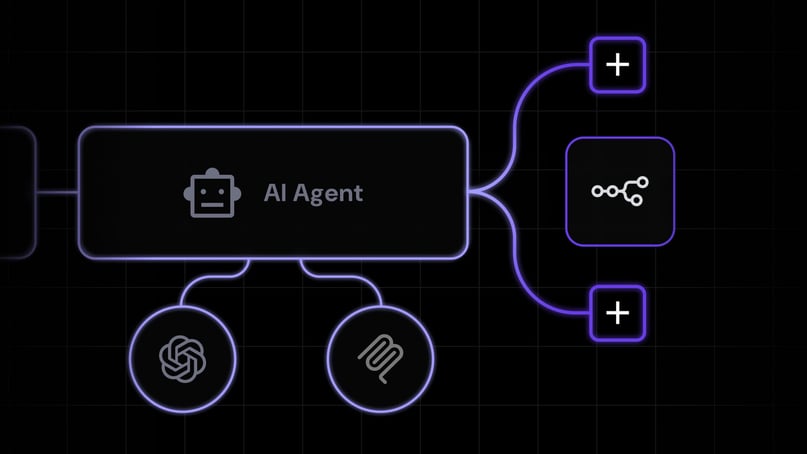
Most AI agents spend their day making tiny decisions: which tool to call next, whether a step worked, whether an email needs a reply. Each one goes to an LLM, takes a few seconds, and comes back as a paragraph of text your code has to pick apart.
It works, but it’s slow, the costs add up, and nothing tells you when the model is guessing.
Diogo Almeida used to work at OpenAI, where he helped build the methods that made ChatGPT good at following instructions. Now he’s CEO of TypeSafe AI, a company he co-founded, and he’s asking: “Models have been superhuman at chat for years, so where is all the automation?”
His answer is Jev, a model that can’t chat at all and is built only for the small decisions agents make, where you already know the handful of possible outcomes.
Within days of launch, developers had it playing Subway Surfers, moving shapes around a screen by voice command, and triaging inboxes for pennies.
The games get the most views, but the inbox demo is closer to your own work. Most teams have dozens of small decisions like that, and Jev could handle them for a fraction of what an LLM costs, as long as you know where it falls short.
We tested it on two of our workloads. Jev was good enough for spotting phishing domains, where it nearly matched the best model, but not for sorting support chats by product, where it fell well behind the LLM we use today.
That makes it a good fit for high-volume checks where a small drop in accuracy is fine, while an LLM is still the better choice wherever every point of accuracy counts.
What is Jev AI?
Jev is a model that makes decisions inside your agents and workflows. You give it a question and the possible answers, and it returns a probability for each one and, usually, a confidence score.
All of it goes straight back to your code. Nothing it returns is meant for a person to read.
It’s like a smart if statement. A normal if statement handles checks your code can do when it knows the exact value, like whether a number is over 100 or a field is empty.
It can’t tell whether a ticket sounds urgent or a tool call looks risky, because those need judgment. That’s the kind of check you hand to Jev, and your code acts on whatever it decides.
How does Jev work?
An LLM writes its reply one token at a time, while Jev works out the probability of every option at once. TypeSafe also trains it to be honest about how sure it is, using a method it calls reinforcement learning for calibrated decisions. That means when Jev returns 0.8 for an option, it should be right about 80% of the time.
Say you want every new email sorted automatically. You set up the question once, in your code or in a workflow tool like n8n. It asks “What kind of email is this?” and gives three possible answers: sales lead, support request, or spam.
From then on, every new email is sent to Jev’s API along with that question, and Jev picks one of the three. Jev might send back:
sales lead: 0.91

support request: 0.07

spam: 0.02

confidence: 0.68
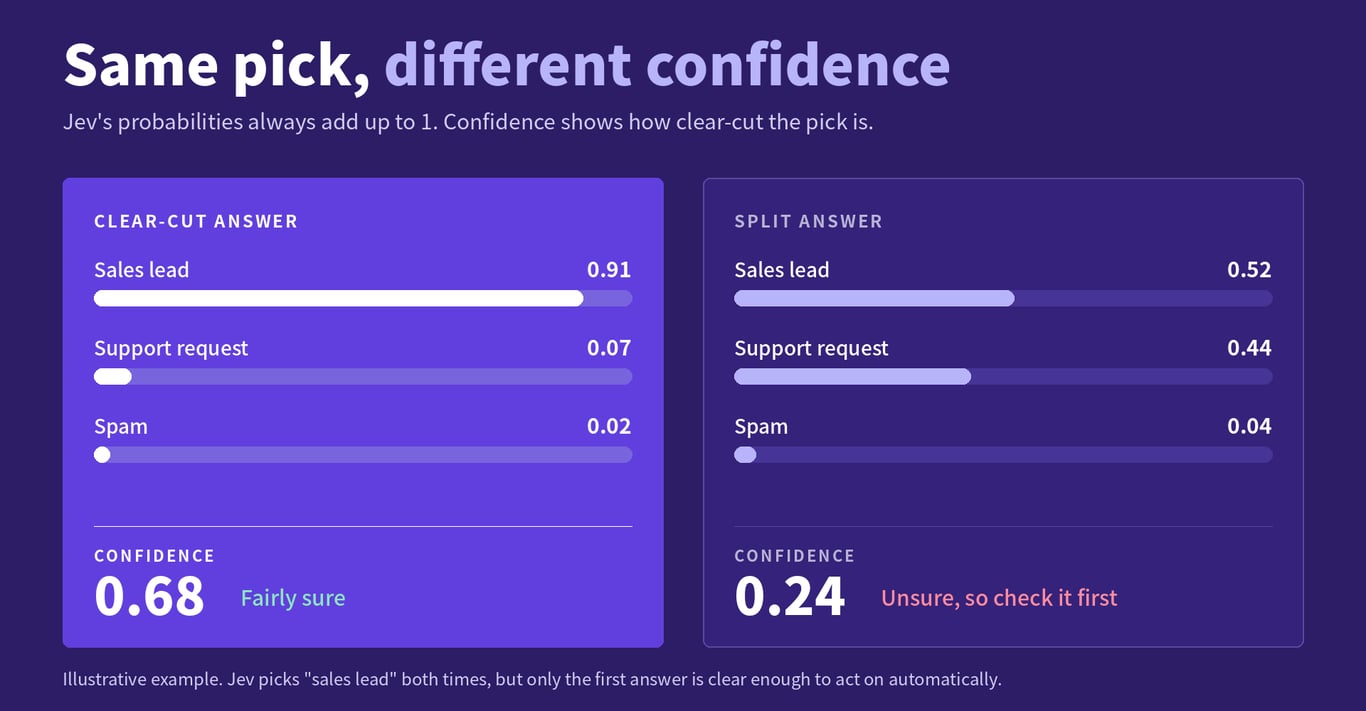
The first three numbers are Jev’s guess at how likely each answer is, and they always add up to 1. The last one, confidence, tells you how clear-cut the decision was.
When most of the weight sits on one answer, confidence is high, and when it’s split, confidence drops.
Here, 0.68 means Jev is fairly sure, since 0.91 sits on one option and the other two share what’s left.
Now imagine the same email came back as 0.52 sales lead, 0.44 support request, and 0.04 spam. “Sales lead” still wins, but confidence falls to something like 0.24, and we wouldn’t let our code act on that without a second look.
You never have to parse anything, because Jev can only return the options you gave it. That doesn’t mean the answer is right, so you still need a way to know when to trust it.
Why the confidence score matters
Speed and price get the headlines, but the confidence score is the most useful part of Jev, because it’s what lets you leave it running without checking every answer yourself.
That matters because a model that’s right 95% of the time still can’t run on its own if nothing tells you which answers are the other 5%.
LLMs rarely say when they’re guessing, so you end up either checking everything or trusting everything. Jev flags its own shaky answers, like that 0.24 email, and your code decides what to do with them.
You can do three things: let your code act on high-confidence answers, ask for confirmation on the ones in between, and pass low-confidence ones to a person or a bigger model.
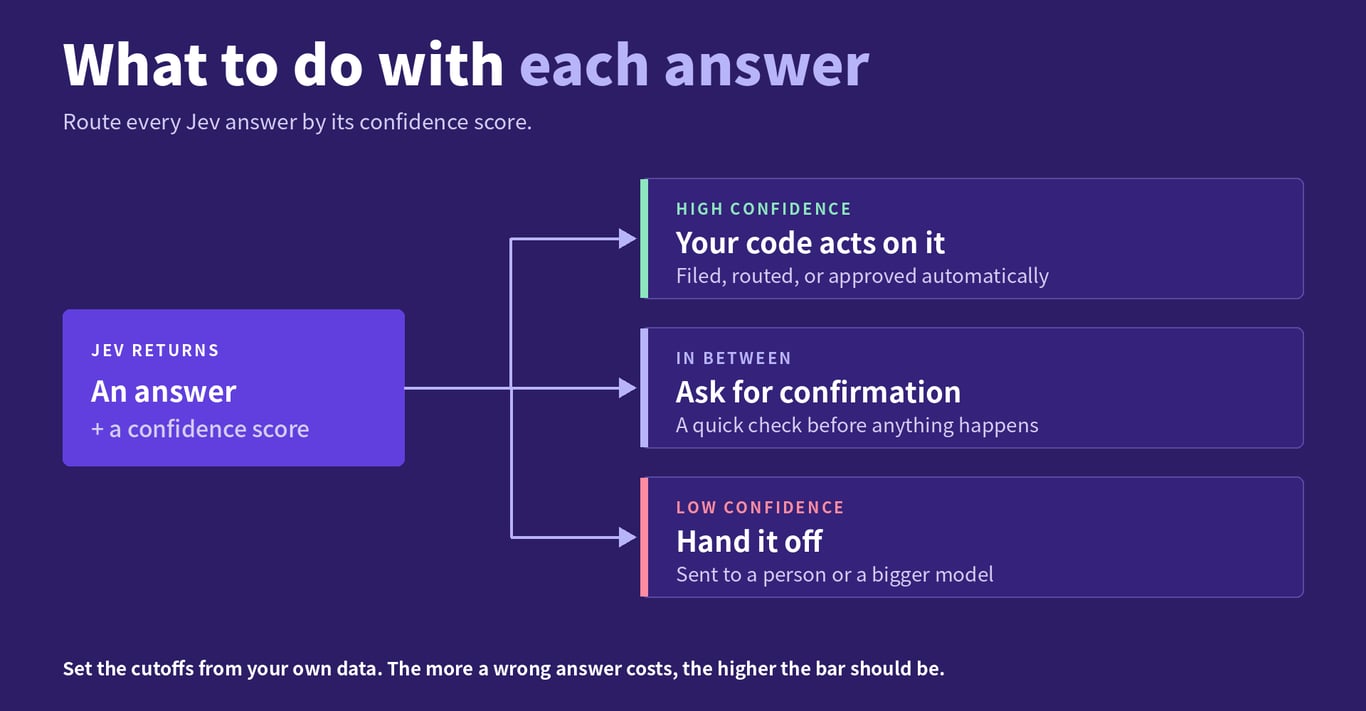
Where you put those lines is up to you, and it mostly comes down to what a wrong answer costs. A spam email that lands in the support queue costs someone a few seconds, while a sales lead filed as spam could cost you a customer, so we’d set a much higher bar before anything gets marked as spam.
We wouldn’t take the company’s 0.8-means-80% claim on faith, either, and you can’t borrow cutoffs from another model.
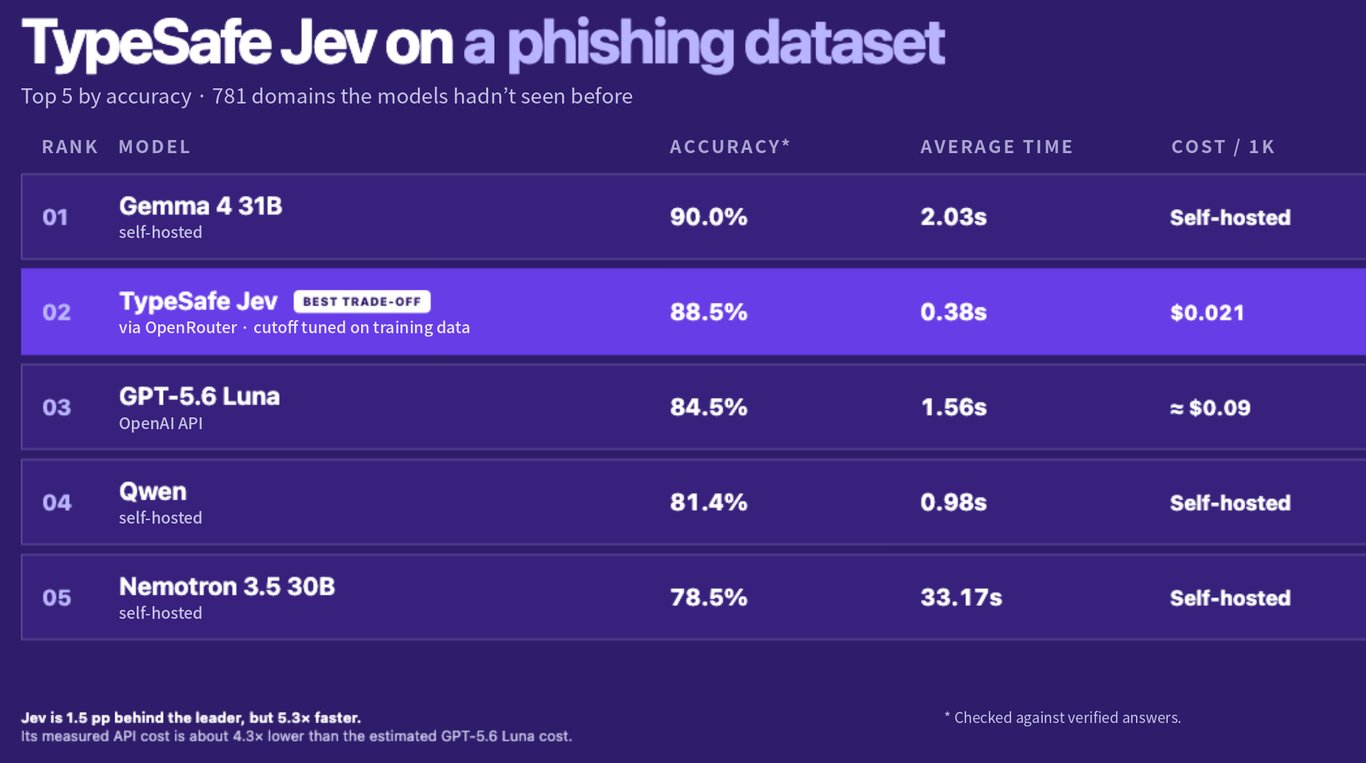
When we tested Jev on our phishing detection dataset, its confidence scale didn’t line up with the other models’, so we picked the cutoff using training examples, locked it in, and only then ran it on 781 domains it had never seen.
That’s the approach you should take. Tune the cutoff on one set of real examples, lock it in, then test it on another. If too many wrong answers slip through, build a better calibration set and repeat the process rather than nudging the cutoff on the test results.
How does Jev compare to LLMs?
We tested Jev on two of our own workloads, and the answer depends on the task.
The first was that phishing check. Compared with the verified answer for each domain, Jev got 88.5% of the 781 domains right. The most accurate model in the test, a self-hosted Gemma 4 31B, reached 90.0%, so Jev was only 1.5 percentage points behind while answering 5.3x faster, in 0.38 seconds on average against 2.03.
It was cheap, too. Jev cost about $0.021 per 1,000 domains, roughly 4.3x less than GPT-5.6 Luna, the best API model in the test, which scored lower at 84.5%.
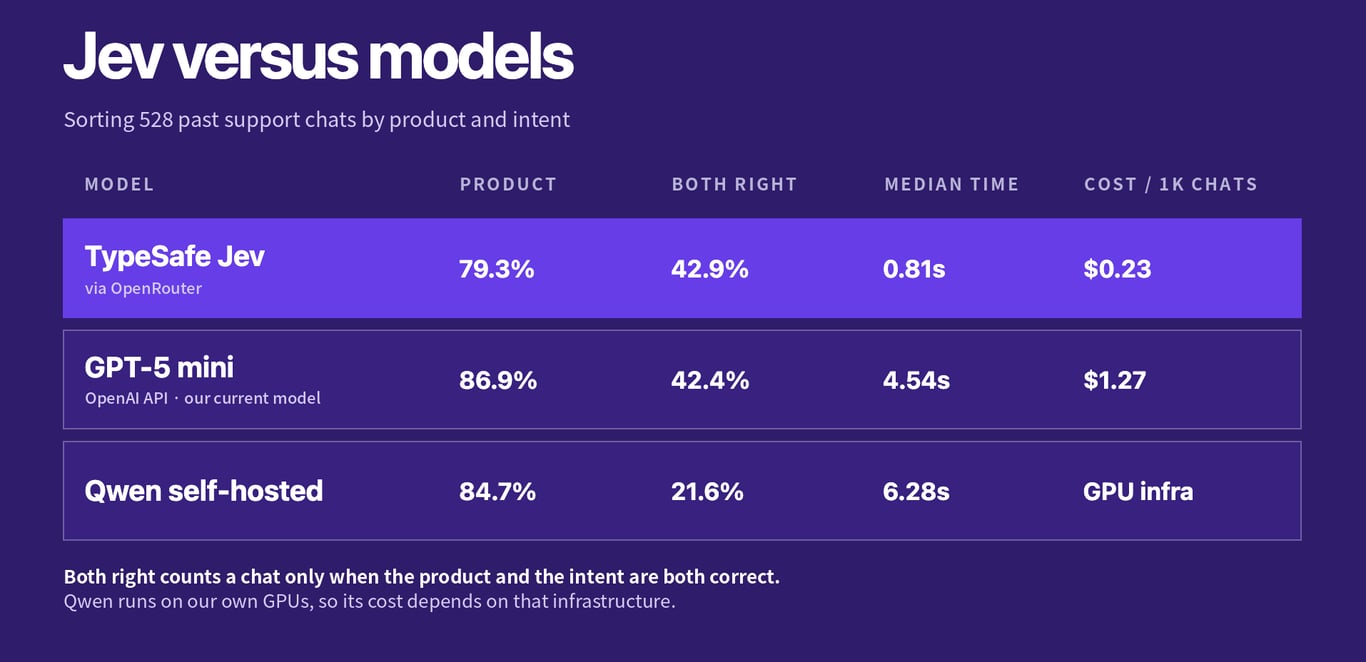
The second was sorting customer support chats by product and intent, using 528 past chats. Here the gap was bigger. Jev picked the right product 79.3% of the time, against 86.9% for GPT-5 mini. When both the product and the intent had to be right, they were level, with Jev at 42.9% and GPT-5 mini at 42.4%.
Jev was still much faster and cheaper, with a median of 0.81 seconds per chat against 4.54 seconds, and $0.23 per 1,000 chats against $1.27.
In both tests, Jev was about 5x faster and 4 to 6 times cheaper. That’s far less than TypeSafe’s launch claims of roughly 193x faster and 444x cheaper. The difference is that TypeSafe measured against large frontier models. We measured against the smaller, cheaper models we actually run, on real workloads, so the gap was always going to be narrower.
For phishing, we’d take that trade without much thought. For product classification, a 7.6-point drop is too much for us to switch today.
That’s why you should test Jev on your own data before deciding, since the gap can be tiny on one task and large on the next.
What changes when decisions are cheap
Once decisions get cheap, you start making far more of them. Right now, when every LLM call costs money and adds a few seconds, you ration. You check the tool calls you remembered to worry about and let the rest through.
At Jev’s prices, you can check every tool call, sort every incoming event, and rethink the plan after each step instead of locking it in at the start.
In our phishing test, Jev checked 1,000 domains for about 2 cents, which makes checking every single one an easy call.
Two warnings before you get too excited, though. First, cheap only counts if the answers are right.
In a separate AI coding models test, the cheapest model looked like the best deal per task, but its changes averaged only 43% of the size of the engineer’s edit, so part of the saving came from doing less than half the job.
A wrong call can also create extra work later, like a retry or someone cleaning up a mess, so keep an eye on what each correctly finished task costs, not just the price per call.
Second, Jev only works on small, clear questions. “Is this a refund request?” is the right size for it, while “handle this customer” is far too big.
Before you plug Jev in, break a big job like “handle this customer” into smaller questions, such as whether it’s a refund request, whether the customer is upset, and whether the order number is valid.
One workflow, split into small decisions
Gabrielė Bagdonaitė, who manages influencer performance and operations at Hostinger, built an agent to review partner content. It scrapes a partner’s video, checks the links and coupons, makes sure the product is described correctly, and logs everything in a sheet.
That turned out to be too much for one agent. It would finish part of the job and miss the rest, or insist it couldn’t use a tool it had access to.
Here’s a rough sketch of how a workflow like hers could be split with Jev:
| Step | Handled by |
| Pull the video’s transcript, description, and the product’s key facts | Plain code |
| Check that the coupon code appears in the description | Plain code |
| Check that the affiliate link is present and works | Plain code |
| Does the video match the product facts? | Jev |
| How prominent is the mention: brief, moderate, or featured? | Jev |
| Is the tone positive, neutral, or negative? | Jev |
| Write a short summary for the team | LLM |
| Log the results in the sheet | Plain code |
| Review any low-confidence or borderline answer | A person |
Only three of the nine steps need judgment, and each of those asks one narrow question.
If we were building this, we’d start with the plain-code steps, since they’re the easiest to get right, and then add the Jev questions one at a time. Each row maps onto a node in self-hosted n8n, so you can test every piece on its own before connecting the next.
Should you use Jev AI?
Jev makes the most sense for decisions your system makes over and over, with a fixed set of possible answers, like routing, triage, tool selection, and safety checks.
Our phishing check is a good example: one clear question asked thousands of times, where Jev came within 1.5 points of the best model.
It’s also worth comparing if you self-host models today. In the phishing test, the self-hosted Gemma 4 31B was the most accurate, but Jev came close at about a fifth of the latency, with no GPUs to run.
In the support chat test, Jev answered far faster than our self-hosted Qwen (0.81 seconds against 6.28) but was less accurate on products (79.3% against 84.7%).
We’d keep it away from three kinds of work, though. The first is judgment that depends on knowing the whole system.
In our coding test, all seven models set a 30-second timeout because the ticket asked for one. The engineer who shipped the task used 20 seconds, because that’s the limit the rest of the codebase already used for this kind of service.
Asking Jev “Is 30 seconds a sensible timeout?” wouldn’t have caught that, because Jev only sees what you send it, and the right answer lived somewhere else in the codebase.
The second is long tasks that need a plan. Jev answers each question on its own in a fraction of a second, so it isn’t built to think several steps ahead. For an open-ended agent, the setup we’d try is a bigger model doing the planning and Jev making the quick calls along the way.
The third is anything that involves writing or seeing. Jev doesn’t generate text, and it only takes text in, so it can’t look at a screen. If your agent needs to understand a screen or a messy page, you’ll have to build that translation step first.
The easiest place to start is an agent or workflow you already run. Find the spots where it asks an LLM a yes-or-no question or has it choose from a short list of options, and run Jev on those same calls next to your current setup for a week.
Then compare how often each one was right and what each one cost. If Jev holds up, those are decisions you can now afford to check every time. If it doesn’t, you’ve spent a week and a few cents finding out.

Simon is a dynamic Content Writer who loves helping people transform their creative ideas into thriving businesses. With extensive marketing experience, he constantly strives to connect the right message with the right audience. In his spare time, Simon enjoys long runs, nurturing his chilli plants, and hiking through forests. Follow him on LinkedIn.

Mantas, a Data Scientist at Hostinger, focuses on leveraging AI technologies to drive innovation and enhance our projects. With a Ph.D. in Informatics and over 8 years of experience in AI, data science, and research, Mantas also contributes to academia through various AI-focused projects.