What we learned running seven AI coding models on real production work
Seven AI models read the same ticket and reached the same answer. They were all wrong.
The ticket said add a 30-second timeout, so they wrote a 30-second timeout. The engineer who’d shipped this task wrote 20 instead.
They’d read the codebase, which already defined a 20-second timeout for that type of service because the system caps how long any single request can wait. A 30-second timeout would never have fired.
That information was sitting right there in the code. The AI models had access to it, but none of them looked.
That was one of 12 pull requests (PRs) in an experiment we ran. We spent $1,024 letting seven models attempt work our engineers had already written, reviewed, and shipped to production. We reset each codebase to the commit before the engineer started, gave the models the same Jira tickets, and let them work alone with no human help.
Five of the seven finished within four hundredths of a point of each other. But the scores don’t tell the full story. The timeout was the most obvious example of a shared blind spot. It wasn’t the only one.
What we tested and how
We picked 12 PRs from six different codebases, all shipped to production. The tasks ranged from small (4 files, 33 lines) to large (21 files, 2,497 lines), and covered ordinary engineering work: a new API endpoint, a ticketing-system update, a payment provider safeguard, a frontend CTA behavior change, template version bumps.
Each model got the task description straight from the Jira ticket, unedited, and worked alone with no human help. No rewriting to make it clearer or more model-friendly, no follow-up questions answered, no “try again.” They also couldn’t access our internal tools and never saw the engineer’s solution.
All seven models ran inside Claude Code with identical settings across all 84 runs, routed through nexos.ai. The only thing that changed was which model answered.
For scoring, we used GPT-6 Astra, a model that wasn’t part of the test. It compared each model’s work to the engineer’s solution, scored the match from 0 to 1, and wrote out its reasoning on every run.
Here’s what came back.
| Model | Match to engineer’s work (0–1) | Cost/run | Time/run | Tokens/run |
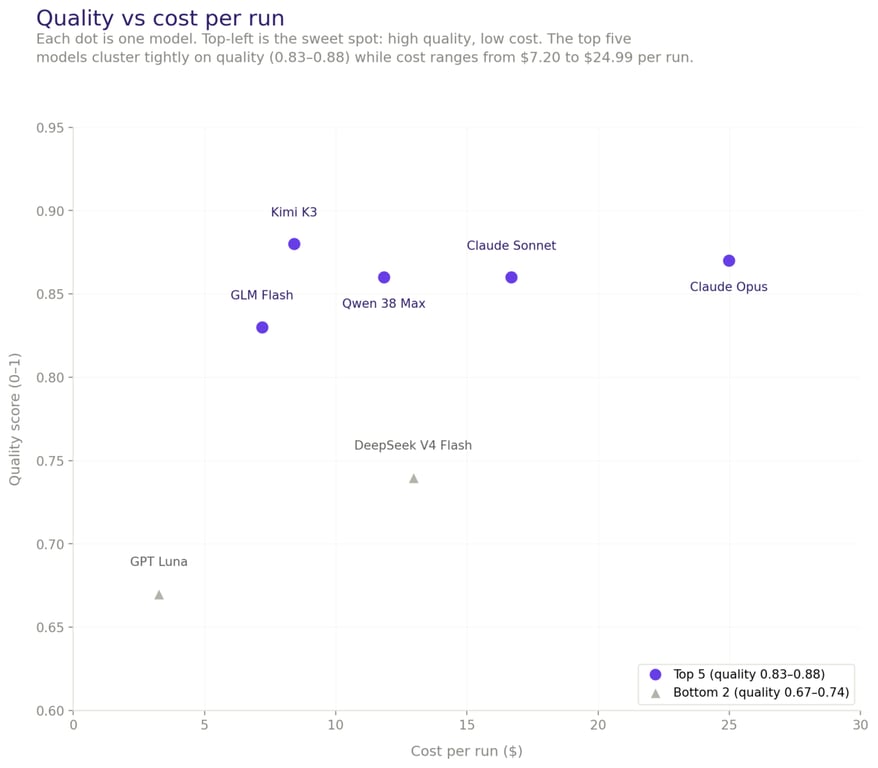
| Kimi K3 | 0.88 | $8.42 | 17.8 min | 6.38M |
| Claude Opus | 0.87 | $24.99 | 7.6 min | 4.84M |
| Claude Sonnet | 0.86 | $16.69 | 12.8 min | 7.09M |
| Qwen 3.8-Max | 0.86 | $11.83 | 25.2 min | 6.48M |
| GLM Flash | 0.83 | $7.20 | 12.7 min | 8.54M |
| DeepSeek V4 Flash | 0.74 | $12.96 | 9.2 min | 3.08M |
| GPT Luna | 0.67 | $3.26 | 15.5 min | 2.54M |
Five models finished with almost the same score
Kimi K3 scored 0.88. Claude Opus scored 0.87. Sonnet and Qwen 3.8-Max both hit 0.86. GLM Flash came in at 0.83. Five models, five different companies, separated by four hundredths of a point.
The gap only opened up at the bottom: DeepSeek V4 Flash scored 0.74, GPT Luna 0.67.
Based on what we saw, Kimi K3 is a solid pick if you want a single winner since it produced the best answer on 8 of the 12 tasks. But on everyday maintenance work in a mature codebase, these five models perform about the same.
We saw a similar pattern when we benchmarked four AI models on creative and analytical tasks – the newest model wasn’t always the best.
Where they differ is speed. Opus finished in 7.6 minutes per task on average and was fastest on 8 of the 12 tasks. Kimi K3 took 17.8 minutes. Qwen 3.8-Max took 25.2 minutes, and its slowest single run lasted an hour and a half.
Speed isn’t fixed the way pricing is. It depends on provider load, network path, and spare capacity. We measured each model on a different day within a single week. That means a big gap like Opus at 8 minutes vs Qwen at 25 is real. But if two models are a couple of minutes apart, that could easily flip on a different day.
Whether speed matters depends on how you’re using these models. A developer watching a progress bar feels every extra minute. A batch job running overnight that someone reviews over coffee the next morning? The slower, cheaper model is fine.
Since five models scored about the same, the quality gap between them isn’t big enough to drive the decision. You’re really choosing based on speed, cost, and how easily they fit into your existing setup.
Teams spending weeks evaluating which model writes the “best” code might get more out of that time by improving their prompts, tooling, and review process instead.
What the scores don’t tell you
The scores look clean, but they hide some interesting stories when you dig into the details.
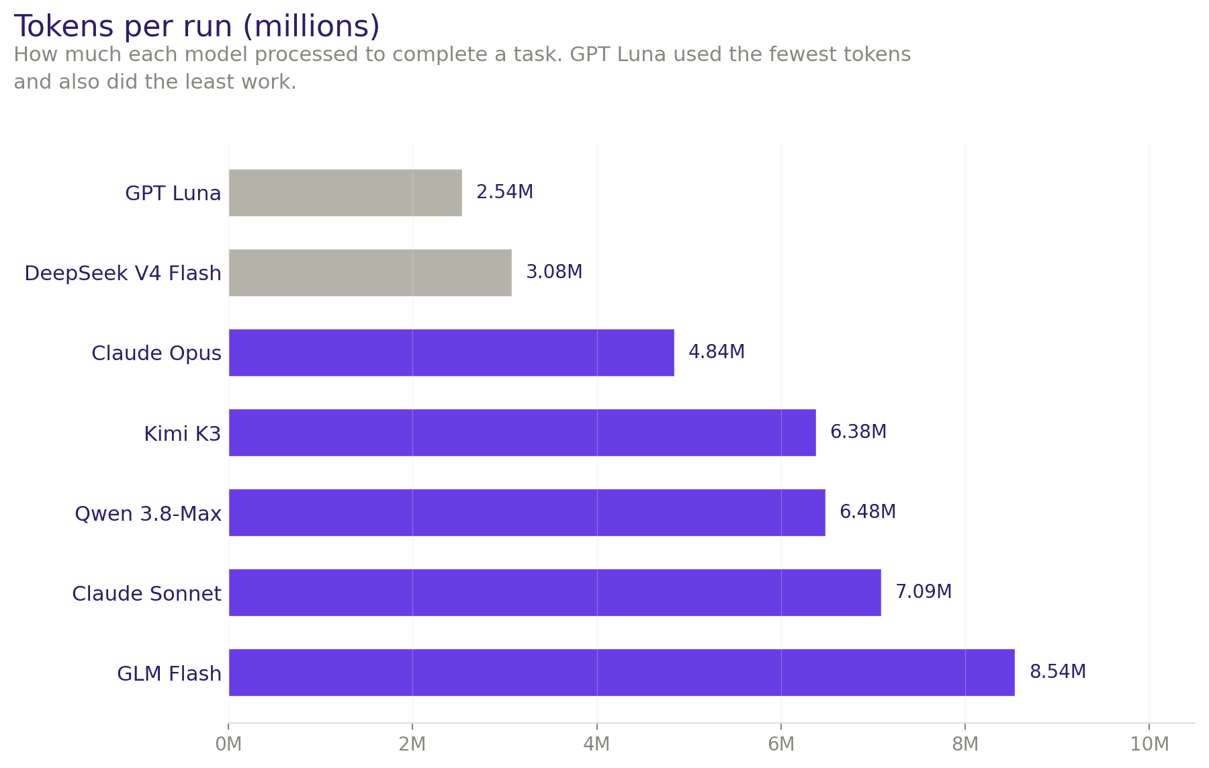
The cheapest model did less, but not worse. GPT Luna cost $3.26 per task and was the cheapest on 8 of 12 tasks. Looks great on a dashboard. But its changes averaged 43% of the engineer’s edit size, meaning it did less than half the work. You can see this in the token counts too – GPT Luna averaged 2.54M tokens per run where the other models used 3–8.5M.
It also found only 64% of the right files and never produced the best answer on any task. The weird part is that it was the most precise about the files it did touch, at 99%. So it picks one corner of the job, does that corner well, and stops as though it’s done.
A high score can still mean an unmergeable submission. Kimi K3 scored 0.9 on the largest task alone. It also touched 200 files where the engineer touched 21. Most of the extra work was end-of-line character rewrites, plus unrelated database migrations and a test script.
One data file had all 961 lines flagged as changed while the content stayed identical. The judge scored the behavior as correctly implemented, because it was. But any engineer reviewing that PR would reject it.
The same blind spot showed up across providers. On one task, when a request failed, the system was supposed to pause before trying again. Four of the seven models skipped the pause and retried immediately, which can overwhelm the system.
Same mistake, four different companies, all arrived at independently. These systems train on overlapping data, so they tend to get the same things wrong. If your plan is to have one model write code and a second one review it, both can miss the same thing.
Tests were the most commonly skipped work. Missing or weaker test coverage was the judge’s most frequent objection, across nearly every model. One run’s changes would have broken existing tests and the model hadn’t noticed. Our engineers wrote tests as part of the work. The models treated them as optional.
The code reads fine. It just assumes everything goes right.
We went through the judge’s objections across all 84 runs and a pattern showed up. It almost never complained about naming, formatting, or readability.
What it flagged was behavior the code didn’t think about: a success response missing the ID the next step needs, a retry that fires with no delay, a validation check quietly left for the caller to handle.
One run was flagged for treating every HTTP 201 as success, including responses without a ticket ID.
Across the board, the code handled the expected case well and left the unexpected case to someone else. This is one of the bigger risks for non-developers building with AI tools, where there’s often no one in the process to catch what the model missed.
The small tasks with tricky edge cases gave the models more trouble than the large ones with straightforward requirements. The task where all seven models performed worst was one of the smallest in the set. The one they found easiest was more than twice the size.
The timeout example is the clearest case of this. The engineer looked at the system and overrode the ticket. The information was right there in the code – the models just never looked beyond the instructions.
Limitations and what comes next
There are a few things to keep in mind when reading these results.
Twelve PRs is a small sample. A bigger dataset would give us more confidence in the rankings, though we’d expect the convergence to hold.
Eight of the 12 PRs were TypeScript, so we’re more confident in the results for TypeScript than for the other languages in the test.
There’s also a limitation in how we scored. The judge compared each model’s work to one specific engineer’s solution, so a lower score sometimes just meant the model took a different approach, not that the code was wrong.
Only 11 of 84 runs got a perfect score, and in those cases the model’s code was essentially identical to the engineer’s. That tells you whether the model could have saved us a day of work, but not whether the code itself was good or bad.
The bigger limitation is how we ran the test. Each model worked alone, start to finish, with no human input. That’s not how developers actually use these tools, which means these scores are the floor, not the ceiling. In practice, it’s back-and-forth: the developer steers, corrects, asks follow-ups, iterates.
How a model responds to feedback and collaborates on a solution matters a lot, and none of that shows up in a single-shot test. Developers also bring their own setups – custom skills, MCP servers, various tools – all of which affect the output.
To get a fuller picture, you’d need to combine automated analysis like this with real developers doing actual work alongside the models.
For now, if you’re using AI coding tools, the model you pick matters less than you think. How you review what it produces matters more, and based on what we saw, that means checking for scope creep, unnecessary file changes, missing edge cases, and skipped tests rather than syntax and style.

Simon is a dynamic Content Writer who loves helping people transform their creative ideas into thriving businesses. With extensive marketing experience, he constantly strives to connect the right message with the right audience. In his spare time, Simon enjoys long runs, nurturing his chilli plants, and hiking through forests. Follow him on LinkedIn.

Tomas Rasymas, AI Research Lead at Hostinger, drives the integration of AI to enhance our products and customer experience. With over 15 years of tech experience, he leads AI research, mentors a talented team, and advocates for transformative AI power. During leisure, Tomas enjoys trail running and reading books.