What are multimodal AI agents and how do they work?
Sep 18, 2026
/
By Bruno S.
/
9 min Read
Multimodal AI agents are systems that process and reason across multiple types of information at once – text, images, audio, video, documents, or structured data – and use that combined understanding to decide what to do next.
These agents work in five stages: they take in inputs, combine and interpret them, reason toward a goal, use tools or take actions, and produce a result. Memory carries context between steps and across sessions.
In practice, that means reading invoices and error screenshots, automating tasks that mix spreadsheets and PDFs, navigating software interfaces, holding voice conversations, creating text with matching visuals, and supporting work in healthcare and robotics.
Richer context and fewer manual steps are the main advantages of multimodal AI agents; the main constraints are higher compute costs and errors when combining conflicting inputs.
What are multimodal AI agents?
Multimodal AI agents are AI agents (automated software systems) with the ability to process and reason across several types of data at the same time and then act on what they understand.
Many AI agents work with one input type at a time, typically text. A multimodal agent removes that constraint by handling several formats at the same time – the way a person might read a report, look at a diagram, and listen to a voice message before deciding what to do.
The term modality describes a type of data. Text is one modality; an image is another; audio is a third. A multimodal agent treats several modalities as a single, integrated input rather than routing each to a separate tool.
Multimodal agents also differ in how much they do on their own. Fully autonomous AI agents complete multi-step tasks without human input; others suggest and action and wait for approval before acting.
What types of data can multimodal AI agents process?
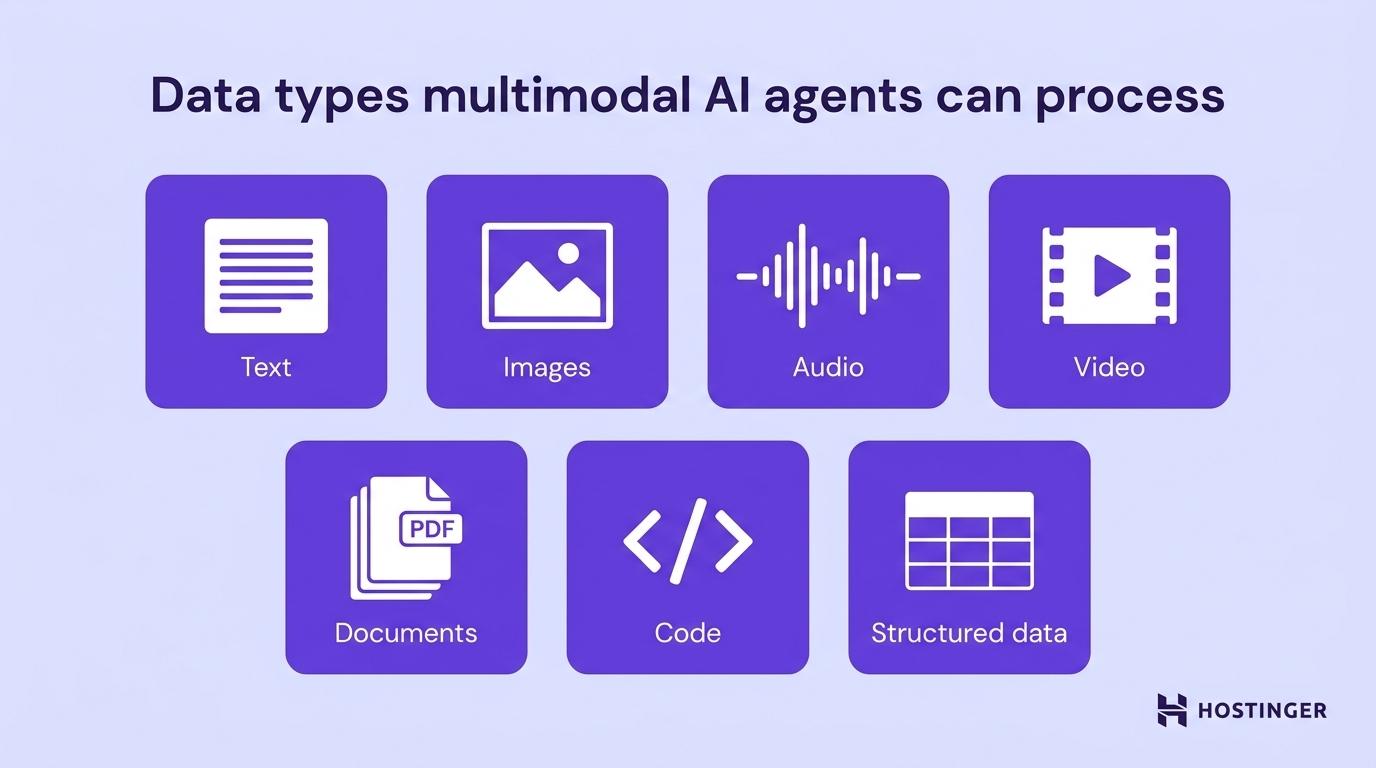
Multimodal AI agents commonly process seven types of data, from written text and images to audio, video, documents, code, and structured records.
- Text. Written instructions, messages, emails, or web content.
- Images. Photographs, diagrams, logos, or screenshots.
- Audio. Voice commands, recorded calls, or sound clips.
- Video. Recorded footage or screen recordings.
- Documents. PDFs, Word files, or spreadsheets that combine text, layout, and sometimes embedded images.
- Code. Programming files or scripts that the agent can read, write, or execute.
- Structured data. CSV files, JSON objects, or database records with defined fields.
How do multimodal AI agents work?
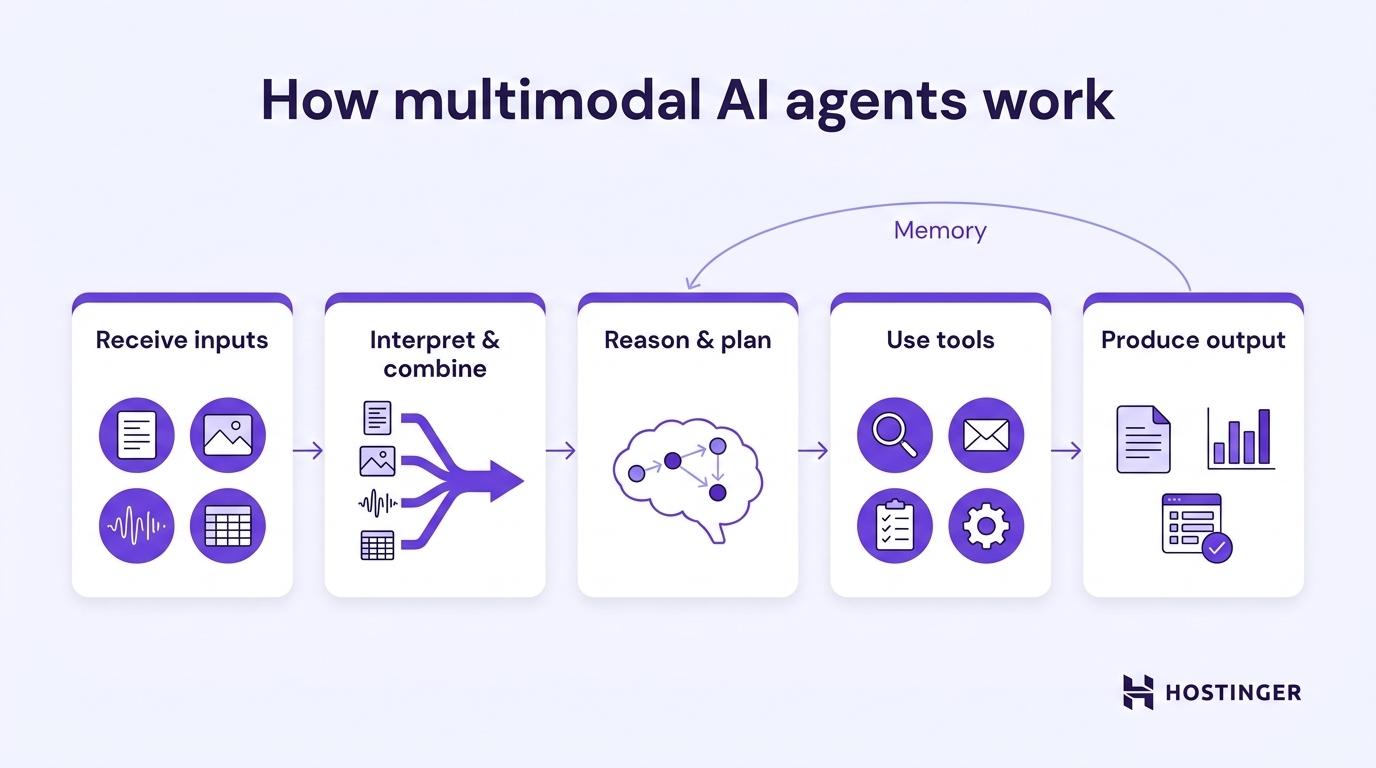
Multimodal AI agents work in five stages: they receive inputs in one or more formats, interpret and combine them, reason and plan toward a goal, use tools or take actions, and produce an output or hand off the next step.
1. Receive inputs
The agent accepts information in any available format – a written prompt, an attached image, an uploaded spreadsheet, or a voice recording.
A customer support agent, for example, might take in a text description of a problem alongside a screenshot showing the error on screen.
2. Interpret and combine
The agent combines all inputs into a unified understanding, so a text description and a screenshot of the same problem become part of the same picture.
The agent links a photo of a product to the written description of it, treating both as references to the same thing. Cross-referencing between formats resolves ambiguity: the ticket text might suggest one issue, but the screenshot confirms another.
3. Reason and plan
The agent uses a large language model (LLM) – a type of AI trained on huge amounts of text to understand and generate language – as its reasoning engine to interpret the combined inputs and plan a sequence of steps.
Multi-step planning is what distinguishes agentic workflows from simple model interactions: each step builds on the previous result.
4. Use tools or take actions
The agent selects and uses tools based on the task at hand, such as searching the web, calling an API (application programming interface), sending a message, filling in a form, or triggering another system.
This is what separates an agent from a model: tool use and the ability to act, not just respond. Multimodal inputs combined with tool access allow these agents to handle tasks that no single model can complete on its own.
5. Produce output or continue
The agent generates a result, such as a written summary, a generated image, a completed form, or a structured report.
The output can itself be multimodal – for example, a written analysis accompanied by a chart generated by the agent in the same step. The loop continues until the agent reaches the goal.
Memory
Memory is what lets an agent build on earlier steps instead of starting fresh each time.. Short-term memory holds context within a single task – the agent remembers what was said earlier in the same conversation. Persistent memory carries context across separate sessions, retaining things like your company’s tone of voice or a decision you made last week..
Pro tip
A multimodal agent does not need to be built on one large model that handles every format. Many production agents chain together smaller, task-specific models: a speech-to-text model feeding into an LLM, which feeds into an image generator. What makes the agent multimodal is the workflow, not the underlying architecture.
What’s the difference between a multimodal AI model and a multimodal AI agent?
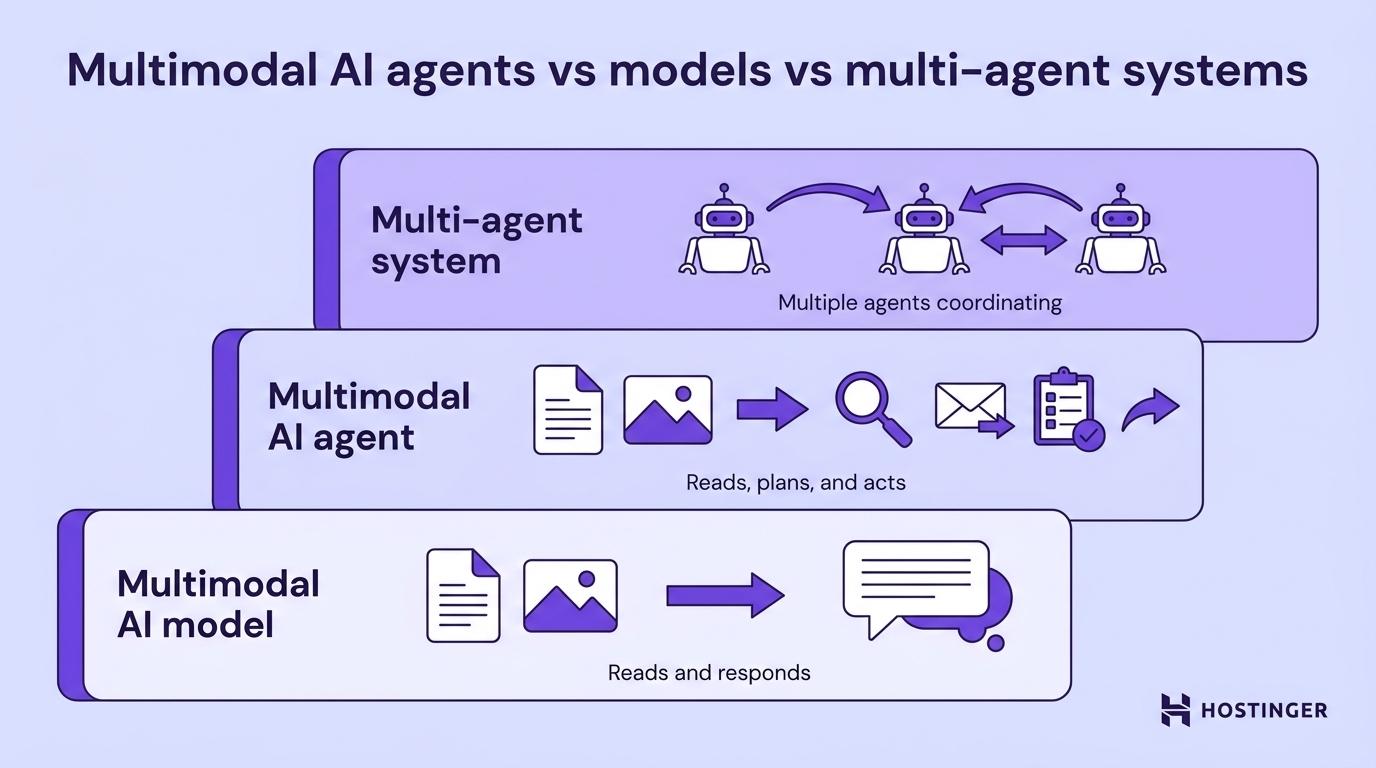
The difference is that while a multimodal AI model reads different types of information and generates a response, a multimodal AI agent uses that same capability to pursue a goal and take real-world actions.
The distinction matters because both terms get used in the same places even though they describe different things. Where a model responds only when prompted, an agent perceives its environment, plans what to do, and acts, often without waiting to be asked again.
Multi-agent systems go a step further: they are networks of individual agents that divide a complex task, with each agent handling a specific part and passing results to the next.
Multimodal AI model | Multimodal AI agent | Multi-agent system | |
What it is | A model that processes multiple data types | A system that uses multimodal processing to pursue goals and act | Multiple coordinating agents sharing a complex task |
What it does | Converts inputs into outputs | Perceives, reasons, acts, and uses tools | Divides work between specialized agents |
Example | Claude or ChatGPT reading text and images together | An agent that reads a PDF, searches the web, and sends a follow-up email | A pipeline where one agent searches, one summarizes, and one formats the result |
A multimodal agent typically contains a multimodal model (or a chain of single-modality models) as its reasoning core. The model is the engine; the agent is the system with a goal to reach.
Is ChatGPT a multimodal AI agent?
No: ChatGPT is primarily a multimodal model interface, not a multimodal AI agent. It processes text and images and generates responses, but it does not act autonomously.
When ChatGPT uses tools – running code, browsing the web, generating images, or running its agent mode – it comes closer to being an agent. Those are features layered on top of the underlying model, not a goal-directed system that plans and acts on its own.
The broader category ChatGPT and similar products belong to is multimodal LLMs: large language models extended to handle multiple data types. A multimodal agent uses an LLM as its reasoning core but adds the architecture to perceive, plan, and act without waiting for the next prompt.
What are multimodal AI agents used for?
Multimodal AI agents are commonly used for document analysis, customer support with visual inputs, business task automation, computer use, voice interaction, content creation, and physical-world applications like healthcare and robotics.
They are most useful when information arrives in more than one format and a text-only tool would miss part of the picture. A broader catalog of real-world AI agent examples covers how these patterns appear across different industries.
Analyzing documents and support tickets containing images
Multimodal agents handle documents where layout and visuals carry as much meaning as the text.
Invoices, contracts, and technical reports often include tables, diagrams, and stamps that text extraction alone would miss. The agent reads both the written content and the visual structure together.
The same capability applies in customer support: the agent reads the error screenshot directly rather than asking the customer to describe what they see. This removes a step where details can get lost, such as the customer describing the wrong thing or leaving out something the agent needs to resolve the issue.
The same agent handles both the document side and the customer-facing side: reading the contract PDF before the call, then analyzing the screenshot the customer sends during it.
Business task automation with mixed file inputs
Multimodal AI agents automate business tasks that involve mixed file types – such as reading a sales spreadsheet, a supplier PDF, a product image, and a series of emails – as one connected workflow rather than separate tools for each.
Hostinger Agent is built for this kind of mixed-input work. It analyzes images, PDFs, JSON files, and CSV files, generates and edits images, searches the web, and connects to 1,000+ external apps.
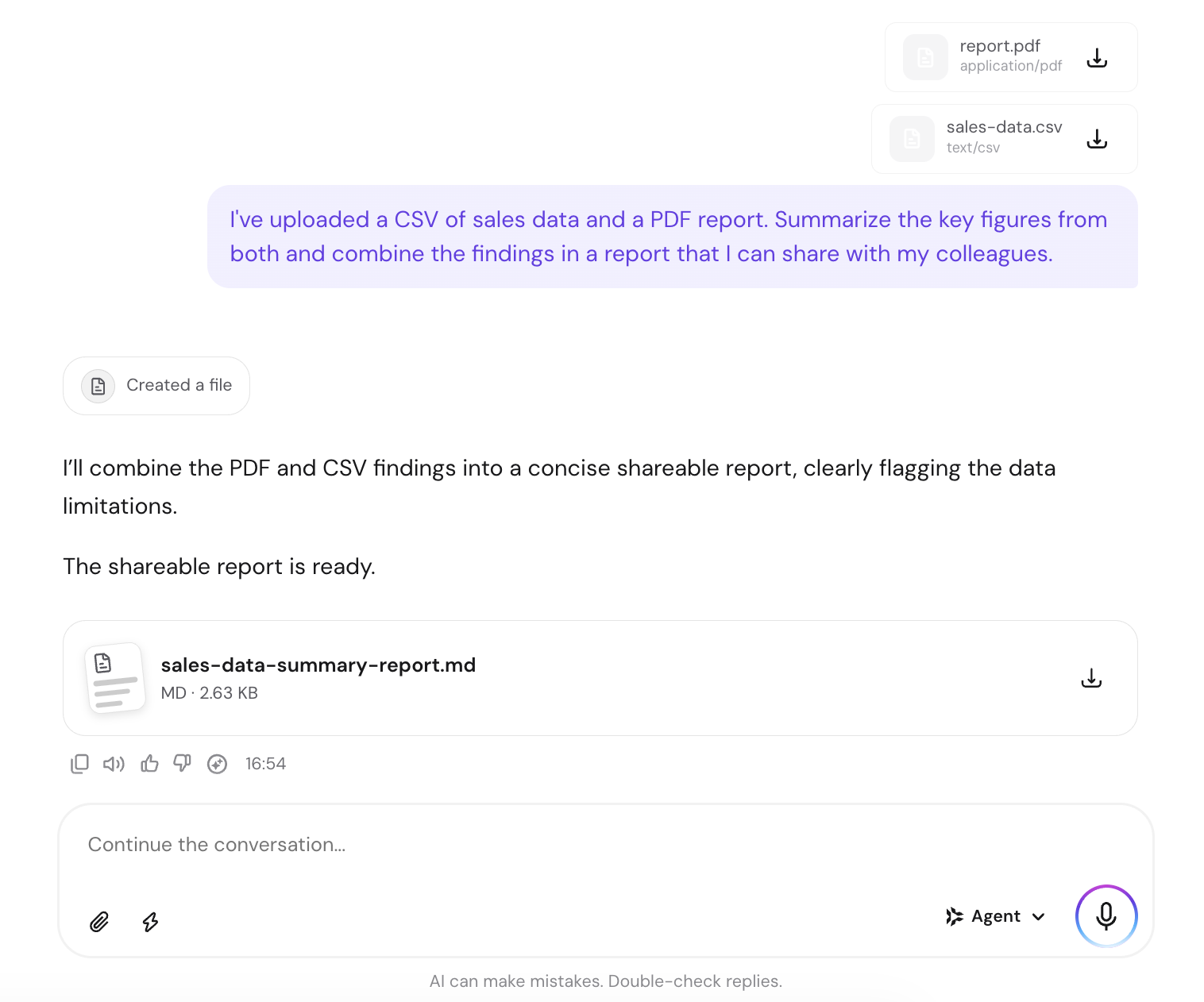
A practical example: upload a CSV of monthly sales alongside a competitor’s pricing PDF, ask the agent to identify pricing gaps, then have it draft a follow-up email and schedule a reminder. The entire task runs inside one conversation, using the apps you already have connected.

Computer-use agents that read interfaces
Computer-use agents interact with software the way a person does: they see the screen, read what is displayed, and take action.
They click buttons, fill forms, navigate menus, and complete workflows inside existing applications without a custom integration. This makes them useful for repetitive tasks in booking systems, customer relationship management (CRM) tools, or internal dashboards where building a direct API connection would be impractical.
Voice-based assistants that hear and respond
Voice agents accept spoken input, process it through a reasoning model, and respond in speech or action.
The critical constraint for this use case is speed: a voice interaction that takes more than a second or two to respond feels unresponsive to the user. This makes voice one of the more demanding multimodal applications to run.
Content creation combining text and visuals
A multimodal agent drafts written content and generates matching visuals in the same workflow, keeping brand language and visual style consistent without switching between separate tools.
This is useful for product listings, social media posts, and marketing materials where the text and image need to reflect the same brief.
Healthcare and robotics applications
In healthcare, multimodal agents read medical images, patient records, and clinical notes together to support diagnosis and treatment planning; in robotics, they fuse camera feeds, audio, and sensor data – readings from cameras, microphones, and environmental sensors – to navigate and act in physical environments.
A clinician reviewing a scan can work alongside an agent that reads the imaging data and the patient’s history together, pulling out relevant details from both. An engineer overseeing an assembly line can work alongside an agent that monitors camera feeds, vibration readings, and audio signals at once, catching irregularities that no single source would flag on its own.
This is the furthest end of the multimodal spectrum: agents operating not just on screens, but in the physical world.
Healthcare and robotics are high-stakes domains. In both, human oversight is a design requirement, not a preference. Multimodal agents in these settings assist human judgment; they do not replace it.
Benefits of multimodal AI agents
Multimodal AI agents offer five main advantages over single-modality systems, all rooted in their ability to work with information in the formats it actually arrives.
- Richer context. An agent that reads both the support ticket and the error screenshot has more to work with than one that reads the ticket alone. Cross-referencing between formats surfaces details that text extraction misses and reduces errors caused by incomplete information.
- More natural interaction. People communicate through text, speech, images, and gestures. Multimodal agents match that range, making interaction closer to talking with a colleague than filling in a form.
- Fewer clarification rounds. When a text instruction is ambiguous, adding a screenshot or a voice note resolves the ambiguity immediately. The agent reads both and adjusts, rather than asking follow-up questions.
- More of your data becomes usable. Photos, voice notes, PDFs, and scans feed directly into the agent – no manual transcription or format conversion required before it can work with them.
- Longer task continuity. Because the agent holds all formats in one context, a workflow that moves from document review to screenshot analysis to drafting a reply never loses the thread. Each step has access to everything from before.
Limitations of multimodal AI agents
Multimodal AI agents have five main trade-offs, most of which stem from the added complexity of handling more than one input type at once.
- Cost and speed. Processing multiple input types requires more resources than handling text alone, which increases running costs. Real-time applications, such as voice agents, are also sensitive to processing delays – the more formats an agent handles at once, the harder it is to keep response times fast enough to feel natural.
- Cross-modal errors. When inputs conflict, the agent must decide which source to trust. A strong signal in one modality can override accurate information in another. These errors are harder to catch than single-modality mistakes because they involve interactions among inputs.
- Privacy and security risks. Images and audio carry more sensitive information than text. A screenshot may contain personal data; a voice recording may capture a private conversation.
- Evaluation difficulty. Measuring how well a multimodal agent performs across formats is harder than measuring text-only performance. Benchmarks for this are still developing, making it less straightforward to compare systems or track improvements.
- Human oversight in high-stakes situations. In decisions involving money, health, legal exposure, or personal data, a multimodal agent should support human judgment rather than replace it.
Getting started with multimodal AI agents
The practical starting point is matching the agent to the formats your work already arrives in.
An agent with voice and image capabilities adds little value if your work is entirely text-based. The case for multimodal is strongest when your day involves screenshots, PDFs, spreadsheets, or voice recordings – formats a text-only assistant cannot use.
Ready-made agents are the fastest route for business tasks: you connect the apps you already use, upload the files you’re working with, and the agent handles the reasoning and actions without any setup.
Building your own agent makes more sense when you need a specific workflow, a particular set of tools, or tighter control over how data is handled. The best AI agent builders can help you build something that fits your specific workflow and tools.
The areas advancing fastest in multimodal AI agents are reasoning quality, persistent memory, and computer-use capability. Agents that understand interfaces, remember context across sessions, and plan reliably across longer task sequences are becoming practical tools for everyday business use.
All of the tutorial content on this website is subject to Hostinger's rigorous editorial standards and values.

Bruno is a Content Writer at Hostinger, focused on creating and optimizing helpful, engaging articles about web development and marketing. With a background in journalism, he combines storytelling with practical insights to make complex topics easier to understand. He has also contributed to publications like MacMagazine and Jornal A Tarde. Outside of work, Bruno enjoys exploring art, cooking, and technology.