How to renew a domain name: 3 methods
Sep 28, 2026
/
By Matleena S. & Klaudijus J.
/
3 min Read

Renew a domain name manually before it expires, restore it after expiration while renewal is still available, or enable auto-renewal for future renewals.
The three common domain renewal methods are:
- Renewing an active domain name. Extend your registration before the domain expires.
- Renewing an expired domain name. Restore the domain after expiration during its grace or redemption period.
- Enabling auto-renewal. Have your registrar process future renewals automatically.
How to renew an active domain name
To renew an active domain name, sign in to your registrar account and extend the registration before it expires.
To renew your domain through Hostinger dashboard:
- Log in to your Hostinger account and go to Account → Billing → Subscriptions.
- Find the domain you want to renew and select Renew.
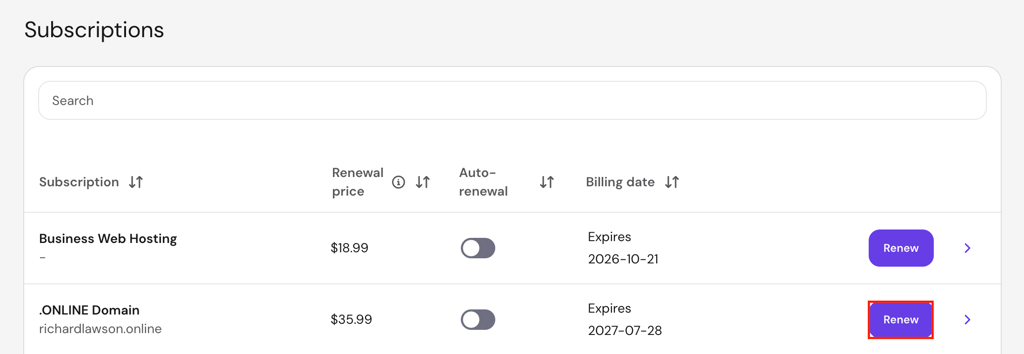
- Review the renewal price, registration period, and other renewal details.
- Select your payment method and complete the purchase.
- Go to Domains and confirm that the expiration date reflects the renewal.
The Subscriptions page shows the exact billing date alongside the renewal price and auto-renewal status. Your domain’s expiration date remains available in the Domains section.
Domain renewal prices depend on the extension and registration period. Check the price in Billing → Subscriptions before completing the payment, or see our domain name cost guide for a broader pricing breakdown.
Another renewal option is by accessing the Domains page:
- Go to Domains → Domain portfolio.
- Select Renew next to the domain you want to renew.
Some top-level domains (TLDs) only allow renewal within a set period before expiration. The Renew now option appears after that renewal period starts. For example, certain extensions only allow renewal within 28 days of expiration.
How to renew an expired domain name
To renew an expired domain name, restore it during the grace or redemption period available for its TLD.
The grace period lets you renew the domain at the standard renewal price. Its length and availability depend on the TLD.
To renew a domain in the grace period:
- Go to Domains in Hostinger dashboard.
- Hover over the Expired status to check the domain’s current expiration stage.
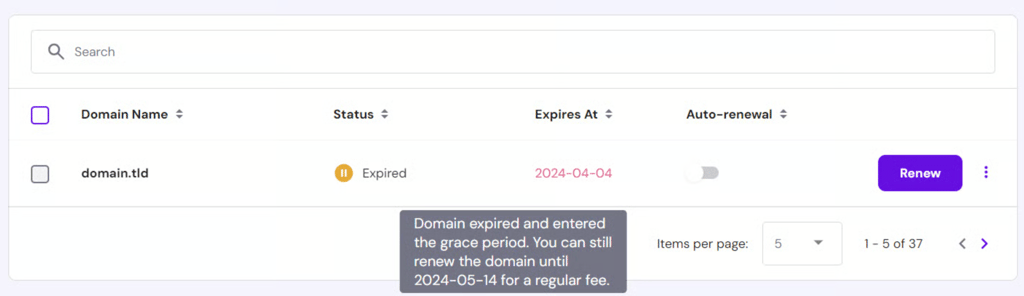
- Select Renew next to the domain.
- Complete the payment.
- Check the Domains page and confirm that the status returns to Active.
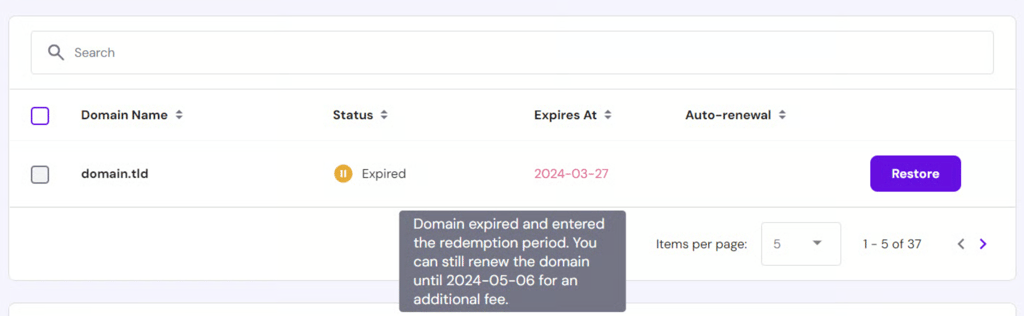
Some TLDs don’t have a grace period and enter the redemption period immediately after expiration. Restoring the domain then requires an additional redemption fee.
Restore a domain in the redemption period by selecting Restore and completing the payment. You’ll pay the standard renewal price plus the redemption fee.
Allow up to 24 hours for the domain to become fully active after Hostinger processes the payment.
The domain enters pending deletion after its grace and redemption periods end without renewal. Once pending deletion starts, the registry no longer accepts renewals, so you must wait for the domain to become available for registration again.
How to renew a domain name automatically
To renew a domain name automatically, enable auto-renewal with your registrar and keep a valid payment method on file.
To enable auto-renewal in Hostinger dashboard:
- Go to Billing → Subscriptions.
- Find your domain and turn on the Auto-renewal toggle.
- Add a payment method if Hostinger prompts you to do so.
Another option is to go to Domains and turn on the Auto-renewal toggle for your domain.
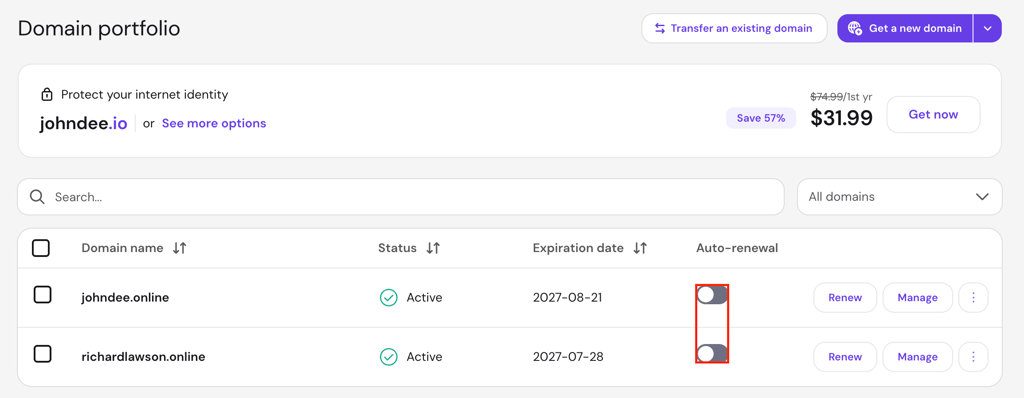
Hostinger processes automatic domain renewals before the expiration date to reduce the risk of your domain, website, or email becoming unavailable. Check the exact billing date in Billing → Subscriptions to see when Hostinger will process the next renewal.
Renewing before expiration doesn’t shorten the registration period you’ve already paid for. The renewed period starts from the domain’s original expiration date.
Domain renewal payments are non-refundable once processed. Turn off auto-renewal before the scheduled billing date if you no longer want to keep the domain.
Keep your payment information up to date so Hostinger processes the renewal successfully. Go to Billing → Payment Methods to add or update your saved payment method.
Next steps for keeping your domain active
After renewing your domain, verify its next billing date, auto-renewal status, and saved payment method so future renewals go through as expected.
Transfer your domain before it gets close to expiration when switching registrars.
Compare registration, renewal, and transfer costs before choosing another provider. Our best domain registrars guide covers the main options.
Learn how to sell a domain name when you no longer need the domain.
Domain Name Checker
Instantly check domain name availability.
All of the tutorial content on this website is subject to Hostinger's rigorous editorial standards and values.

Matleena is a seasoned Content Writer with 5 years of content marketing experience. She has a particular interest in emerging digital marketing trends, website building, and AI. In her free time, Matleena enjoys cups of good coffee, tends to her balcony garden, and studies Japanese. Follow her on LinkedIn

As Hostinger's Head of Domains, Klaudijus Januitis is a product leader but also a customer advocate ensuring the product meets user needs. He works closely with engineering, design, and marketing teams to develop and adapt the product and ensure alignment between product strategy and company goals. Klaudijus is also skilled in building relationships with registries and resellers to support joint marketing efforts and ensure successful partnerships. Follow him on LinkedIn.