How to sell a website
Oct 12, 2026
/
By Ksenija
/
7 min Read

To sell a website to a client, identify a business that needs one, understand what the website should help them achieve, and then create a proposal that explains the solution, scope, timeline, and price.
From there, you’ll need to agree on the project terms, build and deliver the site, and transfer ownership and access after completion. You can also offer ongoing services such as maintenance, updates, hosting management, or security checks.
In most cases, selling a website means selling website design and development services to a client.
You can also sell an established website you already own as a digital asset, which involves valuing the site, finding a buyer, and transferring the business and website assets.
1. Find potential website clients
Find website clients by searching for businesses that already show signs they need a new or improved website, then contact them with a specific solution you can provide.
Start with a few acquisition methods you can use consistently:
- Search for businesses that need a better website. Use Google Maps to find businesses in a specific location or industry, then review their websites for problems such as poor mobile usability, broken pages, or missing functionality. Focusing on one industry at a time can make it easier to spot relevant gaps, such as a salon without online booking.
- Ask your network for referrals. Tell friends, former colleagues, professional contacts, and previous clients what types of websites you build. Give them a portfolio or short description of your services that they can easily share with someone who may need them.
- Apply for relevant freelance projects. Use platforms such as Upwork and Fiverr to find projects that match your skills, then tailor each proposal to the client’s requirements and explain how you would approach the work.
- Partner with complementary service providers. Build relationships with copywriters, designers, photographers, SEO specialists, and marketing freelancers whose clients may also need website services.
Pro tip
When auditing a business website, check Google PageSpeed Insights for performance scores, test it on a mobile device for layout issues, and look for copyright years in the footer — a date older than three years is a strong signal the site hasn't been maintained.
Businesses without a website are another source of leads. Look for companies operating through social media, marketplaces, or physical locations that may need their first site, particularly those preparing to sell online.
Want more ways to attract clients? This video covers picking a niche, building a portfolio, and finding clients through networking, social media, and email marketing.


2. Understand what clients need from a website
Ask the client what they want it to achieve, who they want to reach, and what isn’t working for them now. These answers help you determine what the website actually needs to do.
Focus the conversation on business goals rather than technical features. Ask questions such as:
- What is the main goal of the website? Find out whether the client wants to generate leads, sell products, increase bookings, receive more inquiries, or achieve another measurable result.
- Who should the website reach? Ask who their target customers are, what those customers are looking for, and what information they need before taking action.
- What problems are they trying to solve? If the client already has a website, ask what isn’t working. They might be receiving a few inquiries, losing customers during checkout, or spending too much time managing bookings manually.
- What should visitors do on the website? Define the primary actions the site should encourage, such as requesting a quote, purchasing a product, booking an appointment, or submitting an inquiry.
Pro tip
Schedule a dedicated discovery call to gather requirements directly from the client. A live conversation lets you ask follow-up questions, catch hesitations, and uncover goals the client may not have thought to mention.
3. Create a website proposal
Create a proposal that outlines what you will build, how it supports their goals, how long the project will take, and how much it will cost.
It should give them enough information to understand exactly what they are paying for before they approve the project.
Include:
- Client goals. Define the results the project will work toward, such as more qualified leads, online purchases, or appointment bookings.
- Recommended solution. Explain the type of website you recommend and how it will address the client’s needs.
- Project scope. Specify what you will deliver, including the number of pages, required functionality, content creation, integrations, and other agreed work. Clearly state what isn’t included to prevent additional requests that could unexpectedly expand the project.
- Timeline. Break the project into key stages, such as design, development, client review, revisions, and launch. Include expected completion dates and deadlines for the client to provide content or feedback.
- Pricing. State the total project price, what it covers, and when payments are due. List optional services and their prices separately.
- Included services. Specify any additional work included in the price, such as initial SEO setup, analytics configuration, domain connection, hosting setup, or post-launch support.
4. Choose how to price your website services
Choose a pricing model based on the project’s scope, the value it provides to the client, and whether your work ends at launch or continues afterward.
Start by estimating how much it costs to build a website, including your time, tools, hosting, and other project expenses. This gives you the minimum amount the project needs to cover before you decide how to price your work and profit.
From there, you can structure what you charge in three main ways:
- Fixed project pricing. Charge an agreed amount for a clearly defined project, such as $1,500 for a five-page business website. Estimate the time and resources required, then account for the number of pages, functionality, integrations, revisions, and other deliverables when setting the price.
- Value-based pricing. Price the project based on the financial value it could create for the client. Start by estimating what the desired result is worth to the business. For example, if a new booking website could help a clinic generate $30,000 in additional annual revenue, you might price the project at $5,000 even if your time and production costs are considerably lower.
- Monthly recurring services. Charge a monthly fee for work that continues after the website launches. This can include hosting management, software updates, content changes, security monitoring, and ongoing maintenance.
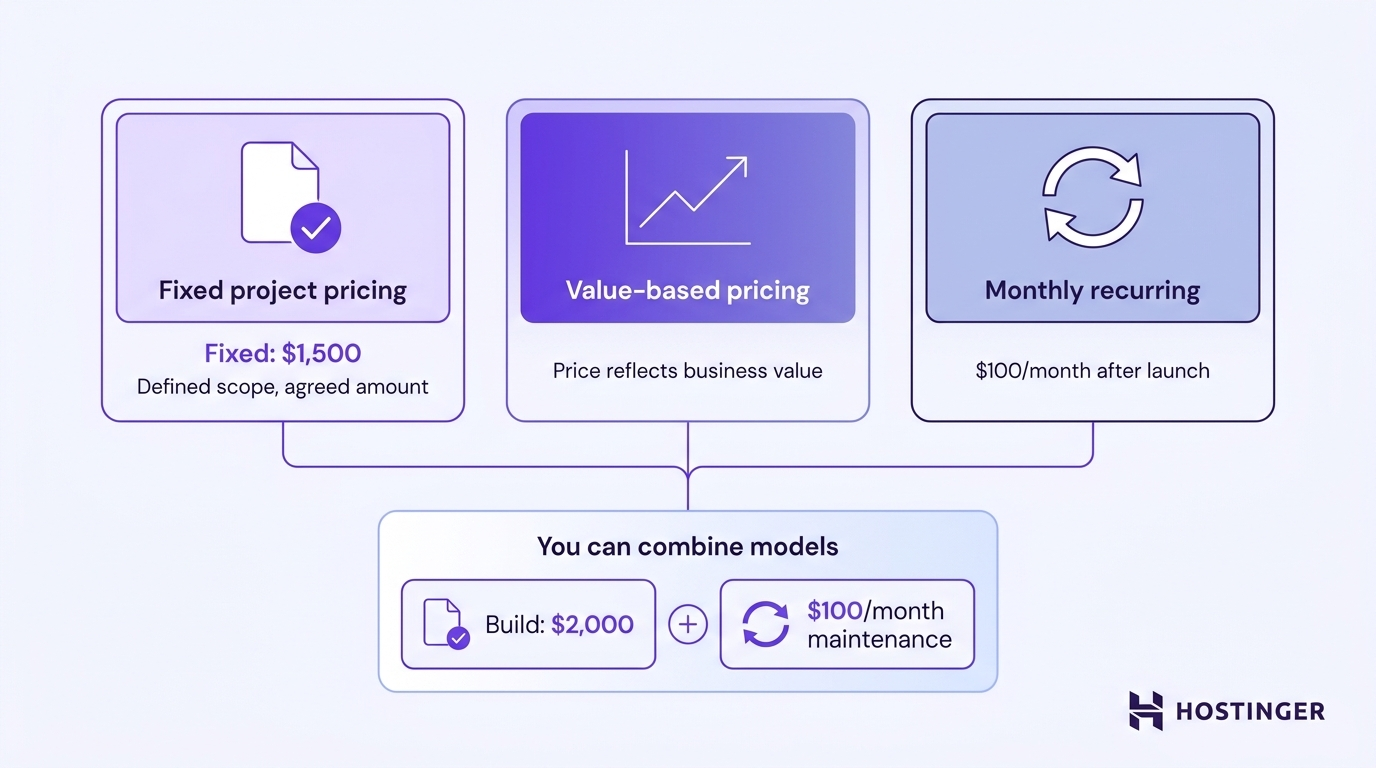
You can combine these models. For example, you might charge $2,000 to build and launch a website, followed by $100/month for hosting management, updates, and maintenance.
5. Build websites efficiently for clients
Build each client website from a repeatable workflow so you can spend less time on setup, revisions, and administrative work.
Here are a few ways to speed up delivery without cutting corners:
- Collect everything before you start building. Ask for the client’s logo, brand guidelines, copy, images, product information, contact details, and necessary account access before you begin building.
- Reuse your process and layouts. Keep a checklist for recurring stages such as setup, page creation, testing, review, and launch. Save layouts for common pages and customize them for each client’s content and branding.
- Set review points. Get approval on the site structure and initial design direction before completing the remaining pages, so major changes are caught early.
- Keep feedback in one place. Ask the client to consolidate comments into a single document or project management tool and set a deadline for each review round.
When you’re making a website for a small business, you can start with an existing template or generate the first version with AI, then customize it to meet the client’s requirements.
Hostinger’s AI website builder lets you start from a prompt or one of 400+ templates, then refine the design, content, images, and layout with AI or drag-and-drop editing.
For ecommerce projects, Hostinger Ecommerce provides tools to manage products, orders, customers, discounts, taxes, and analytics from a single dashboard.
For clients who want to start selling quickly, you can also create quick product links they can share via social posts, DMs, emails, or messaging apps.
6. Deliver and transfer the website to the client
Deliver the website by completing a final review with the client, collecting any outstanding payment, and transferring the website and related accounts to them.
Complete the handover in the following order:
- Review the finished website together. Walk the client through each page and test key functions, including forms, checkout, bookings, navigation, and links. Confirm that the agreed work is complete and resolve any remaining changes included in the project scope.
- Collect the final payment. Send the final invoice and confirm payment before transferring full ownership of the website and related accounts.
- Transfer ownership and access. Give the client access to the website, hosting, domain, analytics, business email, and any other services included in the project. Where possible, transfer accounts to the client or create their own administrator access so they don’t depend on your personal credentials.
- Provide handover documentation. Give the client a simple document showing where the website is hosted, which services it uses, how to log in, and how to complete routine tasks such as editing content or adding products. Include contact details for any third-party services they may need to manage.
- Explain what happens after launch. Tell the client which support is still included, how long it lasts, and what they will be responsible for afterward. If you offer paid maintenance, explain the available services and pricing.
Pro tip
Use a secure tool like 1Password or Bitwarden to share login credentials with your client during the handover. Avoid sending passwords via email or chat, and encourage the client to update all credentials once they have access.
7. Offer ongoing website services
After delivering the website, you can continue working with the client by offering ongoing services for a monthly fee or charging for individual tasks as needed.
This gives the client someone familiar with their website to turn to and gives you an opportunity to earn recurring revenue from the project.
Depending on the website and what the client wants to manage themselves, you can offer:
- Hosting management. Manage the hosting account, backups, domain settings, SSL certificates, and other hosting-related tasks.
- Software updates. Keep the CMS, plugins, themes, and other website software up to date.
- Security checks. Monitor for security issues, review access permissions, and check that security measures are working correctly.
- Content changes. Update text, images, products, pricing, landing pages, and other content as needed by the client.
- Performance improvements. Check page speed and other performance issues, then optimize images, caching, or other elements that may be slowing down the site.
You can bundle several of these tasks into a monthly website maintenance package or let clients request them individually.
Make the service optional and define exactly what it covers, how often you’ll perform the work, and what requires an additional fee.
Sell an existing website as a digital asset
If you already own a website that generates traffic, revenue, or both, you can sell it as a digital asset. This can include content websites, ecommerce stores, and other online businesses with an established audience or income stream.
To prepare a website for sale:
- Gather traffic and revenue data. Compile analytics, income, expenses, and other records that show potential buyers how the website performs.
- Estimate the website’s value. Consider factors such as profit, traffic, revenue stability, growth trends, domain value, and the amount of work required to operate the site.
- Find potential buyers. List the website on marketplaces such as Flippa, apply to a broker such as Empire Flippers, or contact businesses that operate similar websites in your niche.
- Complete the sale securely. Agree on exactly which assets are included, use a secure payment or escrow service, and transfer the domain, website files, accounts, and other agreed assets after payment conditions are met.
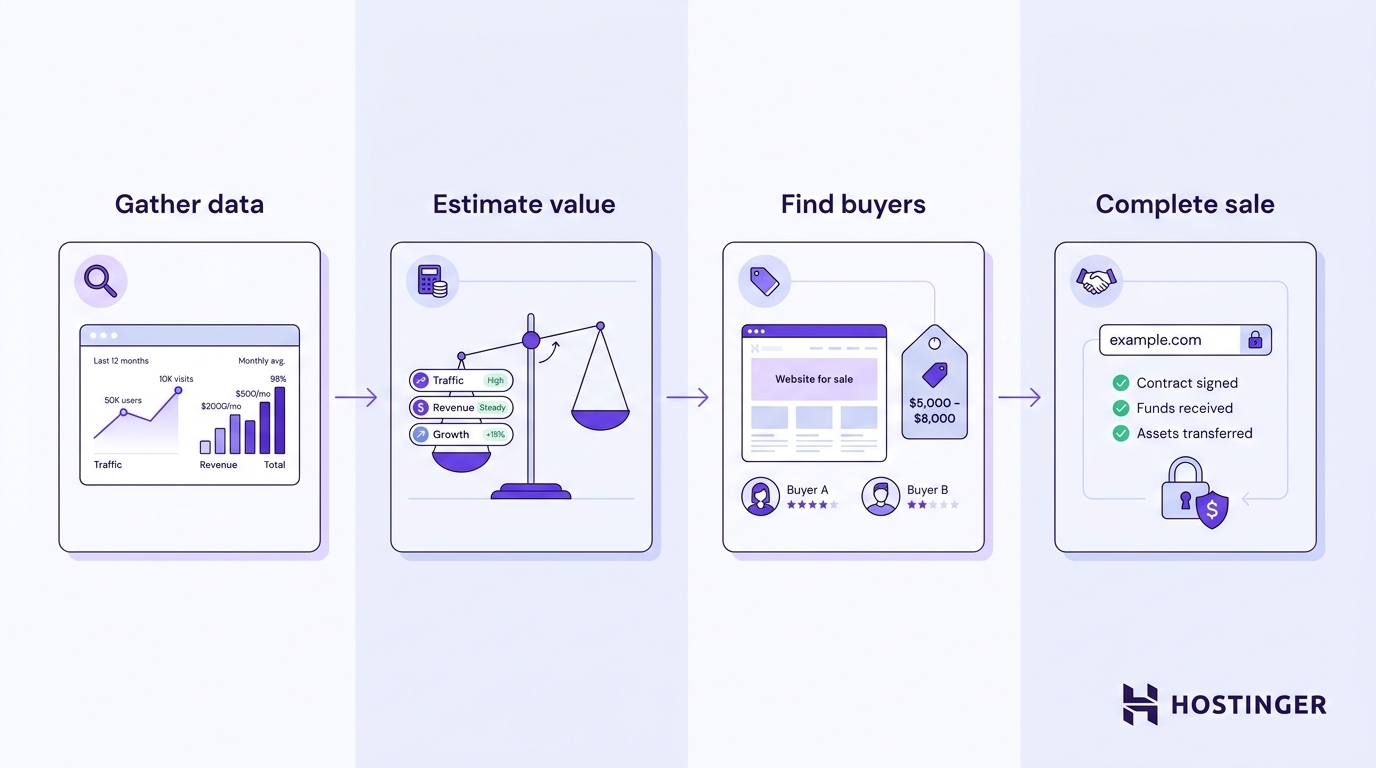
Keep copies of the agreed sale terms and create a transfer checklist so both parties know what needs to change hands before the sale is complete.
All of the tutorial content on this website is subject to Hostinger's rigorous editorial standards and values.

Ksenija is a digital marketing enthusiast with extensive expertise in content creation and website optimization. Specializing in WordPress, she enjoys writing about the platform’s nuances, from design to functionality, and sharing her insights with others. When she’s not perfecting her trade, you’ll find her on the local basketball court or at home enjoying a crime story. Follow her on LinkedIn.