Avoid these common mistakes when building a web app with Hostinger AI Builder agentic mode to get functional, efficient, and well-structured results from your prompts.
Eight most common mistakes to avoid when creating web apps
From failing to define your web app’s goals to forgetting to secure a domain name after launch, these are the biggest mistakes you should avoid when creating a web app with Hostinger AI Builder.
1. Not specifying the app’s purpose
Why is it a mistake?
If the purpose of your web app isn’t clearly defined, you can’t really expect Hostinger AI Builder to generate the desired output. Vague prompts like “Make a functional web app” don’t provide enough context, leading to irrelevant or incomplete results.
Recommended solutions
- Describe the purpose – explain what your app does, whether it’s a review platform, fitness tracker, or task manager.
- List core features – specify key capabilities, such as user registration, submission forms, or data visualization.
Examples of prompting do’s and don’ts
- Wrong prompt:
Why? Too vague – it doesn’t define the app type, features, or objectives. As a result, the output may miss the mark completely.
- Right prompt:
Why? It clearly defines the purpose and features, helping Hostinger AI Builder generate a relevant and functional web app.
Check out how one of our colleagues built a task manager web app using specific prompts and how it turned out result.
2. Using ambiguous language
Why is it a mistake?
Unclear phrases like “make it nice” or “ensure it’s user-friendly’” don’t give Hostinger AI Builder enough direction. To obtain a design or functionality you want, you need to provide full context and use precise terminology that doesn’t rely upon interpretation.
Recommended solutions
- Specify the style – define color schemes, layout preferences, and font choices. If you have specific hex codes or fonts, include them in your prompt.
- Define user interactions – explain how users should navigate the web app, from logging in to completing tasks. Mention button placements, form fields, and navigation structures.
Examples of prompting do’s and don’ts
- Wrong prompt:
Why? There are no clear guidelines for what “nice” or “easy to use” should look like, or how the web app should function.
- Right prompt:
Why? It provides specific details about colors, layout, and interactions, guiding Hostinger AI Builder to create an interface that fits your expectations.
Learn actionable, proven web app design tips with Hostinger AI Builder to ensure your app is not only aesthetically pleasing but also functional and easy to use.
3. Skipping technical preferences
Why is it a mistake?
By including key details about your technical requirements and functionality needs, you ensure that Hostinger AI Builder creates exactly the web app you want.
Recommended solutions
- Specify functionality needs – mention the core features you want, such as user authentication, data filtering, or reporting capabilities.
- Define data requirements – if your web app needs to store or process information, outline the main types of data, relationships, and how users will interact with it. Similarly, your web app requires a database system or API integration, outline the main entities, fields, and relationships to guide the AI.
Examples prompting do’s and don’ts
- Wrong prompt:
Why? It doesn’t specify the framework, database type, or structure, forcing Hostinger AI Builder to make assumptions.
- Right prompt:
Why? It clearly defines the purpose, core functionality, and data relationships, allowing for a solution that meets your specific needs.
4. Overloading the prompt
Why is it a mistake?
If you pack too many instructions or features into a single prompt, you’re sending mixed signals to Hostinger AI Builder as to what should be prioritized so that tasks can be executed efficiently. Well-structured instructions are vital for a result that contains well-organized code, complete functionalities and no conflicting implementations.
Recommended solutions
- Break down complex tasks – split large goals into multiple, focused prompts. For example, start with authentication features in one prompt, then handle UI enhancements in another.
- Iterate step by step – build features gradually, testing each component to ensure it works correctly before moving on.
Examples of prompting do’s and don’ts
- Wrong prompt:
Why? You’re not instructing Hostinger AI Builder what to prioritize, increasing the chances of incomplete or messy results.
- Right prompt:
Why? The request is structured step by step so Hostinger AI Builder can generate a functional base before adding advanced features.
5. Focusing only on visuals
Why is it a mistake?
Focusing solely on design and UI features can lead to overlooking critical functions. While an attractive interface is important, it won’t matter if the web app can’t process data, manage user accounts, or keep information secure. By incorporating functionality, you’re making sure you’re getting an app that meets real-world requirements.
Recommended solutions
- Include security measures – specify authentication methods, data validation, and other safeguards in your prompt.
- Balance form and function – when adding features that collect or process user data, make sure your prompt also covers how the data is stored, handled, and protected.
Examples of prompting do’s and don’ts
- Wrong prompt:
Why? It prioritizes appearance but lacks instructions for functionality, security, or usability.
- Right prompt:
Why? It balances design with essential user authentication features and ensures a functional and secure registration process.
6. Repetition without refinement
Why is it a mistake?
If you keep encountering errors or outputs that don’t meet your expectations, it could be because you have been consistently entering the same prompts. This happens because the AI works with the assumption the outputs already meet your standards since you don’t specify otherwise. The AI isn’t guessing what might be wrong—it’s following your original instructions.
Recommended solutions
- Incorporate AI’s feedback – learn from the previous outputs and adjust your prompt accordingly to fix the mistakes.
- Iterate and optimize prompts – fix the current issue and follow up on lacking outputs before moving on to the next topic.
Examples of prompting do’s and don’ts
Let’s say you’re designing a web app and want to create a sidebar with menus that lead to different features. After instructing Hostinger AI Builder to create the sidebar, you receive an unsatisfactory result. Instead of addressing the sidebar, you move on to individual elements of the sidebar, only to find the results get worse.
- Original prompt:
Why? This prompt is too vague and doesn’t offer enough detail about how the menus should behave. Also, it doesn’t specify any issues with the sidebar itself. Hostinger AI Builder will interpret this as a request for a simple sidebar with shortcuts, which might not meet your expectations for functionality and design.
- Adjusted prompt:
Why? This updated prompt takes into account the previous result and explicitly tells the AI what to fix (making the sidebar collapsible, adding nesting to the menus, and applying consistent design). By incorporating these details, the AI has clear instructions on what to adjust, avoiding a repeat of earlier mistakes.
7. Wasting AI credits
Why is it a mistake?
Repeating inefficient prompts can waste your AI credits because your instruction won’t lead to significant development progress.
Ideally, you should get the most out of each message and have enough credits until the application deployment.
Recommended solutions
- Check and optimize your prompts – before sending a prompt, make sure it follows the Hostinger AI Builder prompting best practices to achieve a high-quality output.
- Refine and iterate – focus your prompts on a specific development aspect until you get the desired result, ensuring your AI credits are well spent.
Examples of prompting do’s and don’ts
- Wrong prompt:
Why? This prompt lacks details, context, and specifications, resulting in an inaccurate result. This means you must spend more AI credits on follow-up instructions to refine the basic aspects of your application.
- Right prompt:
Why? Focusing on the main intent and key features of the web application will result in a more accurate result. This allows you to refine the functionality and design more efficiently.
8. Forgetting to connect to a real domain
Why is it a mistake?
When creating your project, Hostinger AI Builder lets you connect a domain right away or use a temporary one instead. If you choose the temporary option, keep in mind this address might not work properly for other users, and it will not be as functional as a proper domain name.
Solution
To fix this issue, simply connect a valid domain name to your web application.
With Hostinger AI Builder, you get a free domain name included in the plan (if it’s eligible). If you wish to register another domain name, you can do that at Hostinger as well.
Connecting a domain name with your Hostinger AI Builder application is simple and can be done via the same dashboard. Simply go to Hostinger dashboard’s website list and click Change domain.
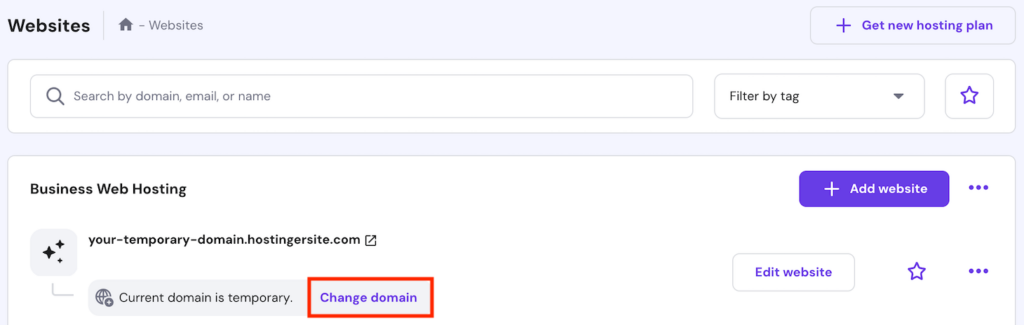
Enter the domain name you want to use and hit Next. Finish the registration process, and your application will now use the new address.
With these common pitfalls in mind, you’ll be able to develop just the application you need, efficiently and quickly.
FAQ on mistakes to avoid when using Hostinger AI Builder agentic mode
How do I avoid mistakes when creating web apps with Hostinger AI Builder agentic mode?
The key to efficient web development using Hostinger AI Builder is high-quality prompts. Follow the proper prompt engineering technique, adjust your instructions based on the previous outputs, and focus on one specific development aspect at a time.
Do I need to iterate on prompts if the first result isn’t perfect?
Absolutely! Any AI tool’s first output will be most likely imperfect. Give follow-up prompts to refine the result until it fits your needs and expectations. Remember to refine one aspect of your web application at a time so the AI can give an accurate response.