ESPHome Docker containers provide an isolated, portable environment for managing ESP8266 and ESP32 smart home devices. Running ESPHome Docker on Hostinger VPS gives you 24/7 access to your device management dashboard, consistent uptime for firmware compilation, and centralized control without maintaining local hardware.
Hostinger VPS includes ESPHome in its pre-configured Docker application catalog, simplifying deployment to a few clicks without manual container configuration.
This guide covers installing ESPHome Docker on Hostinger VPS KVM plans.
How to install ESPHome Docker on Hostinger VPS
Step 1 – Purchase a server
Navigate to our Hostinger VPS plans page and select the plan you would like to purchase. Choose a plan with at least 1GB RAM to support ESPHome Docker installations. ESPHome compilation consumes approximately 500MB RAM per build, so Business or higher-tier VPS plans provide better performance when managing multiple devices.
Step 2 – Set up Ubuntu 24.04 with Docker
Log in to your Hostinger control panel and navigate to your VPS dashboard. Head to OS & Panel section on the sidebar, and select Operating System. Choose Ubuntu 24.04 with Docker.
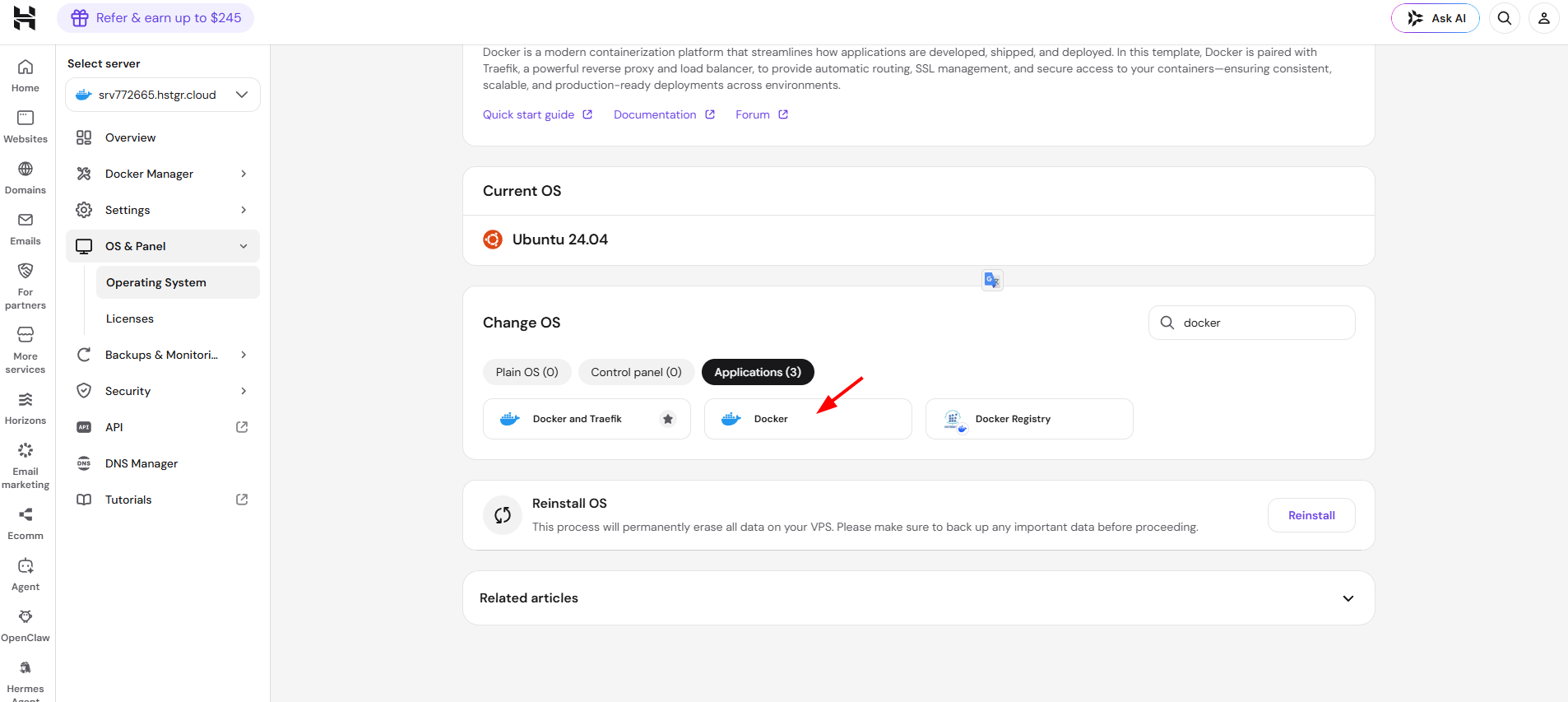
Step 3 – Install ESPhome
Go to the Catalog in the sidebar, then type esp or esphome in the search field to filter the available applications.
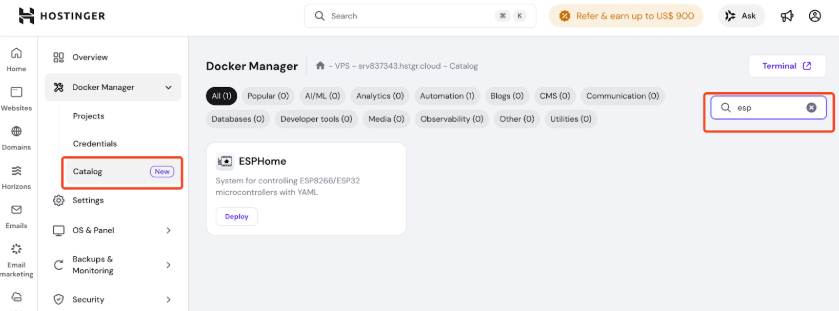
Select ESPHome from the catalog results. The application shows as “System for controlling ESP8266/ESP32 microcontrollers with YAML” with a Deploy button. Click Deploy to start the automated installation.
Hostinger’s Docker catalog automatically configures the ESPHome Docker container with optimized settings for your VPS environment. The deployment process takes 1-2 minutes and includes:
- Pulling the latest ESPHome Docker image
- Setting up network access on port 6052
- Configuring automatic container restart after VPS reboots
- Allocating appropriate resources based on your VPS plan
After deployment completes, the ESPHome application appears in your active applications list with a status indicator showing Running.
Why use ESPHome Docker on Hostinger VPS
ESPHome Docker containers isolate the application with all required Python libraries, build tools, and dependencies in predetermined versions. When you deploy ESPHome Docker on Hostinger VPS, updates won’t conflict with other applications, and you can test new versions in separate containers before updating production devices.
Hostinger VPS provides consistent availability compared to local installations. Your ESPHome Docker instance remains accessible from any location, compiles firmware reliably without interruption, and eliminates the need for dedicated home server hardware. The VPS handles infrastructure maintenance, security updates, and backup management at the platform level.
Container portability allows you to migrate your entire ESPHome setup between VPS instances by transferring the configuration directory. You can scale resources by upgrading your Hostinger VPS plan without reinstalling ESPHome Docker. Version control becomes straightforward – roll back to previous container images if issues occur, or run multiple ESPHome Docker versions simultaneously for testing.