The clientHold status is an administrative setting that pauses a domain’s DNS resolution, meaning the domain will not resolve to a website or host email. This article explains why Hostinger applies this status and the steps you can take to activate your domain again.
What is ClientHold?
The ClientHold status is an administrative setting that pauses a domain’s DNS resolution. It is most commonly applied for the following reasons:
- Unverified contact information – ICANN requires domain owners to verify their email address within 15 days of registration or contact updates.
- Legal or TOS violations – The domain may be suspended due to a breach of Hostinger’s Terms of Service or a legal dispute.
- Missing documentation – Certain domain extensions require specific validation documents that have not yet been provided.
- Expired domain status – If a domain is not renewed before its expiration date, it may be placed on clientHold by the registry before entering the redemption period.
Step 1 – Check your domain status
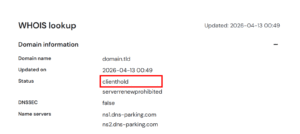
Before taking further action, you must confirm the current status of your domain using a WHOIS lookup tool:
- Navigate to the Hostinger WHOIS lookup tool.
- Enter your domain name (for example, domain.tld) and click Search.
- Locate the Domain Status field in the results.
- If the status is listed as clientHold, the domain is suspended and requires manual intervention to be reactivated.
Step 2 – Verify your contact information
If the suspension is due to an unverified email address, follow these steps:
- Search your inbox for an email from Hostinger or your domain’s registrar regarding “Verification Required”.
- Click the verification link provided in the email.
- If you cannot find the email and the domain is registered in Hostinger, go to the Domains section in Hostinger dashboard and click Resend email.

If you no longer have access to the email address listed in the WHOIS records, you will need to first complete a contact detail change. You can refer to How to Change Domain Contact Details at Hostinger and contact our support team to apply the changes.
Step 3 – Address legal or technical suspensions
- If your contact details are verified but the ClientHold remains, the issue may require manual review:
- Check your registered email address for any “Notice of Suspension” or “Abuse Report” from the Hostinger Abuse team.
- Follow the specific instructions provided in that notice to resolve the violation.
- When a Registrar applies a ClientHold to your domain, Hostinger automatically sends an email notification to your account contact address. The email explains the suspension and outlines the steps required to resolve it. If you do not receive a notification, check your spam/junk folder or contact Hostinger Support for a case review. We will be happy to review your case and guide you through the next steps.
Conclusion
Once you verify your email or resolve the underlying issue, the ClientHold status is typically removed automatically. It may take up to 24 hours for the domain to start working globally due to DNS propagation.
NOTES
- If the ClientHold status is related to a legal or abuse report, you must reply directly to the email notification you received.
- See how to fix a domain suspended due to pending ICANN verification at Hostinger for a more detailed walkthrough