Hostinger keeps website access logs for up to 7 days. Each log entry records one request made to your website, including the time, visitor IP address, country, requested URL, status, and user agent. You can view the logs in hPanel under Traffic ❯ Access logs and download them as a CSV file before they expire.
Hostinger website access logs retention period
Hostinger stores website access logs for up to 7 days. Logs older than 7 days expire and are no longer available in hPanel. Download any logs you need to keep before they expire.
Information in Hostinger website access logs
Each Hostinger website access log entry contains six details:
- Time of the request.
- Visitor IP address.
- Visitor country.
- Requested URL.
- Request status.
- User agent.
View Hostinger website access logs in hPanel
Open Traffic ❯ Access logs in hPanel to view website access logs from the last 7 days.
- Open hPanel and go to Traffic ❯ Access logs.
- Choose a time range within the last 7 days.
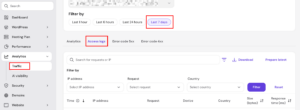
The access log entries for the selected time range appear.
Download Hostinger website access logs as a CSV file
Select Download logs in Traffic ❯ Access logs to save your website access logs as a CSV file.
- Open hPanel and go to Traffic ❯ Access logs.
- Select Download logs.
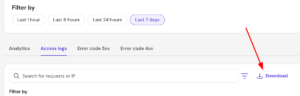
- Open the saved CSV file in a spreadsheet application, such as Google Sheets or Microsoft Excel.
Hostinger website access logs expire after 7 days, so download the logs you need before then.
What Hostinger website access logs do not include
Hostinger website access logs do not record FTP or SSH logins. The logs cover only requests made to your website.
You now know how long Hostinger keeps website access logs and how to save a CSV copy before they expire. Download logs regularly if you need a record longer than 7 days.
NOTE
- Access logs show requests to your website only, not FTP or SSH activity.
- Only logs from the last 7 days are available to view or download.