Check Hostinger Reach campaign opens by device in the Devices tab of a sent campaign’s performance report, which splits opens into desktop, tablet, mobile, and other. The Devices tab also shows detected operating systems, so you can adjust subject line length, layout, and buttons for the devices your subscribers use most.
How to view opens by device
- Open Hostinger Reach, then go to the Campaigns section.
- Select a sent campaign.
- Open the campaign performance report.
- Select the Devices tab.
The report displays the total number of opens and divides them into the following device categories:
- Desktop
- Tablet
- Mobile
- Other
For each category, you can see both the number of recorded opens and its percentage of all campaign opens.
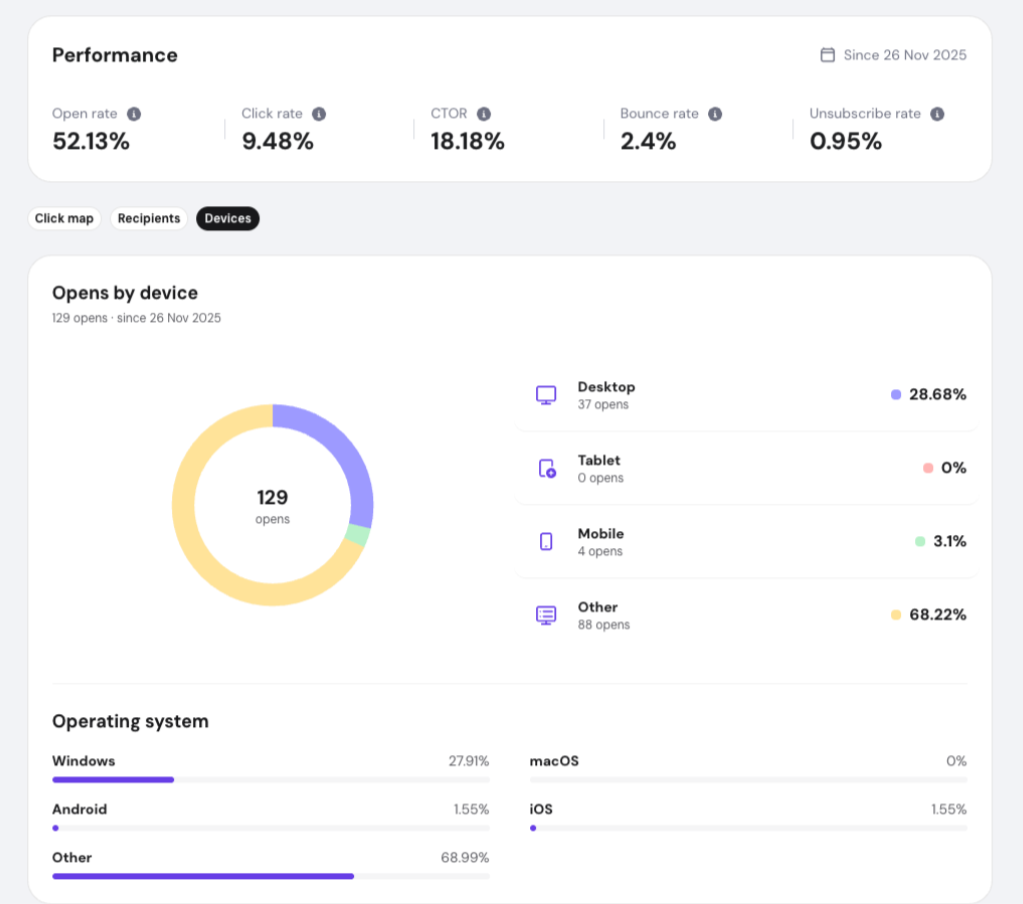
Operating system information
Below the device breakdown, you can also see which operating systems were detected, including:
- Windows
- macOS
- Android
- iOS
- Other
The percentage next to each operating system represents its share of the campaign’s recorded opens.
How to use this information
Device insights can help you understand how your audience engages with your emails. For example, when a large share of recipients open emails on mobile devices, you may want to prioritize shorter subject lines, concise content, clearly visible buttons, and mobile-friendly layouts.
The Other category includes opens that could not be assigned to one of the listed device or operating system categories.
With the Devices tab in Hostinger Reach, you know which devices and operating systems your subscribers use, so you can shape your next email campaign around them.