Block an IP address in cPanel to restrict access to your website. If you haven’t added the website yet, see how to add a website in Hostinger cPanel first.
Block and unblock an IP address
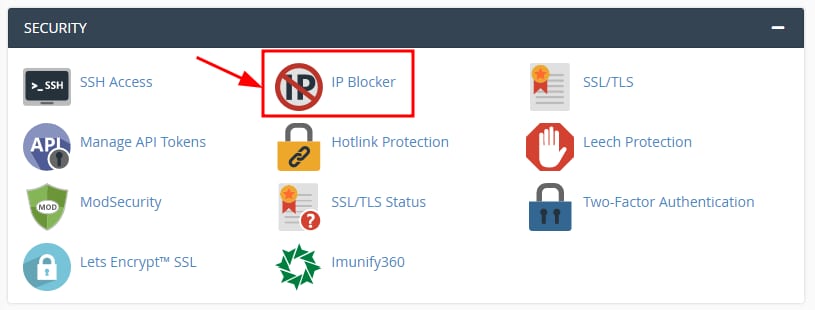
If you want to restrict access to your website by blocking an IP address on cPanel, you can do so by accessing Security → IP Blocker:
Enter the IP or IP range you wish to block and click on Add:
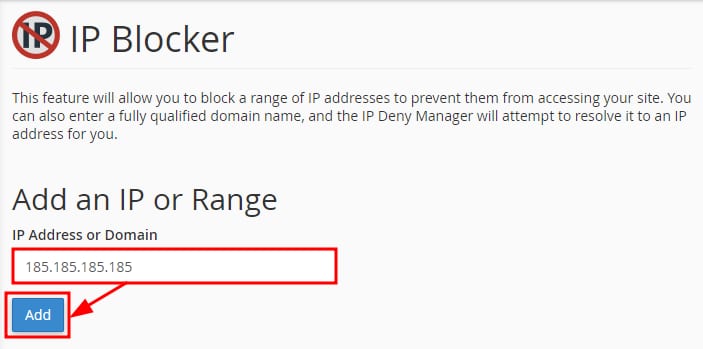
Once added, all incoming connections from the IP or range will not be able to access your website.
To re-enable the access, simply head to the Currently-Blocked IP Addresses list in the same section and click on Delete:
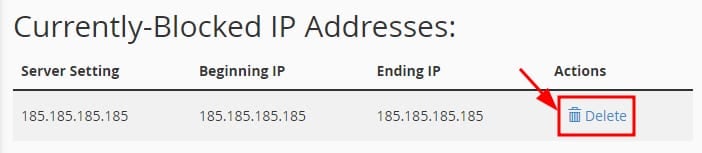
After removing it from the blocked list, access will be possible from that IP or range once again 😊