When you create a Hostinger AI Builder website, it is initially hosted on a temporary domain. You can later replace the temporary domain with a custom domain (for example, domain.tld) or a subdomain (for example, store.domain.tld).
This article explains how to create a AI Builder site on a subdomain and make it accessible online.
Before you start
- The subdomain must belong to a domain you own.
- Only first-level subdomains are supported (for example,
store.domain.tld).
shop.store.domain.tld) are not supportedStep 1 – Create a AI Builder site on a subdomain
If you have not yet created the website, start from adding it to your hosting plan:
-
Open Hostinger dashboard and go to Websites.
-
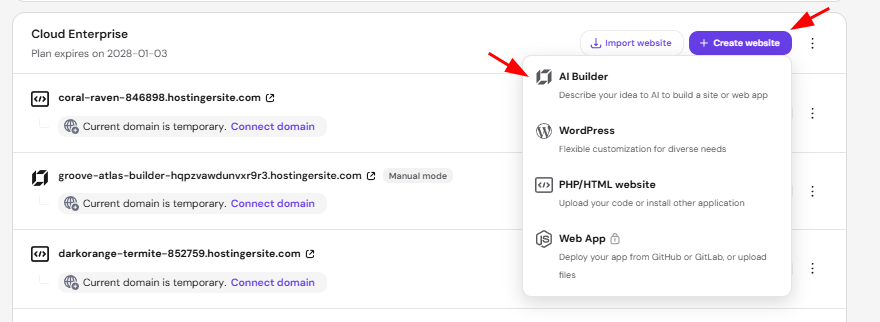
Select Create website on the desired hosting plan.
-
Choose Hostinger AI Builder.
-
Complete the onboarding process.
-
In the AI Builder platform, open Connect domain.
-
Enter the subdomain name and continue.
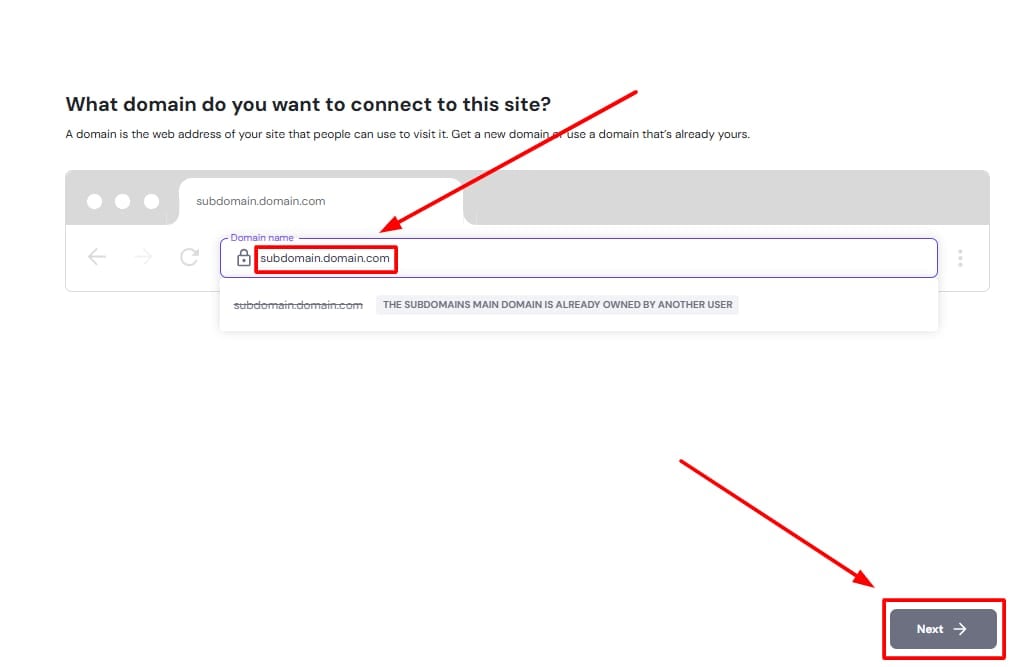
This assigns the subdomain to the website. If you choose not to connect the subdomain during setup or if you have already created the website, you can connect it at any time from Hostinger dashboard:
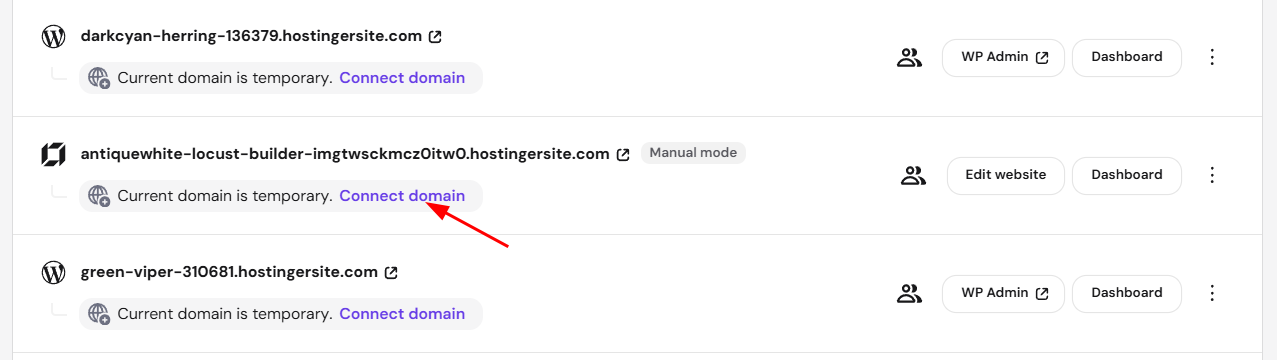
- Go to Hostinger dashboard → Websites
- Locate the website using a temporary domain, and click on Connect domain below the temporary domain name to continue with domain connection.
Step 2 – Point the subdomain
For the website to be accessible using the subdomain, the subdomain’s DNS must point to Hostinger.
If the domain uses Hostinger nameservers
If the main domain is pointing to Hostinger nameservers, no additional action is required.
The subdomain connects automatically and becomes available shortly.
If the domain uses external nameservers
If the domain’s DNS is managed outside Hostinger (for example, at Cloudflare or another provider), you need to add a CNAME record for the subdomain.
Create the following DNS record at your DNS provider:
For manual mode:
-
Type: CNAME
-
Name: subdomain name (for example,
shop) - Points to:
connect.hostinger.com -
TTL: default or 300
For agentic mode:
- Type: CNAME
- Name: subdomain
- Points to: yourdomain.tld.cdn.hstgr.net
- TTL: default or 300
Replace yourdomain.tld with your full domain name, including the extension.
Do not add a www record when connecting a subdomain.
After saving the changes, allow up to 24 hours for DNS propagation.
NOTE
- An AI Builder site can be connected to one address at a time. It is not possible to use both a domain and a subdomain for the same website.
- See How to change domain to change your domain if it’s needed.