Anti-DDoS events in Hostinger dashboard show the Distributed Denial-of-Service (DDoS) attacks that reached the IP addresses of your Hostinger web hosting (shared hosting) or Cloud hosting plan. Hostinger detects and stops these attacks automatically. The Anti-DDoS events page lists each attack with the affected IP address, the affected websites, the start and end time, the status, and the website impact. To review attacks, open Security → Anti-DDoS events in your website’s hosting dashboard and filter the list by website or time period. During an active attack, a notification also appears on your website dashboard and on the Plan Details page.
Before you start
- A Hostinger web or Cloud hosting plan.
- Agency hosting plans don’t include Anti-DDoS events or DDoS attack notifications yet.
- For a Hostinger VPS, see What are Anti-DDoS Events in Hostinger VPS instead.
Open Anti-DDoS events in the Hostinger hosting dashboard
Open Anti-DDoS events from the Security menu of your website’s hosting dashboard:
- Log in to Hostinger dashboard and go to Websites.
- Click Dashboard next to your website.
- In the sidebar, click Security → Anti-DDoS events.
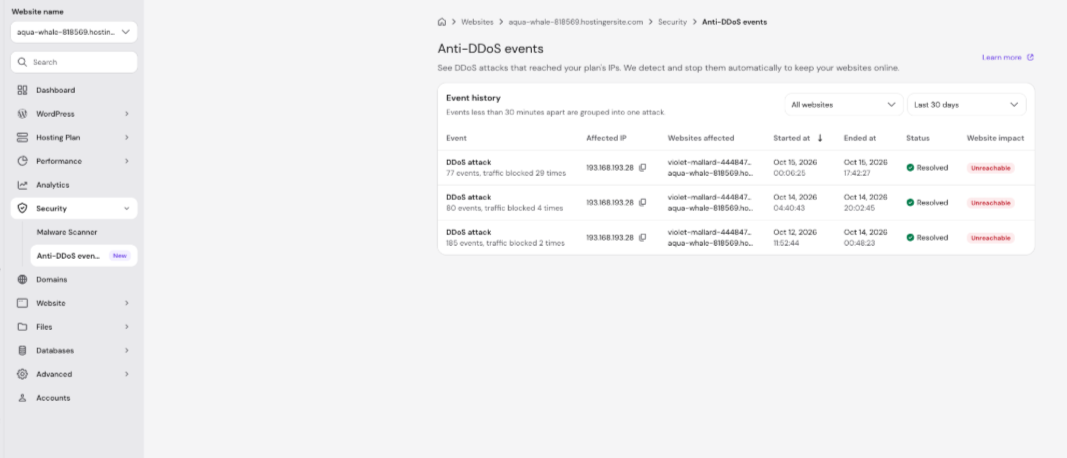
The Anti-DDoS events page opens with the Event history table, which lists the DDoS attacks that reached your hosting plan’s IP addresses. The most recent attacks appear at the top.
Filter Anti-DDoS events by website and time period
Filter the Event history table with two dropdowns:
- All websites – show the attacks for one website on your hosting plan.
- Last 30 days – change the time period of the attacks shown.
Anti-DDoS events groups events that happen less than 30 minutes apart into one attack, so a single row can include many events.
Anti-DDoS events table columns in Hostinger hosting
The Event history table shows seven columns for each DDoS attack on your Hostinger hosting plan.
|
Column |
What it shows |
|
Event |
The event type, such as DDoS attack, with the number of events grouped into the attack and how many times traffic was blocked. |
|
Affected IP |
The hosting plan IP address that received the attack. Click the copy icon next to it to copy the IP address. |
|
Websites affected |
The websites on your hosting plan affected by the attack. |
|
Started at |
The date and time the attack started. |
|
Ended at |
The date and time the attack ended. |
|
Status |
The current state of the attack, such as Resolved. |
|
Website impact |
How the attack affected your websites, such as Unreachable. |
DDoS attack notifications in the Hostinger hosting dashboard
During an active DDoS attack on your web or Cloud hosting plan, Hostinger dashboard shows a notification on two pages: your website’s dashboard main page and the Plan Details page under Hosting Plan. To see the affected IP address, the affected websites, and when the attack started, open Security → Anti-DDoS events.
Reduce the impact of repeated DDoS attacks on Hostinger hosting
Reduce the impact of repeated DDoS attacks by using Hostinger CDN, Cloudflare, or a plan with a dedicated IP address. Find the steps for each option in What is a DDoS attack and how to prevent it at Hostinger.
With Anti-DDoS events, you can see every DDoS attack that reached your Hostinger hosting plan, which websites it affected, and when it started and ended.