Enable dLocal Go payments in Hostinger Ecommerce to accept cards, bank transfers, and cash payments across Latin America. You connect dLocal Go from Settings → Payments in your Hostinger Ecommerce Store Manager. dLocal charges processing fees.
Before you start
- A Hostinger Ecommerce store.
- A dLocal account, or the option to create one during setup.
Connect dLocal Go to your Hostinger Ecommerce store
- Access Hostinger Ecommerce Store Manager.
- Open the store you want to manage. Hostinger Ecommerce: How to navigate the Store Manager explains the menu.
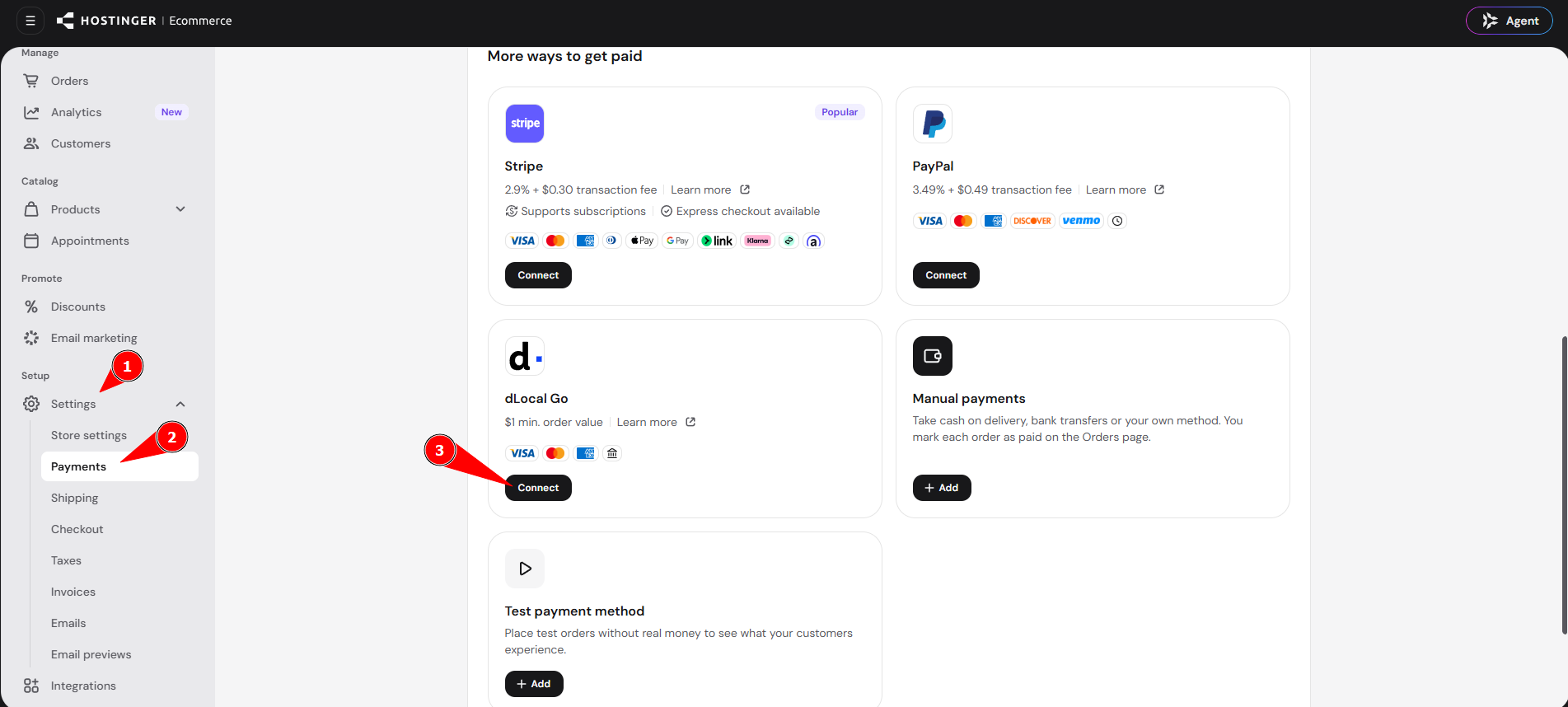
- Go to Settings → Payments.
- Click Connect next to dLocal Go.
- Link an existing dLocal account or create a new one, and follow the instructions on the screen.
Your Hostinger Ecommerce store can now accept payments through dLocal Go. Place a test order to confirm your checkout works before you start selling.
NOTES
- If a payment isn’t working as expected, see How to fix online store payment and checkout issues.
- To compare all payment providers, see Online payment gateways.