Reset your Hostinger account password from the Forgot password page when you can’t log in with your email address and password. Enter your account email, click Send Reset Email, and use the link from the latest reset email you receive. Accounts that log in with social login can’t reset their password this way.
Step 1 – Open the Forgot password page
Go to the Hostinger login page:
Click on Forgot password? below the login form.
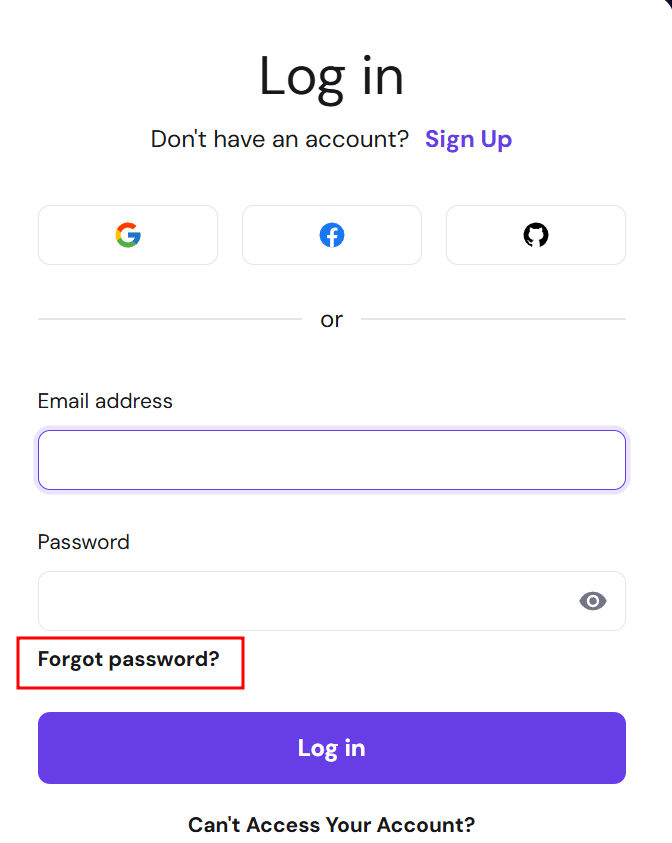
You can also access the reset form directly:
The links above work for all Hostinger brands, regardless of the Hostinger site where your account was created (e.g., Hostinger India, Hostinger UK, etc.).
Step 2 – Reset Hostinger password
On the next screen, enter the email address associated with your Hostinger account, and click Send Reset Email. A password reset link will be sent to your email.
When will the email arrive?
In most cases, you will receive the password reset link in a few minutes. However, it can land in your Spam, Updates, or other inboxes – make sure to check them all.
In rare cases, the password reset email might be delayed by your email provider. We recommend waiting up to one hour before trying to reset the password again.
If you have requested a password reset several times, make sure to use the link from the latest email you received, as each new request overrides the previous one.
Resetting the password for social login accounts
If you are using a social login method to access your account, such as Google, Facebook, or GitHub, the Forgot password option will not send a reset link. Your Hostinger account is accessed through your social account credentials.
If you forgot your social login password, follow the recovery steps provided by the platform:
You may also contact the support team of your social login platform for further assistance. Once you set a new password through the reset link, log in to Hostinger with your email address and the new password.
NOTES
-
If you do not use social login and you no longer have access to the email address linked to your Hostinger account or to your two-factor authentication device, check this article: How to recover your Hostinger account.
-
If you have access to your Hostinger account, but forgot the password of a Hostinger Email mailbox, you can reset it by following this guide: Reset Hostinger Email password.
-
If you can still log in and only need a new password, see How to change your Hostinger account password.
- If a message says you already have an account while you sign up, see What to do if you already have a Hostinger account when signing up.