MX (Mail Exchange) records are like postal addresses for emails. Their purpose is to tell email servers where to deliver emails for a domain, helping to ensure that emails reach the correct destination.
Before you start
- If your domain isn’t set up for Titan Email yet, see how to set up a domain for Titan Email at Hostinger.
Required MX records for Titan Email
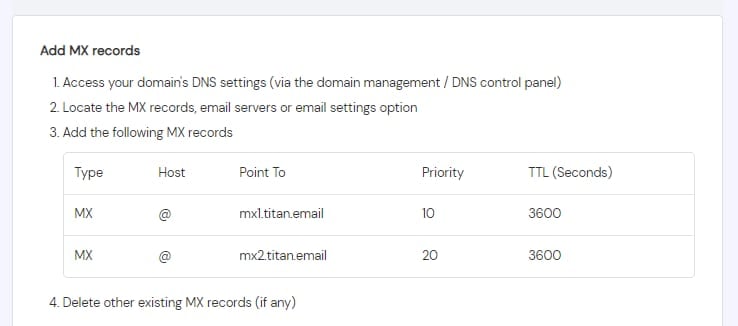
If you use Titan Email, the following MX records should be present in your domain’s DNS zone:
|
Priority |
Value (Mail server) |
TTL |
|
10 |
mx1.titan.email |
default |
|
20 |
mx2.titan.email |
default |
Find your MX records in Hostinger dashboard
Alternatively, to find the values for Titan Email MX records:
-
Navigate to the Emails section
-
Click on Mailboxes next to the preferred email account
-
Select Domain Verification:
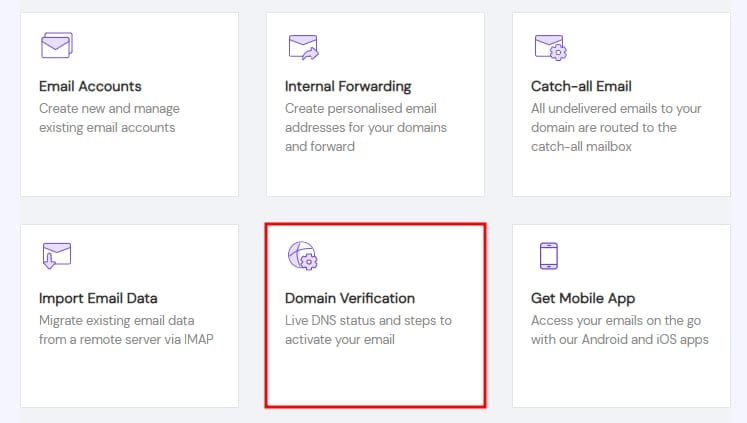
You will find them in the Add MX records section:
NOTE
-
After making any changes to your domain’s DNS zone, DNS propagation starts; give it some time to complete, and your email service will be up and running smoothly.